How & Where to Report Online Abuse, Scams and Harmful Content
Something’s happened online and you need to do something about it. Maybe a stranger’s been messaging your kid. Maybe there’s a scam, a threat, a fake account, an image that shouldn’t exist. You want to know one thing: where do I report this, and what do I do first? This is that reference. One page, every “where do I report X” answer, plus the two rules that apply to almost all of it.
Reporting works. Platforms remove content and accounts every day because someone flagged them. Authorities open cases because a parent kept a screenshot. You’re not overreacting by reporting something that scared or upset your child, and if your child is the one who was targeted, none of it is their fault. Say that to them, and mean it. Kids stay quiet because they’re scared they’ll be blamed or lose their phone. The moment they believe reporting won’t blow back on them, they tell you more.
Two rules that apply to almost everything
Whatever the problem is — grooming, a scam, bullying, a leaked image — two things come first, before you report anywhere.
Rule one: preserve the evidence before you delete anything. The instinct is to make it disappear. Don’t, not yet. Once you’ve saved what you need, deleting is fine. But a report backed by screenshots, usernames and timestamps gets taken seriously in a way that “someone said something bad” never will.
Rule two: if a child is in immediate danger, that’s a phone call, not a form.
Preserve the evidence first
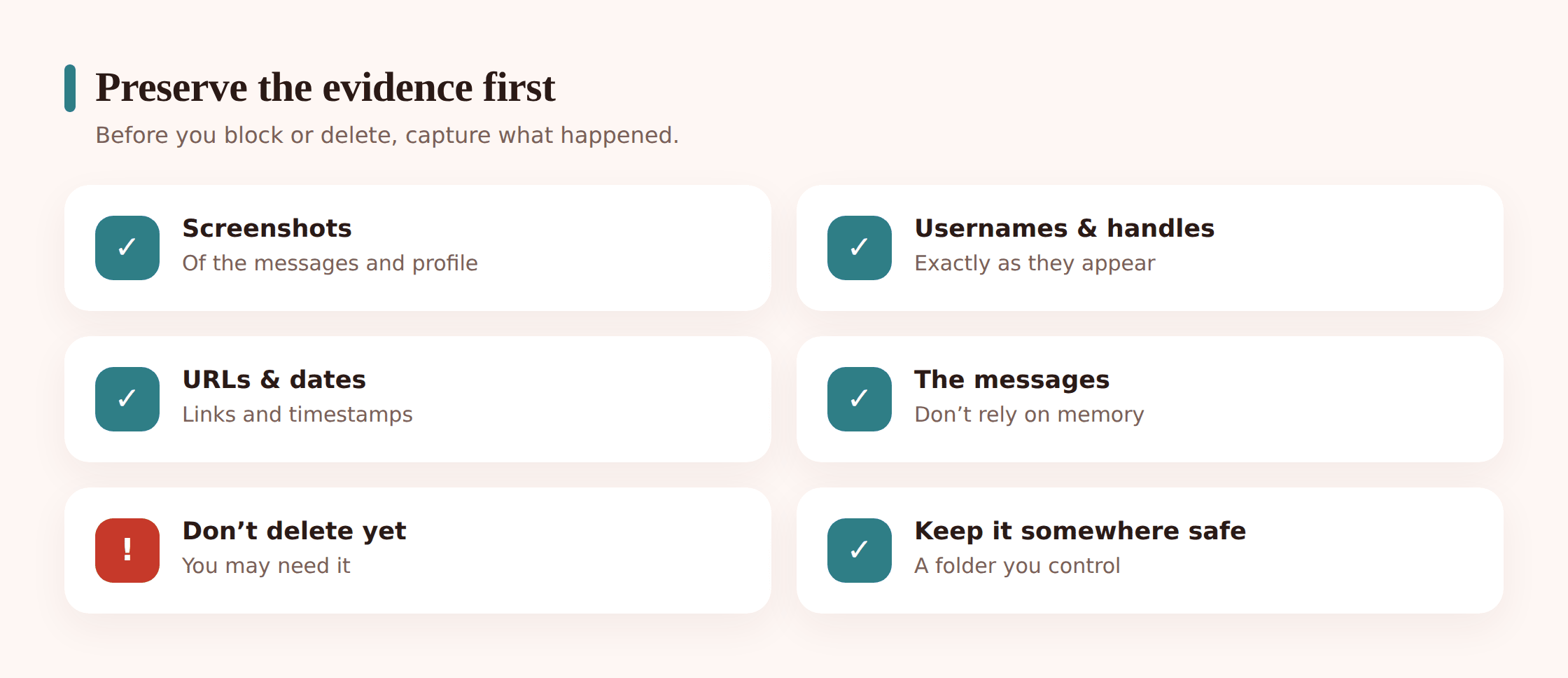
You don’t need to be forensic about it. You need enough that someone else can see what you saw. Grab this while it still exists:
- Screenshots of the messages, posts or profile — full screen, so the date and time show if possible.
- The username or handle exactly as written, and any display name and profile photo.
- The URL or link to the profile, post or message.
- Dates and times, and roughly how long it’s been going on.
- The messages themselves — the actual words, kept intact. Don’t paraphrase over them.
- A short note of what happened, in plain order, while it’s fresh.
Don’t delete the account, the thread or the app yet. Blocking is fine and often smart, but deleting the whole conversation can wipe the proof you’ll need. Keep everything somewhere safe and off the child’s phone if you can — a folder on your own device, or a printout. If money was involved, keep receipts, bank messages and reference numbers too.
Where to report what
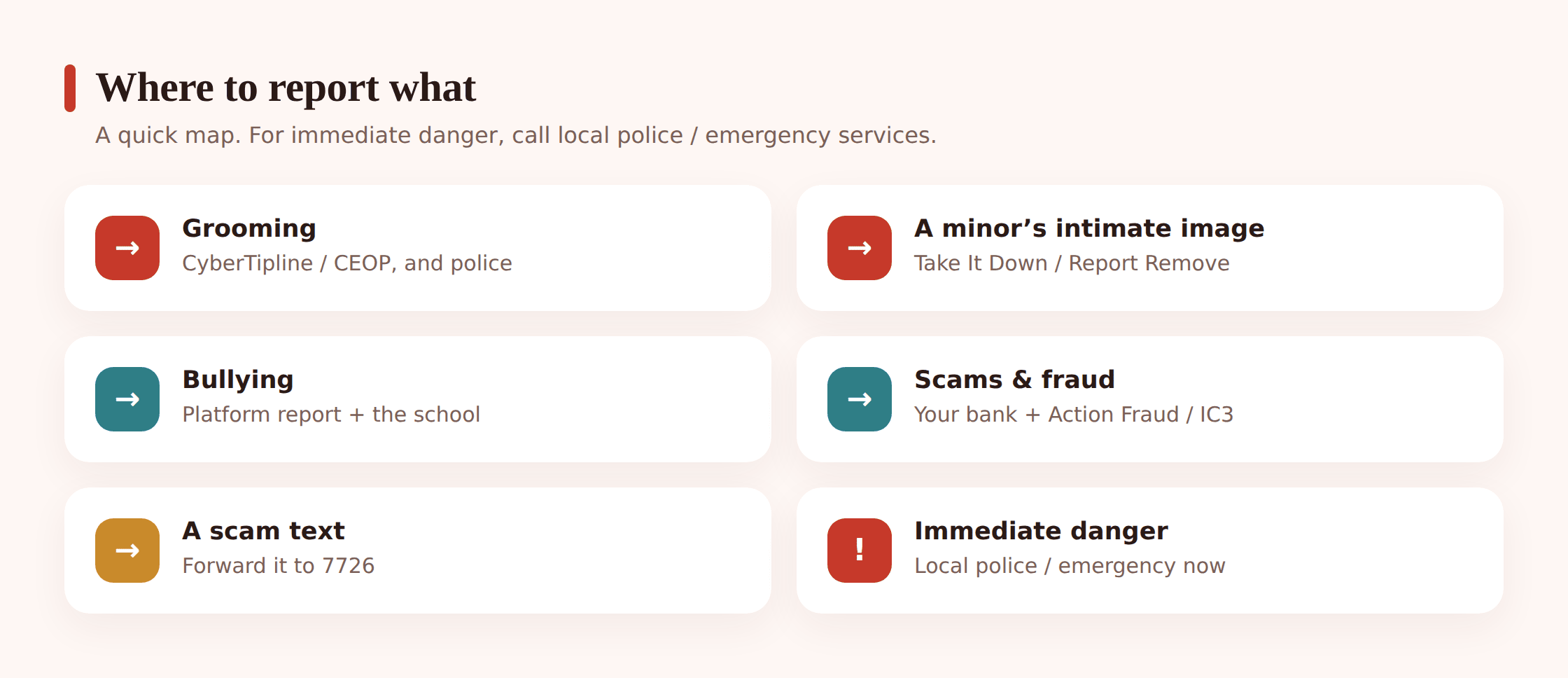
Almost everything starts the same way: report it on the platform where it happened. Then, depending on what it is, you add the right authority on top. Services differ by country, so check your national equivalents — the ones named below are common US and UK examples, and most countries have something similar.
| What happened | Where to report it |
|---|---|
| An adult contacting a child inappropriately (grooming) | The platform, and child-exploitation authorities — NCMEC CyberTipline (US) or CEOP (UK). Police if it’s urgent. |
| An intimate image of a minor shared or threatened (sextortion) | The platform, plus “Take It Down” (US) or Report Remove & the IWF (UK) to get images removed. And the police. |
| Bullying or harassment | The platform’s report and block, the school, and police if it turns to threats. |
| A scam, fraud or phishing | The platform, your bank if money moved, national fraud reporting (Action Fraud UK / FBI IC3 US). Forward scam texts to 7726. |
| Harmful or illegal content | The platform’s report. Child sexual abuse material to NCMEC (US) or the IWF (UK). Never download or share it. |
| A fake account impersonating your child | The platform’s impersonation report. |
| A hacked account | The provider’s account-recovery flow, then change passwords and turn on 2FA. |
Grooming or an adult contacting a child
Report the account on the platform, and report it to child-exploitation authorities: in the US that’s the NCMEC CyberTipline; in the UK, CEOP. If there’s any suggestion of a meeting or your child is in danger, call the police now. Keep the messages. Don’t confront the adult yourself or pretend to be your child — you can compromise a case that way. For the fuller picture on spotting and stopping this, read our guide to protecting kids from online predators.
Sextortion or an intimate image of a minor
This is one where the removal tools matter most. In the US, “Take It Down” (run by NCMEC) helps get images of under-18s taken off participating platforms; in the UK, Report Remove and the IWF do the same. Report to the platform, use those tools, and report to the police. Say clearly to your child that they are not in trouble and this is not their fault — offenders rely on shame to keep kids silent. Our guide to sextortion walks through exactly what to do and say.
Bullying and harassment
Use the platform’s report tool and block the account. Tell the school if the other kids are known — schools can act on things that spill in from outside. If it becomes threats, stalking or persistent harassment, that’s a police matter, and your saved evidence is what makes the report stick. More on handling it well in our cyberbullying guide for parents.
Scams, fraud and phishing
Report the account or listing on the platform. If money left an account, call your bank straight away — fast action can sometimes stop or claw back a payment. Report to national fraud reporting: Action Fraud in the UK, the FBI’s IC3 in the US. And forward scam and phishing texts to 7726 (it spells “SPAM”), which is free and helps carriers block the sender. See our guides to scams that target kids and how to spot a phishing or scam text.
Harmful or illegal content
For violence, hate, or content promoting self-harm, use the platform’s report tool and pick the closest reason. For child sexual abuse material, report to NCMEC (US) or the IWF (UK) — and never download, save or forward it, even to “show someone as proof.” Reporting the location of it is what’s needed; the specialists handle the rest. If you’ve stumbled onto it, step back and report the link, nothing more.
Fake accounts and impersonation
If someone’s set up an account pretending to be your child, most platforms have a specific impersonation report — it usually asks you to confirm your child’s identity. Report it, and warn friends who might be fooled by it. If the fake account is being used to trick or lure people, our guide on catfishing and fake profiles covers what to watch for.
A hacked account
Go straight to the provider’s account-recovery process to lock the attacker out. Then change the password to something new and unique, and turn on two-factor authentication so a stolen password isn’t enough on its own. Our guide to family passwords and 2FA shows how to set this up across your kids’ accounts.
How to report on the big platforms
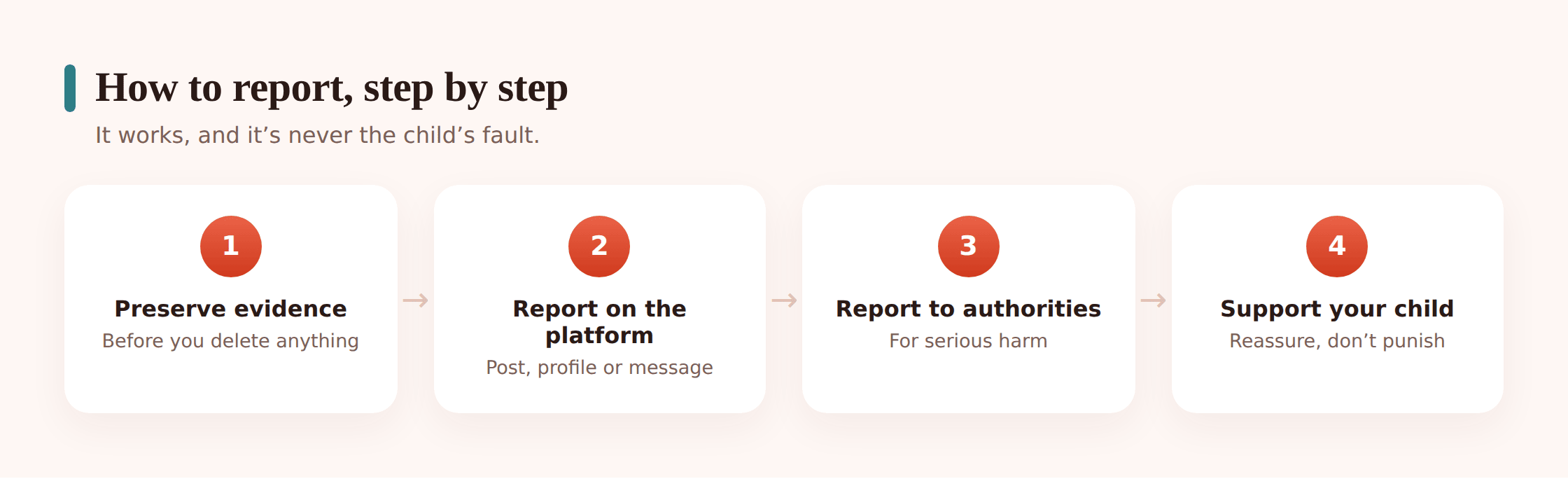
Instagram, TikTok, Snapchat, YouTube, WhatsApp, Roblox, Discord — the wording moves around, but the flow barely changes. Once you’ve done it on one, you can do it on any of them.
- Open the thing itself. Tap the post, the profile, or the individual message you’re reporting.
- Find the menu. Look for the three dots (…), a gear, or a “more” arrow near it.
- Tap Report. It’s almost always there in that menu.
- Pick the reason. Choose the closest match — harassment, nudity, a scam, someone underage, impersonation. Getting the category right routes it to the right team.
- Block after you report. Blocking first can sometimes cut off your access to the report options, so report, then block.
You can also report through the app’s Safety or Help centre, usually under Settings — useful for a whole account or a pattern of behaviour rather than one post. Reports are typically anonymous to the person you’re reporting; they don’t get told it was you. That’s worth telling a nervous teenager who’s afraid of retaliation.
What happens after you report
Be honest with yourself and your child about the timeline. Platform reviews can take hours or days, and sometimes the first answer is “this doesn’t break our rules” even when it clearly upset your kid. Don’t take that as the end.
- You’ll usually get a confirmation and sometimes a reference number. Keep it.
- If the first review does nothing, appeal or re-report with more context. Reports from several people, or with clearer evidence, get looked at again.
- For anything serious — grooming, threats, images of a minor, fraud with real money — don’t wait on the platform. Go to the authorities in parallel. The platform removing a post and the police opening a case are two different things, and the serious stuff needs both.
- Keep your evidence until it’s fully resolved. You may be asked for it again.
Supporting your child through it
The report is the practical part. Your kid is the part that matters. However this started, they’re watching how you react to decide whether telling you was safe.
- Reassure before anything else. “I’m glad you told me. We’ll sort this out together.” That sentence does more than any form.
- Don’t punish them for telling you. Taking the phone away as a reaction teaches the next kid to hide it. Keep the door open.
- Get them real support if it hit hard. A helpline like Childline (UK) or a counsellor gives them somewhere to talk that isn’t you. Some things are easier to say to a stranger.
- Look after yourself too. Discovering your child’s been targeted is a shock. You’ll handle it better if you’re not running on adrenaline and guilt.
A quick “report it” checklist
- Is anyone in immediate danger? If yes, call emergency services now.
- Screenshots, usernames, links, dates saved somewhere safe.
- Reported on the platform, correct reason picked.
- Right authority added — child-exploitation, fraud, or removal tool.
- Scam texts forwarded to 7726; bank called if money moved.
- Account blocked, passwords and 2FA sorted if anything was compromised.
- Confirmation or reference number kept.
- Your child reassured, supported, and not blamed.
FAQ
Should I report to the platform or the police first?
If your child is in immediate danger, police first — that’s a call, not a form. Otherwise you can report to the platform straight away and go to the authorities in parallel for anything serious. They’re not either/or.
Will the person know I reported them?
On most platforms, no — reports are anonymous to the person you’re reporting. They may notice their content or account was removed, but they aren’t told who flagged it. That’s worth telling a child who’s worried about payback.
Do I have to keep the horrible messages? I want them gone.
Keep them until you’ve reported and it’s resolved. Screenshot everything first, then you can hide or delete the thread from your child’s view. A report with evidence gets acted on; a report without it often doesn’t.
What if the platform says the content is fine?
Appeal or re-report with more context, and if it’s genuinely harmful, escalate to the relevant authority anyway. Platform rules and the law aren’t the same thing — something can break the law even when a platform’s first review shrugs.
My child is embarrassed and doesn’t want me to report it. What do I do?
Explain that reporting protects them and often other kids too, and that it can be anonymous. For intimate images or grooming, be clear it isn’t their fault. If they’re still shut down, a helpline or counsellor can help them feel safe enough to let you act.
These resources are US and UK. What about my country?
Most countries have equivalents — a national child-protection body, a fraud reporting line, a way to get intimate images of minors removed. Search for your national versions, and the platform reporting tools work the same everywhere.