
A call log tracker that’s clear, and honest about recording
See who your child called and who called them: numbers, names, times, duration and the numbers you don’t recognize. FreePhoneSpy is a straightforward call history tool, with a clear answer about what call recording can and can’t do on a modern Android phone.
Android child app
Runs in any browser
Why the call log is the first place to look
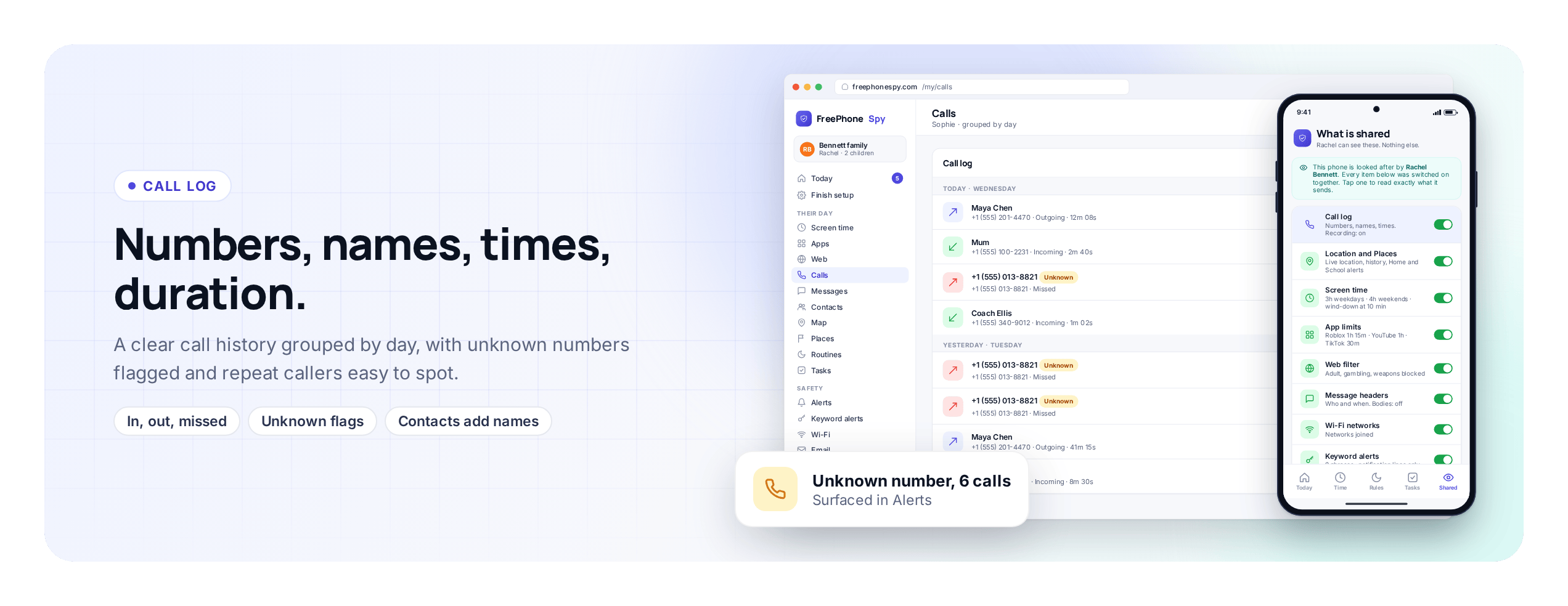
The call log is the least fiddly monitoring tool there is, and often the most useful. It doesn’t read anything private. It shows the shape of who your child talks to on the phone: the number, the name if it’s saved, the time, whether the call came in or went out, and how long it lasted. It’s the information a phone bill used to give you, laid out cleanly by day and kept up to date.
FreePhoneSpy runs one app on your child’s Android phone, and you watch from a browser on your own laptop or phone. Nothing installs on your side. The child’s app has a Transparency screen listing what’s shared, so the call log isn’t a secret from the person carrying the phone, which is why it’s a sensible first thing to switch on.
This page is about calls only. Text messages and social apps are their own subject, with their own consent switch and their own honest limits, so they’ve got a separate home. If that’s what you’re after, head to the text message and social monitoring page. Here we’ll stay on calls: the log in depth, unknown numbers, how contacts fit, and then the part most apps fudge, call recording.
The call log in depth: numbers, names, times, duration
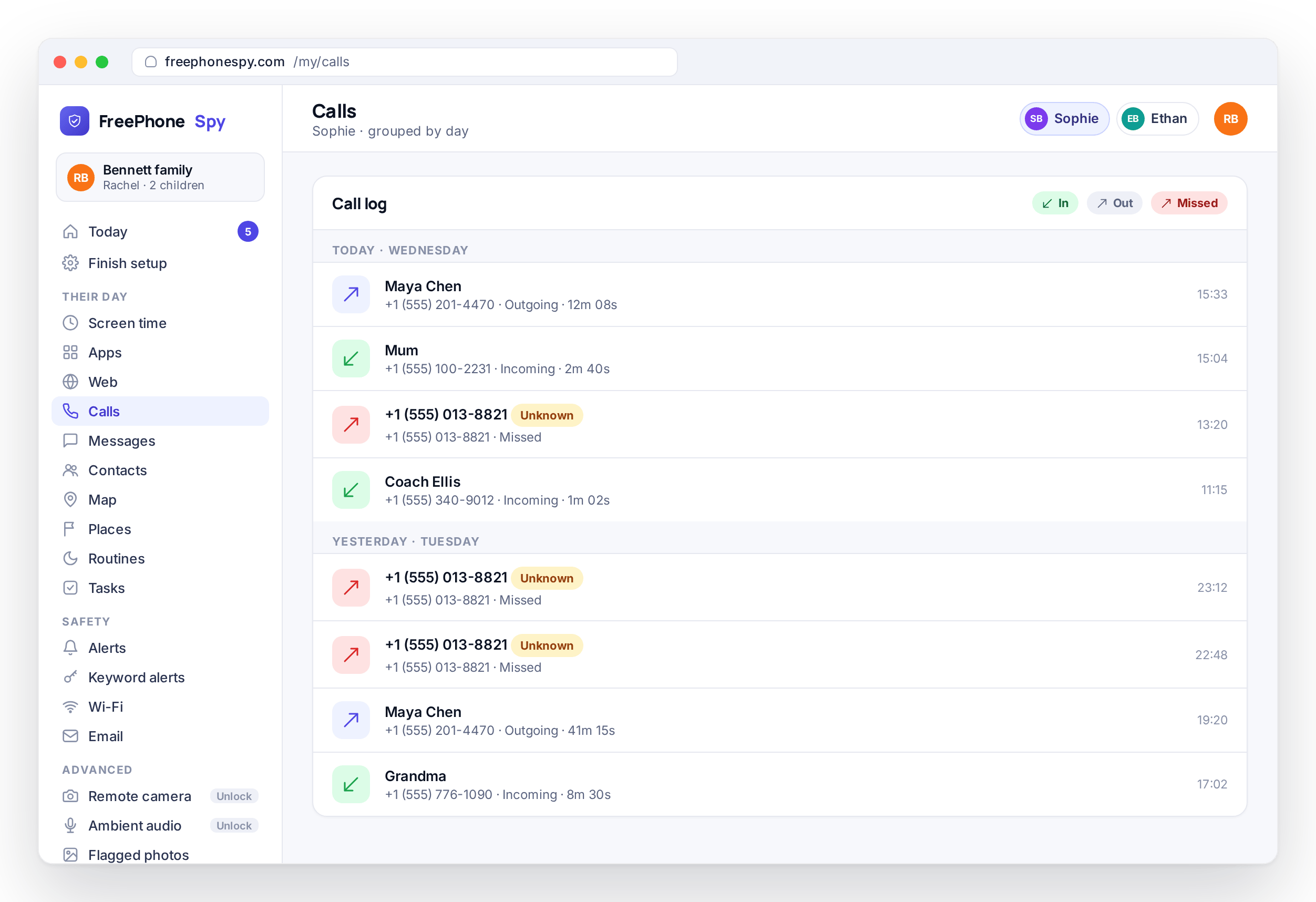
Every call your child made or took shows up in the log, newest first. You get the number, the saved contact name when there is one, whether it was incoming, outgoing or missed, the exact time, and the duration. Missed calls are in there too, which matters more than it sounds, because a run of missed calls from one number tells its own story.
It answers the small questions before they turn into an argument: who rang at eleven on a school night, whether the “quick call to a friend” was really forty minutes, whether that unrecognized number called once or keeps calling. You’re seeing the outline of the day, not reading anything private, and for most families that outline is where the reassurance lives.
- Incoming, outgoing and missed calls, newest first
- Number plus the saved contact name when there is one
- Exact time and call duration on every entry
- Grouped by day, so the pattern is easy to read
Spotting a number that calls a lot, and the ones you don’t know
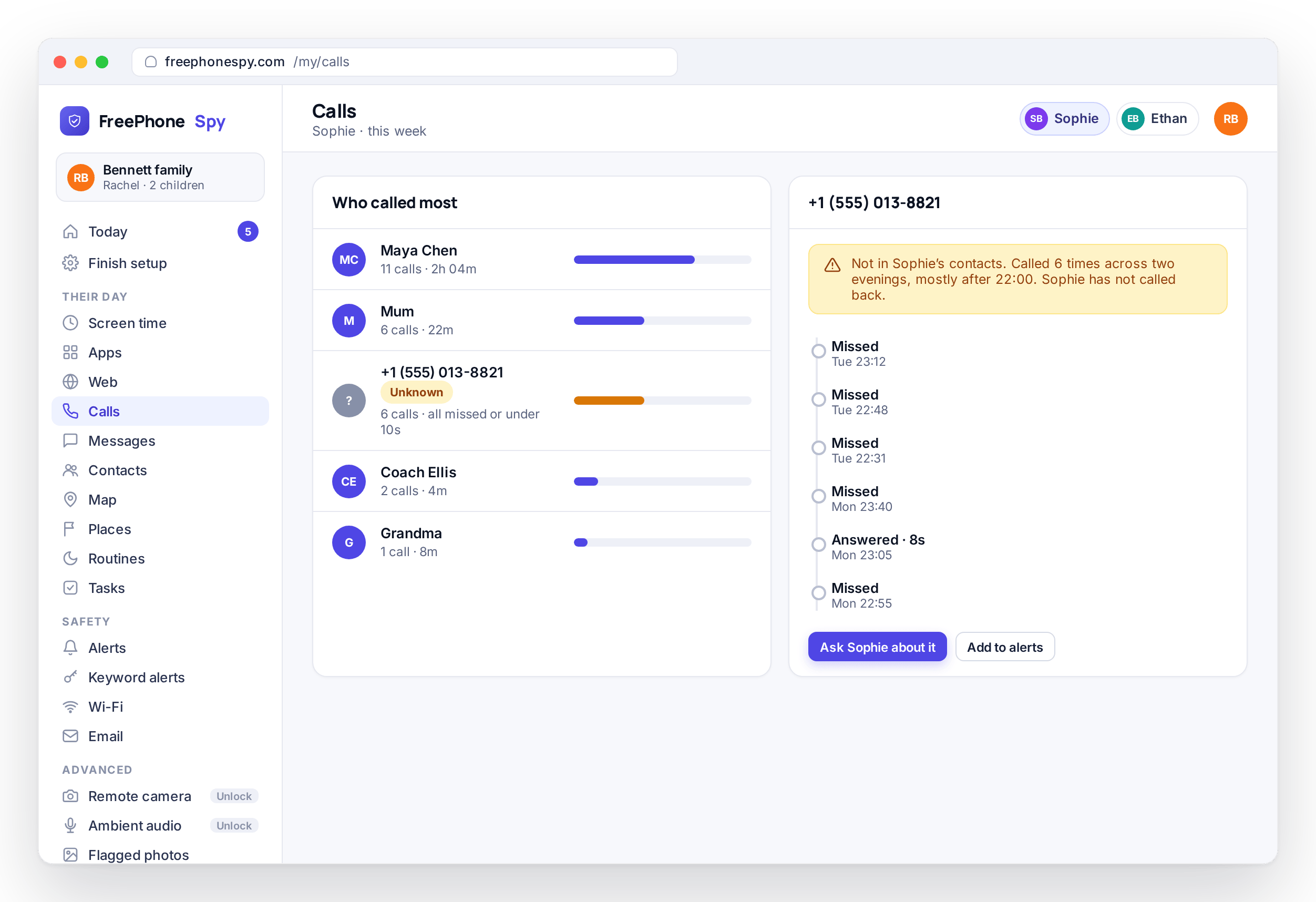
A single call from an unknown number is nothing. It’s a wrong number, a delivery driver, a returned missed call. What you’re watching for is a pattern, and the log is built to make patterns obvious. The same unknown number ringing six times across two evenings pulls itself out of the list, and a number that appears far more than any saved contact is worth a question.
You don’t have to study the log to catch this. A glance is usually enough, because frequency, timing and the unknown flag do the sorting for you: the rare thing that needs your attention stands out, and the ordinary hundred calls a week don’t.
- Repeat callers rise to the top of your attention, not the bottom
- Unknown numbers flagged automatically, so patterns are obvious
- Odd-hour calls are easy to spot against the day’s rhythm
- A one-off wrong number reads differently from a persistent caller
Contacts turn digits into names
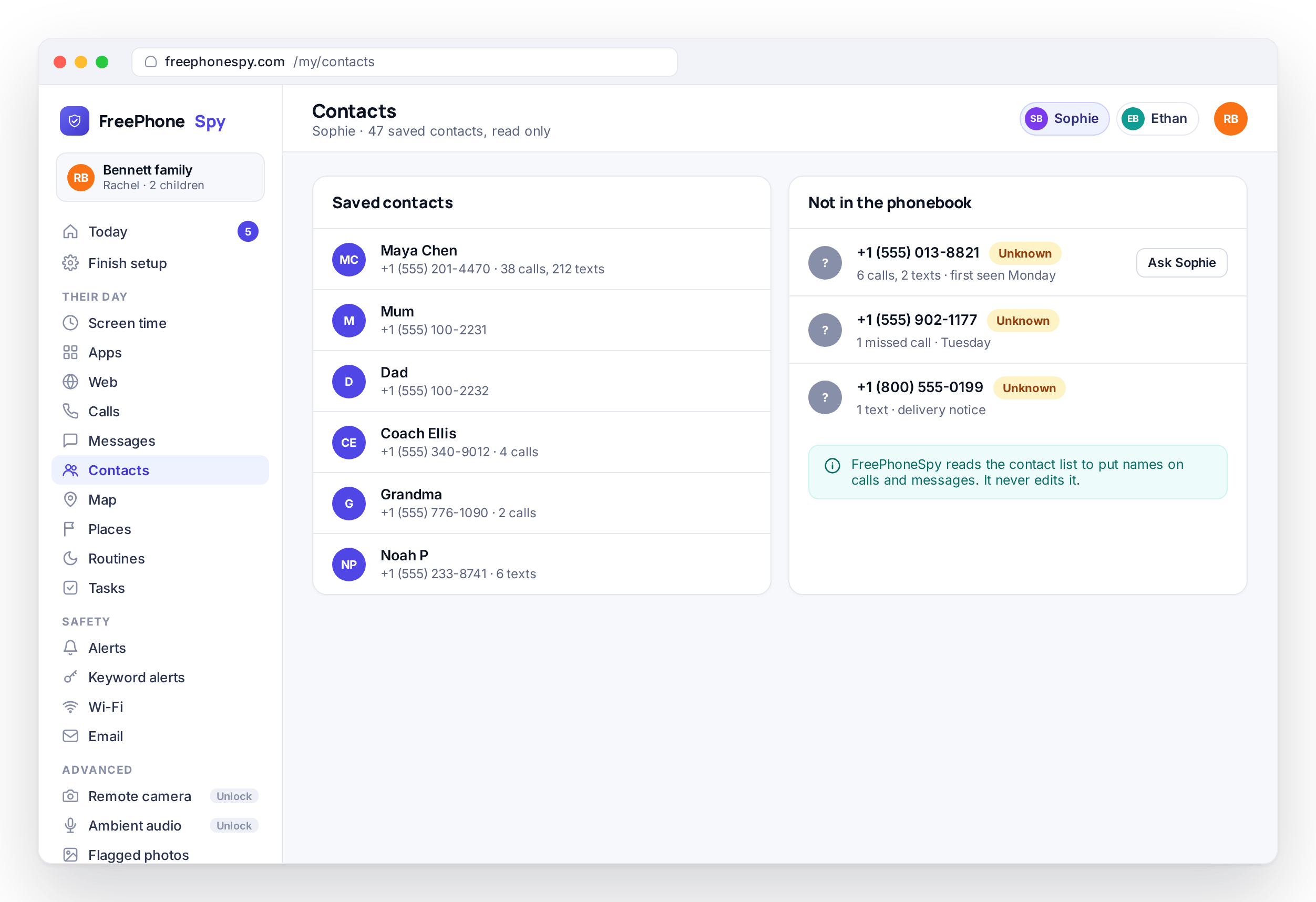
Names are what make the call log mean something. FreePhoneSpy reads your child’s Contacts, so a number in the log shows as “Grandma” or “Coach Ellis” instead of a row of digits. The people you recognize almost never worry you, and there are usually a lot of them.
When a number isn’t saved, it’s flagged as unknown, which is your cue to look closer or not, depending on what else the log shows. FreePhoneSpy never changes your child’s contacts, only reads them to label the calls. The same list also names your child’s texts and social messages over on the messages page, so a number reads the same way wherever it appears.
- The child’s saved contacts, so calls show as names
- Unknown numbers flagged automatically in the log
- The same names label calls, texts and social alike
- A read of the phonebook only, never an edit
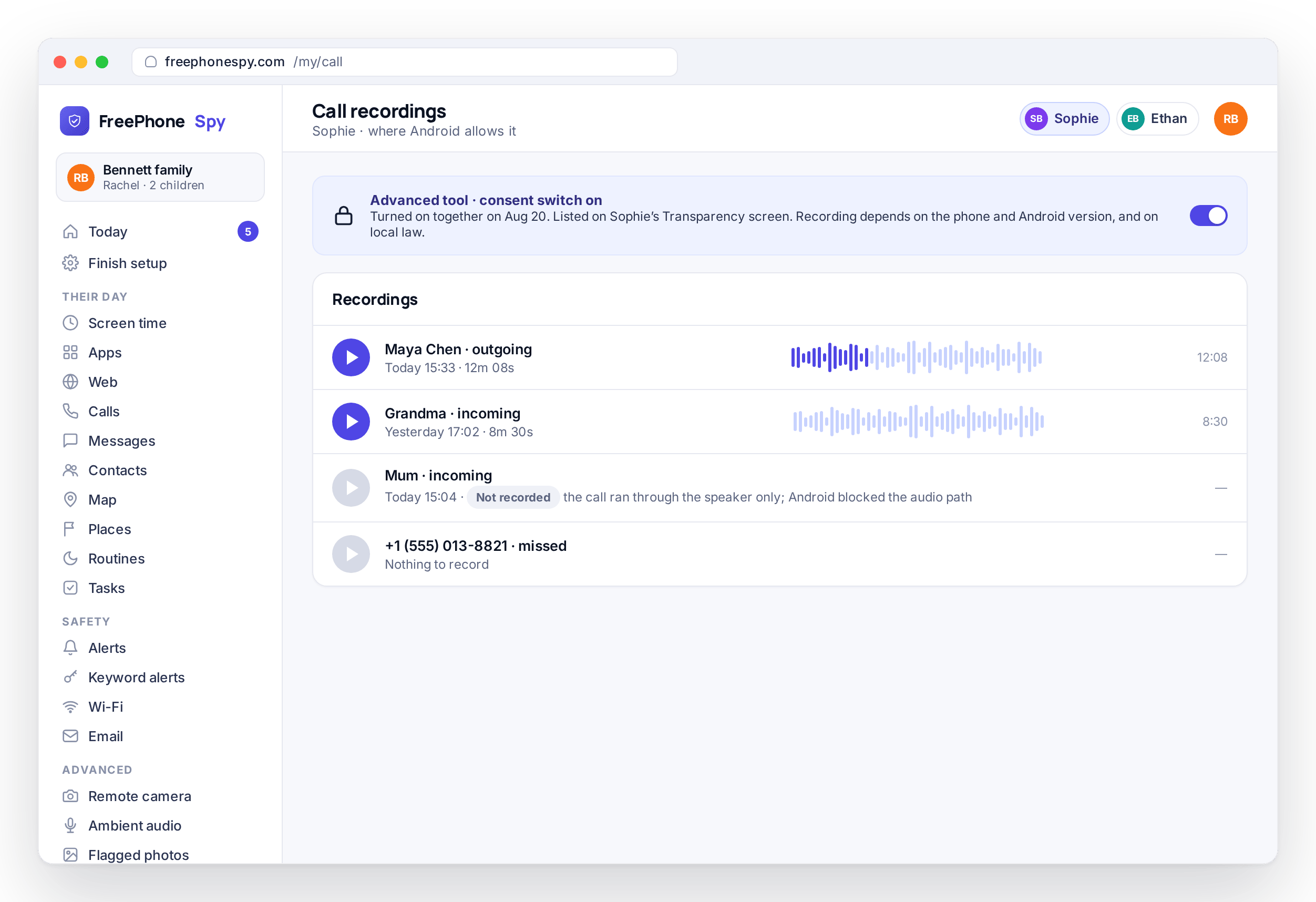
Call recording, told straight
This is the part most apps oversell, so here’s the straight version. Call recording is best-effort on modern Android, and on a lot of phones it simply won’t capture the other person. From Android 10 onward, the system blocks third-party apps from recording call audio on most devices, and some manufacturers block it further. It also needs the child’s microphone permission, granted openly during setup.
What you get depends on the phone. On some devices, recording works and the clip shows up in your panel to play back. On many newer ones it won’t, and rather than pretend, FreePhoneSpy tells you when a call couldn’t be recorded instead of leaving a gap you’d have to guess about. Call recording is also an advanced feature, unlocked by completing a few simple tasks rather than paid for; the pricing page covers exactly how. Treat the call log as the reliable tool and recording as an occasional bonus, not the main event.
- Best-effort on modern Android; results depend on the device
- Android 10+ blocks capturing the other party on most phones
- Needs the child’s mic permission; some OEMs block it entirely
- Advanced feature, unlocked through tasks, listed on the phone
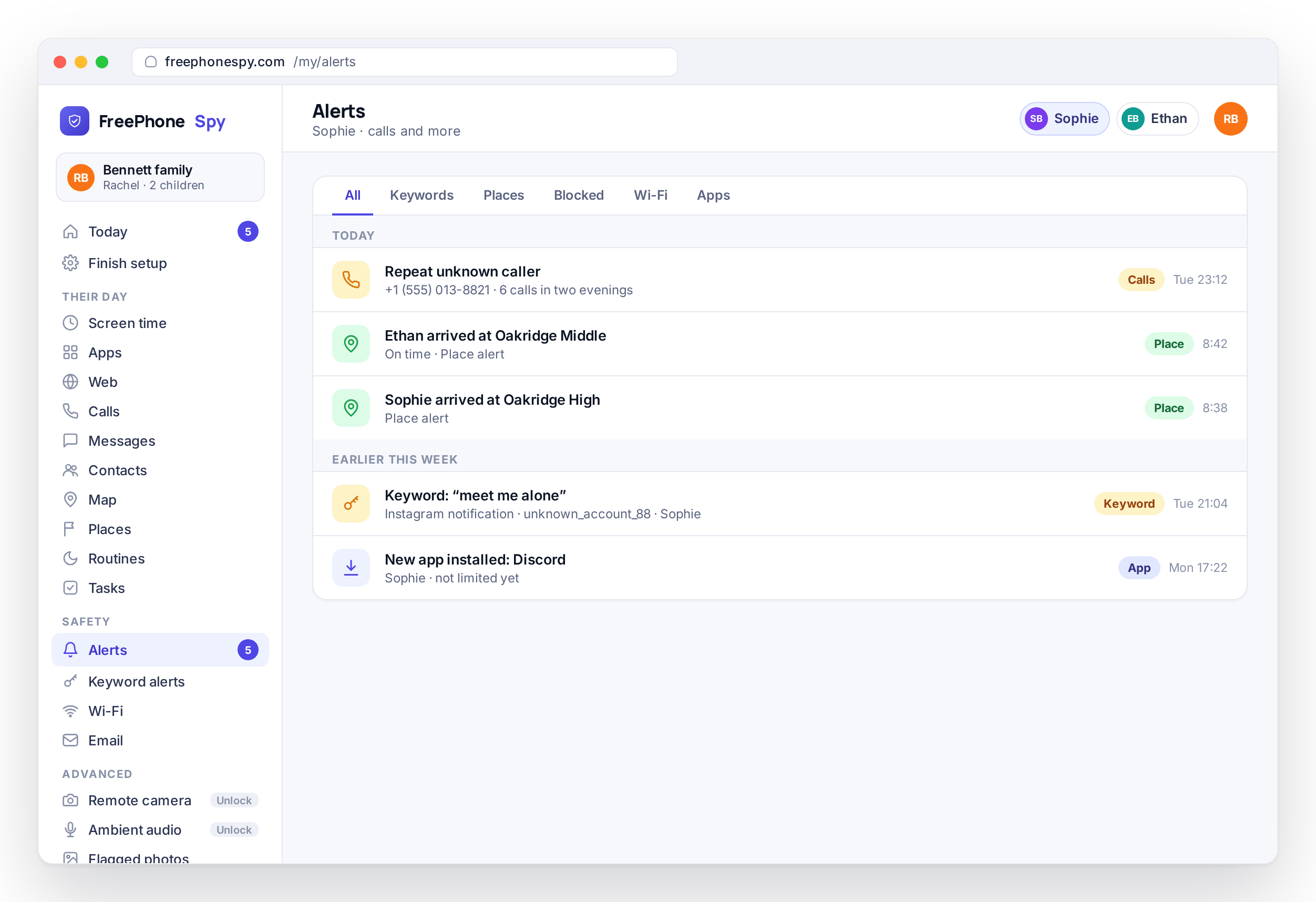
Repeat and unknown callers can raise an Alert
You won’t watch the call log all day, and you shouldn’t have to. When a number behaves in a way worth noticing, it can surface in your Alerts feed, so the thing worth seeing comes to you instead of you going to look for it. A persistent unknown caller is exactly the kind of pattern that’s easy to miss by eye and easy to catch as a flag.
Most check-ins stay a five-second glance that ends in “all fine.” The rare call pattern that deserves a proper look gets flagged and waits for you, whether you’re at a laptop or on your phone.
- Notable call patterns can surface in the Alerts feed
- Persistent unknown callers are easy to catch as a flag
- The feed reaches you on your own phone or laptop
- Most check-ins are a quick glance, not a study session
Setting it up together
The call log and any recording are both listed on the child’s Transparency screen, so neither is a secret from the person carrying the phone; recording also needs the child’s microphone permission, granted openly during setup. The call log itself is the dependable part, reading reliably what Android records about calls. Recording is the part with caveats: best-effort, blocked for the other party on most phones from Android 10 onward, and switched off entirely by some manufacturers. This is the Android child app, with an iPhone version still in development, and the parent panel works in any browser on any device. A number that rings a lot means more once you can see it texting too, so pair this with messages. Add your child, pair the phone with the 6-digit code on the Devices screen, and agree together which switches to turn on. Free for the first ten days, and free to keep going by helping the project along; details are on the pricing page.
Questions parents ask about calls and recording
Does the call log show contact names or just numbers?
Both. FreePhoneSpy reads the child’s Contacts, so a saved number shows as the person’s name. Numbers that aren’t saved appear as unknown and get flagged, which makes repeat unknown callers easy to spot at a glance.
Can FreePhoneSpy record my child’s calls?
Sometimes, and we’d rather be honest than oversell it. Call recording is best-effort on modern Android. From Android 10 onward the system blocks third-party apps from capturing the other party on most phones, some manufacturers block it entirely, and it needs the child’s mic permission. Where recording works, the clip appears in your panel; where it doesn’t, the log tells you so.
Why does recording work on one phone but not another?
Because it depends on the Android version and the manufacturer. Newer phones and certain brands lock down call audio for third-party apps. That’s a platform decision, not something any monitoring app can switch back on. Treat the call log as the reliable tool and recording as an occasional bonus.
Will my child know the call log is being shared?
Yes. The child’s app has a Transparency screen listing what’s shared, and call recording appears there when it’s on. FreePhoneSpy is built for open, consented use between a parent and their own child, not for covert monitoring of another adult.
What about text messages and social apps?
Those have their own page so each can be explained properly, including the consent switch for reading message bodies. Head to the text and social monitoring page for SMS logs, social notification lines and keyword flags.
Does this work on an iPhone?
Not yet. The child app is Android for now, and the iPhone version is in development. The parent side already runs in any browser, on any device.
More: Text & social monitoring · Photos, videos & audio · Alerts & keyword flags · Pricing · All FAQs