What to Do If Your Child’s Account Gets Hacked
Someone’s posting from your kid’s account. Or the password stopped working overnight. Or a friend messages you asking why “your son” is sending links about free V-Bucks. That drop in your stomach is normal — but the account is almost always recoverable, and you have more control than it feels like right now. Here’s exactly what to do, in order, without panicking.
Signs an account has been hacked
Sometimes it’s obvious — the password won’t work and your kid is locked out. Often it’s quieter than that. Here’s what tends to show up.
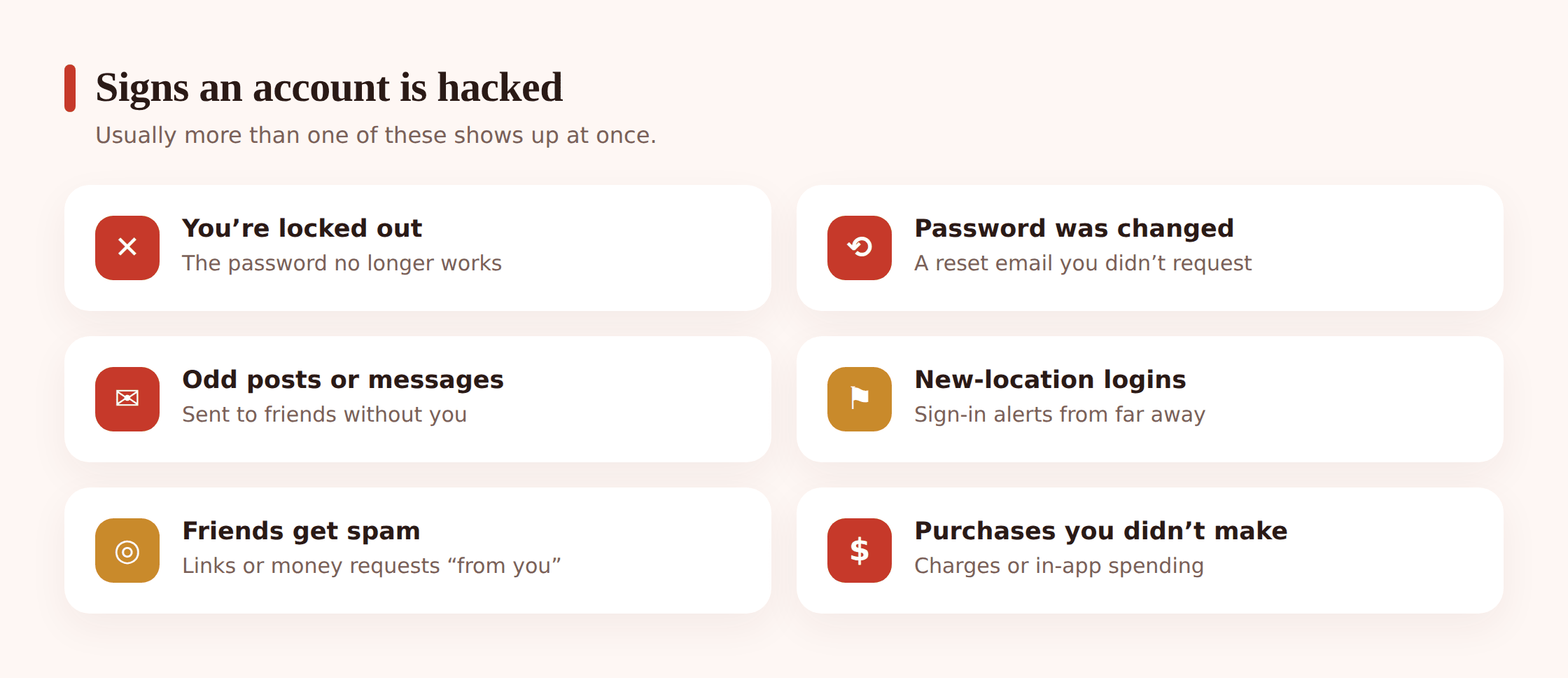
They can’t log in. The password suddenly fails, even the one saved in the browser. A hacker’s first move is often to change the password so the real owner can’t undo their work.
Posts, messages or comments they didn’t make. Spammy links in the story, DMs sent to the whole friends list, comments on strangers’ posts. Scammers use a stolen account to reach the people who trust it.
The email or phone number on the account changed. If your kid gets an email saying “your email was updated” or “your phone number was changed” and it wasn’t them, that’s a live break-in. These “was this you?” emails are gold — they usually contain a link to reverse the change.
Login alerts from places you’ve never been. “New login from a device in another country.” Games and social apps send these; don’t ignore them.
Friends flag it before you do. Someone messages to say the account is sending weird links or asking to borrow money. Believe them and check.
Missing items or spent balance. In games, a hacked account often gets stripped — skins traded away, Robux or V-Bucks spent, rare items gone. On a store account, unfamiliar purchases appear.
Two-factor codes arriving out of nowhere. A string of verification texts your kid didn’t request means someone has the password and is hammering at the second lock. Don’t read those codes to anyone.
Do this first: the immediate steps
Speed matters more than perfection here. The goal in the first ten minutes is simple: prove you own the account, kick the intruder out, and slam the door behind them. Do this from a device you trust — your own phone or a home computer — not from a machine you think might be part of the problem.
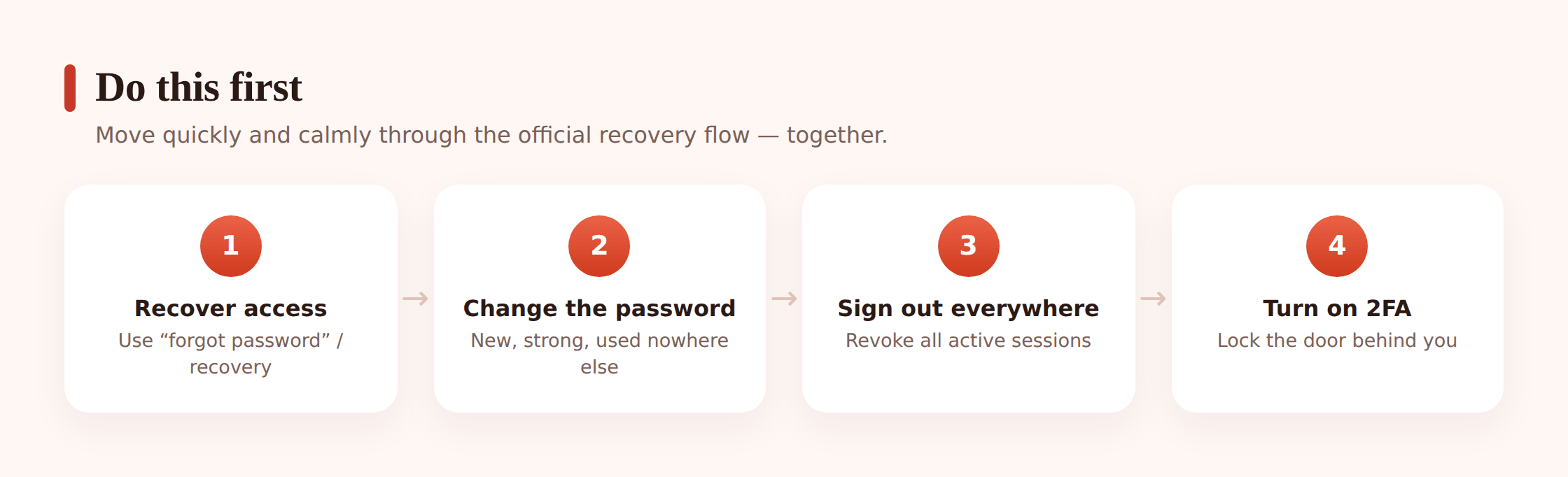
Step 1 — Try the normal login once, then stop.
Attempt the current password a single time. If it works, great — go straight to changing it (Step 3). If it doesn’t, don’t keep guessing; move to recovery. Repeated failed attempts can temporarily lock the account and slow you down.
Step 2 — Use the official “forgot password” or account-recovery link.
On the login screen of the real app or website, tap Forgot password (or Trouble logging in / Get help). The platform sends a reset link or code to the email or phone on file. Only ever use the recovery flow inside the genuine app or by typing the official web address yourself — never a link someone sent you. If the email on the account has been changed, look for the “was this you?” message the platform sent when it changed, and use its “reverse this change” or “secure my account” link.
Step 3 — Set a brand-new, strong password.
Not a tweak of the old one. A fresh password the attacker has never seen, and one you haven’t reused anywhere else. A short passphrase of a few unrelated words is easy for your kid to remember and hard to crack. If this password was used on other accounts too, those are now at risk — note them for later.
Step 4 — Sign out every other session and device.
In settings, find Security → Where you’re logged in (wording varies: “Active sessions,” “Devices,” “Manage devices”). Log out of everything you don’t recognise, or use “log out of all sessions.” This is the step people skip — and it’s the one that actually evicts the hacker, who may still be signed in even after you change the password.
Step 5 — Check and reclaim the recovery details.
Confirm the email address and phone number on the account are your kid’s, not a stranger’s. Remove anything you don’t recognise. If a backup email or “trusted contact” was added, delete it. These are the back doors attackers leave so they can break in again next week.
Step 6 — Turn on two-factor authentication (2FA).
This is the single most important step for keeping the account. With 2FA on, a password alone isn’t enough — a second code (from an app or a text) is needed too. Turn it on now, before you do anything else. Our passwords & 2FA guide walks through setting it up if you’re new to it.
Step 7 — Review connected apps and revoke what you don’t know.
Many accounts let third-party apps and games connect (“Log in with Google,” “Connect to Discord,” and so on). In settings, open Connected apps or Apps and websites and remove anything unfamiliar — a shady app with access can quietly control the account even after a password change.
Getting back in, platform by platform
The seven steps above work almost everywhere, because every real platform is built around the same recovery idea: prove you control the email or phone on file, and you get the account back. What changes is where the buttons live. Here’s the general route for the accounts kids actually use.
Email (Gmail, Outlook, iCloud)
Email is the master key — most other accounts reset through it, so recover this first if it’s the one that’s been hit. Use the provider’s account-recovery page (search the official name plus “account recovery,” or type the address yourself). Google, Microsoft and Apple all have guided recovery that asks security questions, a backup email, or a code to a recovery phone. Answer as much as you can — even partial matches help their system trust you. Once you’re back in, changing your email password and turning on 2FA there protects everything downstream.
On the login screen tap Forgot password, or use Get help logging in. Instagram can send a login link to the email or phone on file. If the account was fully taken over, its “My account was hacked” flow can verify identity with a selfie video for accounts with photos of a person. Instagram also emails you whenever the email or password changes, with a “secure my account” link — check the inbox and spam folder for it.
Snapchat
Use Forgot your password? on the login screen to reset via email or SMS. If you’re locked out entirely, Snapchat’s support site has an account-recovery form. Snapchat often temporarily locks an account that’s shown suspicious activity, which is annoying but is actually protecting it — follow the unlock prompts.
TikTok
Tap Log in, then the recovery option for the method used (phone, email, or a linked Google/Apple account). If the login details were changed, TikTok’s in-app Report a problem and its web support form handle compromised accounts. Having a phone number and email both linked makes recovery far easier — add the missing one once you’re back in.
Roblox
If your child added an email (or a parent’s email) to the account, use Forgot password to reset it. No email on file makes recovery much harder — this is why linking a parent email to a kid’s Roblox account matters. Roblox support can sometimes help verify ownership with account details and purchase history, so gather receipts and the account creation date. After recovery, check that no items were traded away and turn on 2FA in the account’s security settings.
Gaming accounts (Xbox, PlayStation, Nintendo, Epic, Steam)
Each has an official account-recovery route tied to the email on the account, plus phone support or a support ticket if the email itself was changed. These accounts hold real money and payment cards, so treat a compromise here seriously: recover access, remove any unfamiliar payment method, and check the purchase and download history. Most gaming platforms have a dedicated “my account was hacked” support page — use that, not a search result that leads to a third-party “account recovery service” (those are frequently scams that finish the theft).
Telling friends the account was compromised
A stolen account is dangerous mostly because of who trusts it. The whole reason scammers want your kid’s Snapchat isn’t your kid — it’s the friends list. So once you’ve secured the account, get ahead of the damage.
Post a short, plain message from the recovered account: “My account was hacked for a bit today — if I sent you any weird links or asked for money, ignore it, it wasn’t me. All sorted now.” No drama needed. It protects friends who might otherwise tap a scam link thinking it came from a mate.
If the hacker sent DMs asking friends for money, one-time codes, or “vote for me” links, message those friends directly too. Anyone who did tap a link or share a code should reset their own password and, ideally, do the same steps in this guide. That’s how these things spread through a friend group — and how you stop it.
Watch out for the follow-up trick: a scammer using the account to message your kid’s best friend saying “I got hacked, can you send me a code to help me recover it?” That code is the friend’s account key. The rule to teach: never share a login code to help someone recover an account — that’s not how recovery works.
If money or purchases were involved
When a hacked account is linked to a card, a store balance, or in-game currency, you’re dealing with two problems: securing the account (done above) and dealing with the money (starts now).
- Remove the saved payment method from the account as soon as you’re back in, so nothing else can be bought.
- Check the purchase and transaction history for anything you didn’t authorise. Screenshot it — you’ll want it for a dispute.
- Contact the platform’s billing support to report the unauthorised charges. Stores like the App Store, Google Play, Xbox, PlayStation and Roblox all have a refund or dispute process for fraudulent purchases, especially when the account was compromised.
- Call your bank or card provider if real money left a card. Use the number on the back of the card, not one from any message. Ask them to reverse the charges and, if the card details are exposed, cancel and reissue the card.
- Watch the account for a few weeks. Thieves who got one charge through often try again. Keep an eye on statements and the store’s order history.
Kids get pulled into “free currency” scams that end with a hacked account and a drained balance — our guide to online scams targeting kids covers the tricks that lead here, so the next “free Robux” offer gets an eye-roll instead of a tap.
Lock it down afterwards
Getting back in is half the job. The other half is making sure the same door doesn’t swing open again next week — because a hacker who got in once often kept a way back, and the same weak password may be sitting on your kid’s other accounts too.
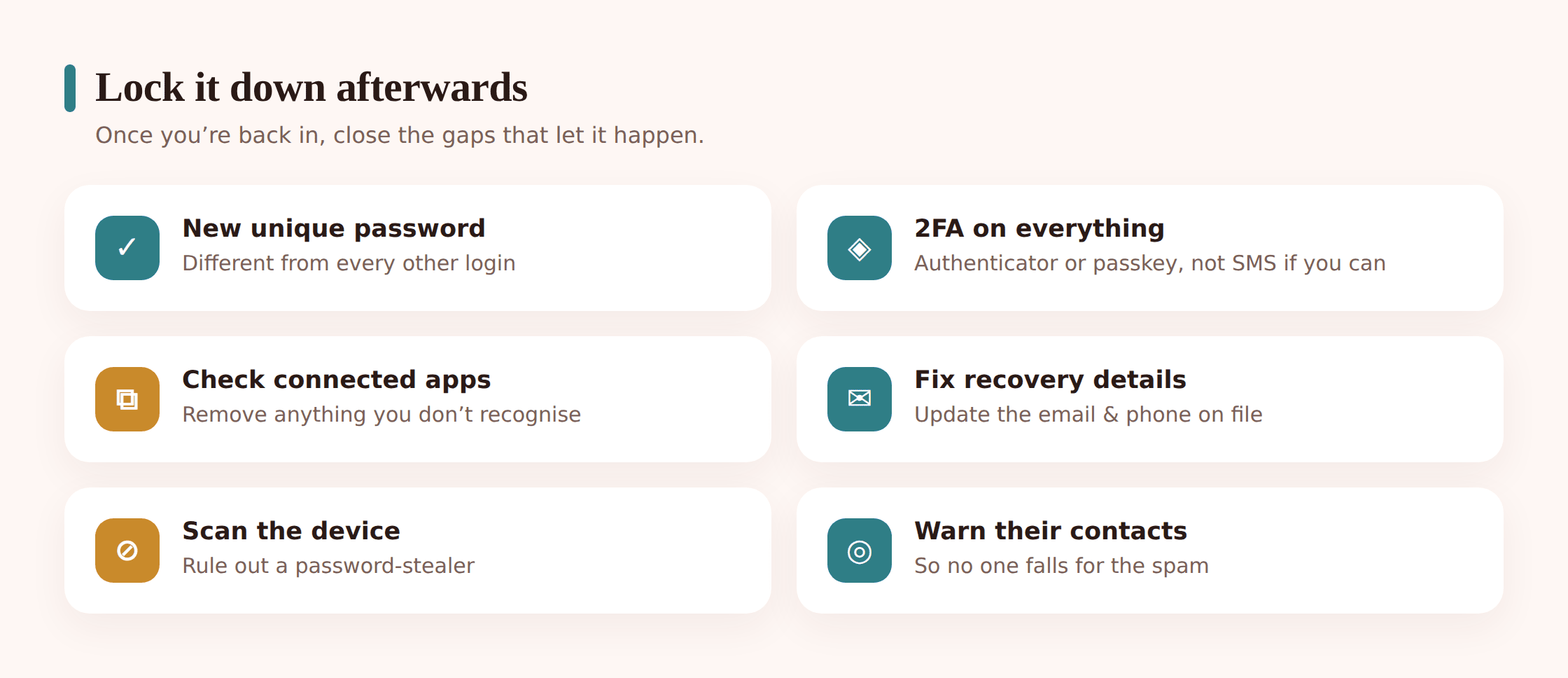
Change the password anywhere it was reused. If the hacked account’s old password was also on email, another game, or a social app, the attacker may already be trying those. Give each one its own unique password. This is the number-one reason one hack turns into five.
Secure the email that account resets through. If it wasn’t the email itself that was hacked, it’s still the key to this account — put a strong unique password and 2FA on it too.
Re-check connected apps and login sessions. A day or two later, look again at active sessions and connected apps. If anything unfamiliar reappeared, the account may still be compromised — repeat the recovery steps and change the password again.
Scan the device for the leak. Ask how it happened (see the FAQ). If your kid entered the password on a fake site or downloaded a sketchy “free skins” app or game mod, that thing may still be on the phone. Remove any app you don’t recognise, and if you’re worried the phone itself is compromised, our guide on whether a phone is being monitored covers the signs to look for.
Spotting trouble early is what keeps a scare from becoming a disaster. FreePhoneSpy is transparent parental monitoring for an Android phone your child knows is monitored — set up together, in the open — and part of that is simply staying aware of your child’s accounts and logins so an odd sign-in or a worrying keyword gets noticed while it’s still small. It’s a smoke alarm, not a lock: it won’t recover an account for you, but it can help you notice something’s off before the whole friends list gets spammed. It’s a safety net you both know about, never a secret tool for watching anyone without their knowledge.
Stopping it happening again
Most account hacks come down to a handful of causes, and each has a boring, effective fix. Once, together, is enough to make the account much harder to steal.
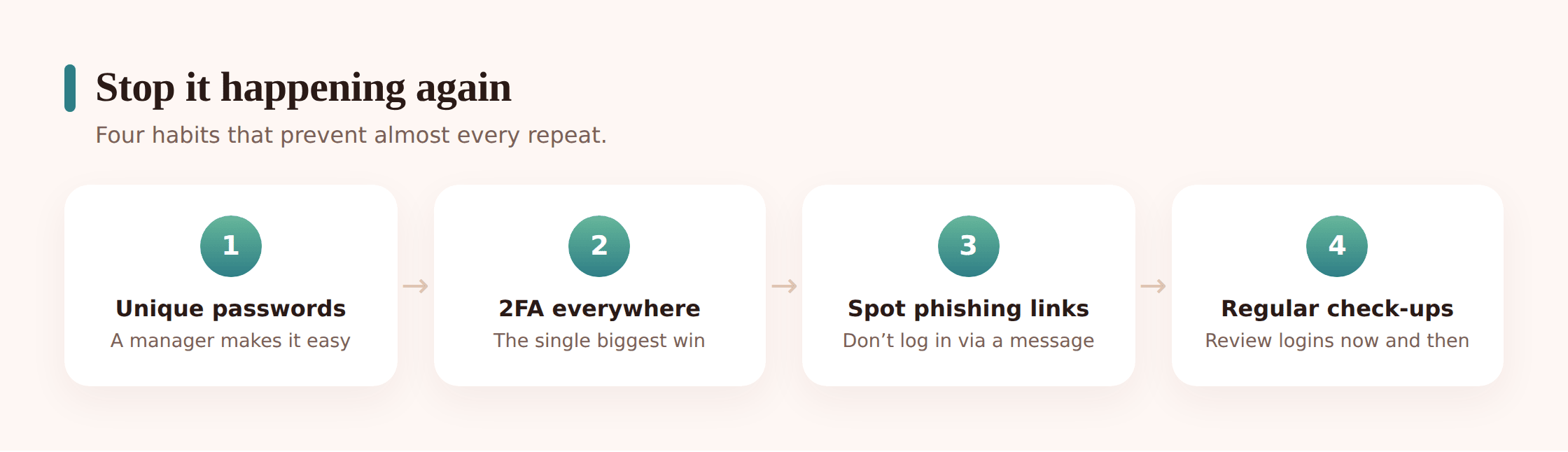
Two-factor authentication on every account that offers it. This alone blocks the vast majority of takeovers, because a stolen password becomes useless without the second code. Prioritise email and any account with money attached.
A unique password per account. The single biggest cause of “how did they get into all of them?” is one password reused everywhere. A password manager makes this painless — it remembers them so your kid doesn’t have to.
Teach the code rule. No one legitimate ever asks you to read out a verification code — not support, not a friend, not a “giveaway.” A code shared is an account handed over.
Slow down on links and “free stuff” offers. Most kid-account hacks start with a fake login page reached through a “free V-Bucks / Robux / followers” link, or a friend’s already-hacked account. If your kid can spot the setup, they never enter the password in the first place — our guide on how to spot a phishing text is a good thing to read together.
Keep a parent email on kids’ accounts. For younger children especially, having your email as the recovery address on their Roblox, game and social accounts means recovery is quick and in your hands if this ever happens again.
- Password changed to a new, unique one nobody else knows
- Signed out of all other sessions and devices
- Recovery email and phone confirmed as yours, strangers removed
- Two-factor authentication turned on
- Connected/third-party apps reviewed, unknowns revoked
- Friends told the account was compromised
- Any saved payment method checked and unauthorised charges disputed
- Reused passwords changed on other accounts
- The email that resets this account secured with its own 2FA
- Device checked for the fake app or link that caused it
FAQ
They can’t get the recovery email — the hacker changed it. Now what?
Look first for the alert the platform sent when the email was changed — it usually lands in the old inbox with a “this wasn’t me / reverse this change” link that undoes it. If that’s gone, use the platform’s dedicated “my account was hacked” or account-recovery form (not the normal forgot-password flow). These ask you to prove ownership another way — a linked phone number, a selfie video, old passwords, purchase receipts, the account creation date. Gather what you can before you start; the more you provide, the more likely they’ll restore it to you.
Should we pay if there were unauthorised purchases?
Don’t pay anyone claiming they’ll “recover” the account or “return” the items for a fee — that’s always a scam. For the actual charges, don’t pay them either; dispute them. Report the unauthorised purchases to the platform’s billing support and, if real money was taken from a card, to your bank. Legitimate stores have fraud and refund processes precisely for compromised accounts.
How did this even happen?
Usually one of three ways: the password was reused somewhere that got breached, your kid typed it into a fake login page reached through a “free stuff” link or a friend’s hacked account, or a code got shared with someone posing as support or a friend. It’s very rarely some sophisticated attack — which is good news, because 2FA and a unique password shut down all three. It also isn’t a moral failing, so skip the blame; it happens to plenty of careful adults.
The account is gone for good — can we just make a new one?
Sometimes, yes, and that’s okay. If an account holds nothing valuable and recovery stalls, a fresh account (secured properly from day one) is a fine outcome. But recover rather than abandon if the account is tied to money, purchases, a phone number others use to reach your kid, or is itself a recovery method for other accounts — leaving a hacked account live lets the attacker keep abusing your kid’s name and friends list.
My other kids use the same phone or share logins — are they at risk too?
Possibly. If accounts share a password, or if the same device was used, treat the others as potentially exposed: change their passwords to unique ones and turn on 2FA. Shared logins are convenient right up until one gets hacked, at which point they all do. This is a good moment to give each child their own accounts and passwords.
How fast do we actually need to move?
Within the first hour, ideally. An attacker’s whole plan is to change the recovery details and lock the real owner out before they notice. The sooner you reset the password and reclaim the email and phone on file, the easier recovery is. If it’s the middle of the night and you spot it, do the password reset and sign-out-all-sessions steps now; the rest can wait until morning.