Is Instagram Safe for Kids? A Parent’s Guide
Sophie Bennett is 15. She’s on Instagram most evenings, and her mum keeps hearing two things from other parents: it’s fine, everyone’s on it, and it’s a disaster, take the phone away. Neither is true. Instagram can be a good place for a teenager and a rough one, sometimes in the same hour. The useful question isn’t “safe or not” — it’s “safe enough, set up how, with what conversation running alongside it.” That’s what this covers.
What Instagram actually is now
If your mental picture of Instagram is square photos of brunch, update it. For a teenager today the app is four things stacked in one.
The feed is posts from accounts they follow plus a growing pile of “suggested” content the algorithm thinks they’ll like. Stories are photos and clips that vanish after 24 hours — casual, in-the-moment, and where a lot of friend-group life happens. Reels is the big one: short vertical videos, one after another, an endless scroll built to keep you there. And DMs — direct messages — is a full private messenger sitting inside the app, one-to-one or in group chats.
Kids want it because their friends are there. That’s the whole reason, and it’s a good one. Being off Instagram at 15 can mean missing the running joke, the party plan, the group chat where everything gets decided. It’s also creative — Sophie edits Reels, follows artists, runs a little account for her drawings. Writing the app off as “brain rot” misses why it matters to them, and a parent who does that tends to get tuned out fast.
The real risks, one by one
Vague worry doesn’t help you set anything up. Specific risks do. Here’s what actually goes wrong, and — held for the settings section below — what tames each one.
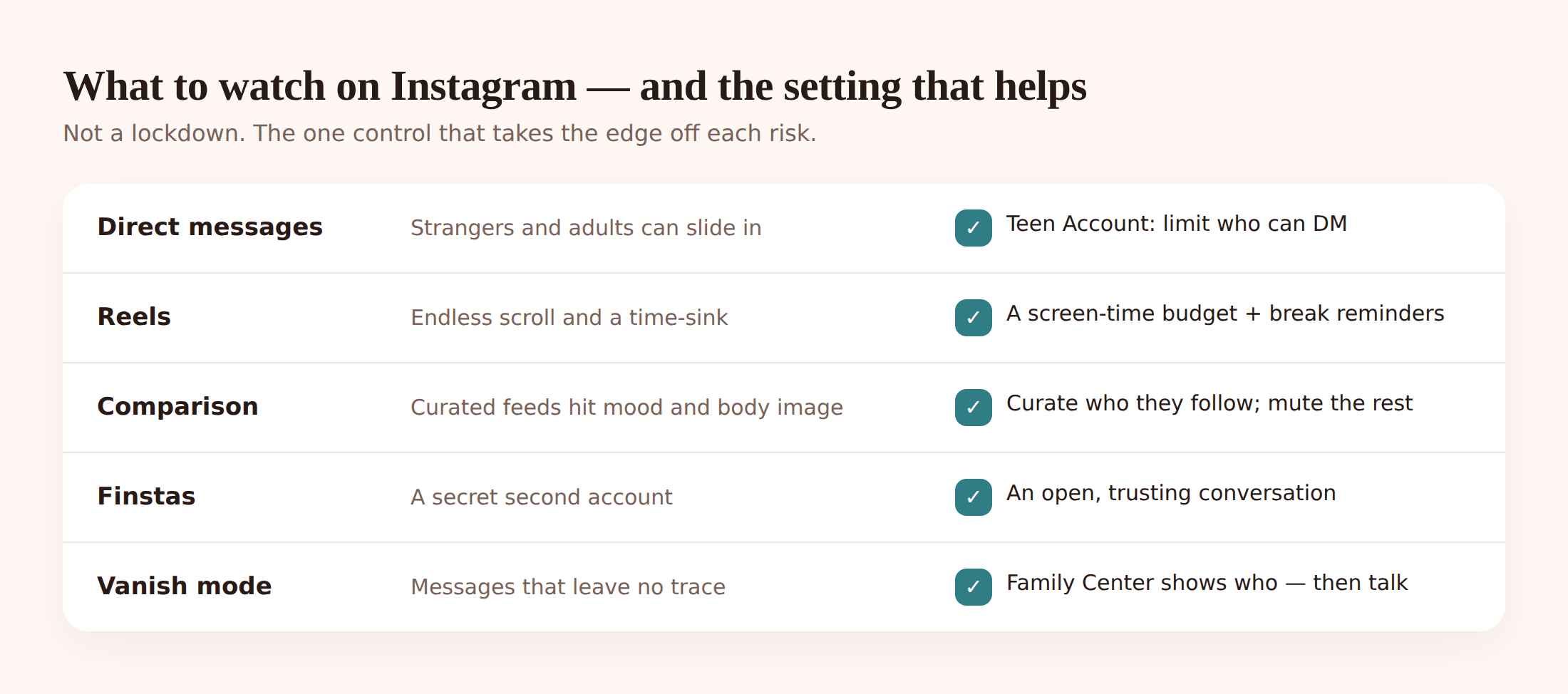
DMs from strangers and adults. The single most serious one. An open account can be messaged by anyone, and adults do contact children this way — sometimes posing as a peer, warming up slowly, moving to another app once trust is built. This is the risk that a private account and messaging limits exist to shut down.
The Reels rabbit hole. Reels is engineered to hold attention. “Ten minutes” becomes an hour without anyone deciding it should. Beyond lost time, the feed learns fast — watch a few videos on one anxious topic and it serves more of the same. For a young teen that pull is strong and the off-ramp is genuinely hard to find.
Comparison and body image. Instagram is a highlight reel presented as everyday life. Filtered faces, edited bodies, the best two seconds of someone’s holiday. Kids know it’s curated and it still lands. The research and, frankly, most parents’ own eyes point the same way: heavy scrolling of idealised images and body-image worry travel together, and it hits girls hardest.
Finstas — the secret second account. “Finsta” is fake-Instagram: a private throwaway account, often under a joke name, that a teen keeps for a small circle away from the main account parents and wider friends see. Not always sinister — sometimes it’s just where they’re silly. But it’s also where the account you approved isn’t the account they actually live on.
Vanish mode and disappearing messages. Inside DMs, vanish mode makes messages delete once seen. Stories disappear in a day. The design encourages “say it, it’s gone” — which lowers the bar for things said in the heat of the moment and means there’s often no trace of a bad exchange afterwards.
Inappropriate content in the feed. Even without searching for it, suggested posts and Reels can surface violence, sexual content, self-harm material or hate. The algorithm doesn’t know your child is 12. Sensitive-content controls exist precisely because the default flow can drift somewhere you wouldn’t choose.
Follower pressure and the numbers game. Likes, follower counts, who commented, who left them on read. For some kids this becomes a running scoreboard of their own worth. It’s low-grade and constant, and it’s one of the quieter reasons a teenager can seem flat after an evening on their phone.
Age 13+, and Instagram Teen Accounts
Instagram’s minimum age is 13. That’s not a safety rating — it’s a floor, and plenty of younger kids get on by entering a fake birth year. If your child is under 13, the honest answer is that they’re not meant to be there yet, and the account has none of the protections below because the app doesn’t know their real age. Setting up with a truthful birthday is the first safety step, boring as that sounds.
For teens who are old enough, Instagram now rolls under-16s into Teen Accounts, a bundle of protections switched on by default. Worth knowing what you actually get:
- Private by default. New teen accounts start private, so only approved followers see posts.
- Messaging limits. Teens can only be messaged by people they already follow or are connected to — strangers can’t slide into DMs.
- Sensitive-content set to the strictest level. Less edgy, borderline stuff surfaced in Explore and Reels.
- Time and sleep nudges. A reminder to close the app after a set period, and quieter notifications overnight.
- Under-16 changes need a parent. Loosening several of these settings requires parental permission through Family Center.
Don’t assume it’s all on, though. Check it. Open the child’s profile, go to the menu, and look for the Teen Account or account-status section — it’ll show whether the account is registered as a teen and which protections are active. If the birth year is wrong, the whole thing is switched off, and that’s the first thing to fix.
The settings that actually help
This is the part to do with the phone in your hands. None of it takes long. Work through it in one sitting.
Link Family Center (Supervision). This is Instagram’s parental tool, and it’s the backbone of the rest.
- On your own phone, open Instagram and go to Settings and privacy → Family Center.
- Tap Create invite (or Add a teen) and send your child the link.
- They accept from their account, and the two are linked.
- Once connected you can see how long they spend in the app, set daily time limits and break reminders, and get notified when they change key safety settings or report someone.
Family Center shows you who they follow and who follows them and lets you set time limits — it doesn’t let you read their DMs. That’s deliberate on Instagram’s part, and it’s the honest boundary of what any Supervision tool does.
Set the account to private. If Teen Account didn’t already, do it manually: their profile → menu → Settings and privacy → Account privacy → Private account, on. Now new followers need approval.
- Who can message and add to groups: Settings → Messages and story replies → set message controls so only people they follow can DM them.
- Tags and mentions: Settings → Tags and mentions → limit who can tag or @mention them to “people you follow.”
- Hidden Words: Settings → Hidden Words → turn on the filter for offensive comments and message requests, and add any words or names you want auto-hidden.
- Sensitive Content Control: Settings → Sensitive Content Control → set to Less (the strictest option) so Explore and Reels surface less borderline content.
- Close Friends: show your child the Close Friends list for Stories — a smaller circle for anything more personal, instead of the whole follower list.
- Reels and time: use the daily time limit and the “take a break” reminders in Family Center, and turn on Instagram’s own Time spent nudges.
That combination — private, followers-only DMs, strict sensitive content, hidden words, a time limit — closes off most of the risks in the section above. It won’t make a follower’s cruel comment kind or stop a bad day, but it removes the stranger-contact and worst-content pathways, which is the heavy lifting.
Where open phone monitoring fits (and where it can’t)
Instagram’s own controls cover Instagram. A tool like FreePhoneSpy sits one level up, on the child’s Android phone, and covers the whole device — every app, not just this one. It’s a web-panel product: one app on the child’s Android phone, a 6-digit code, and you check in from any browser. It’s transparent by design — your child sees it’s there, and nothing is monitored until you set it up together. (On an iPhone, this is Apple’s Screen Time and Family Sharing instead; there’s no child app to install.)
Here’s what it genuinely adds, and — just as important — what it doesn’t.
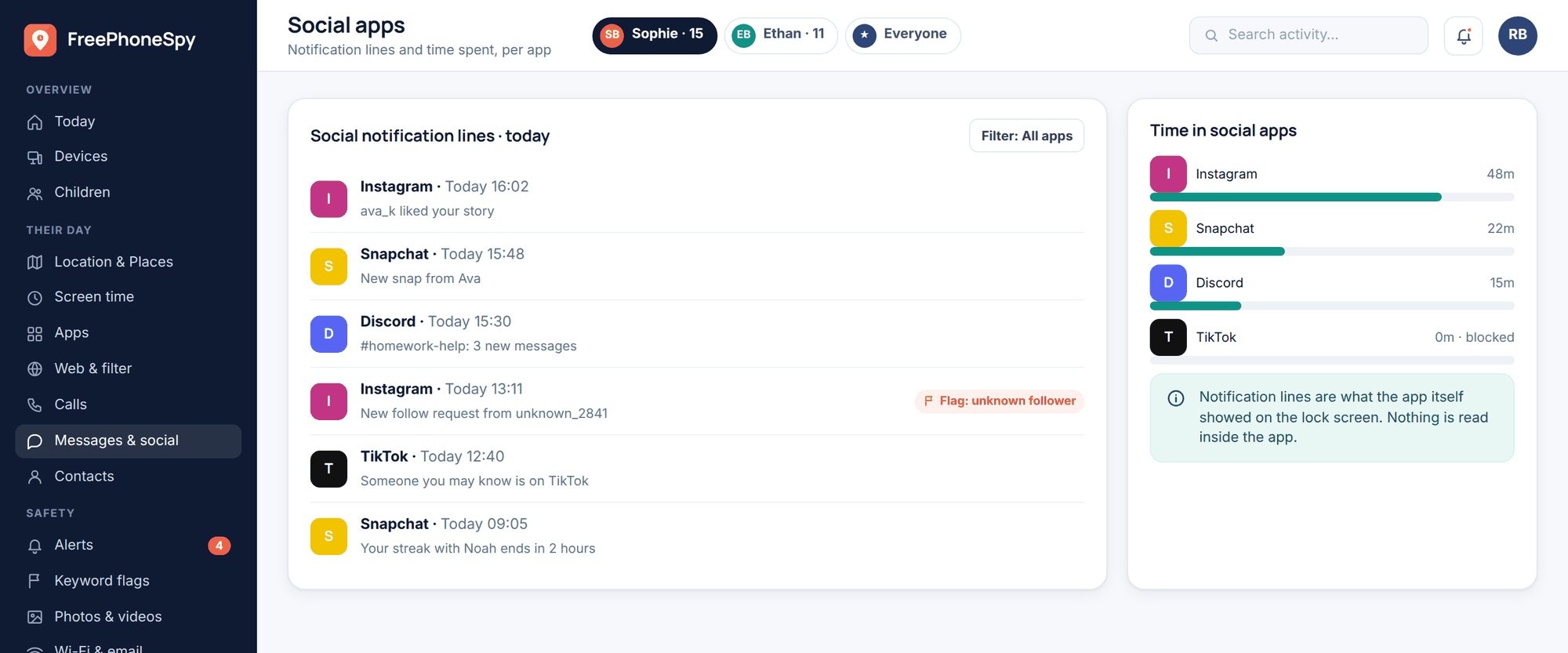
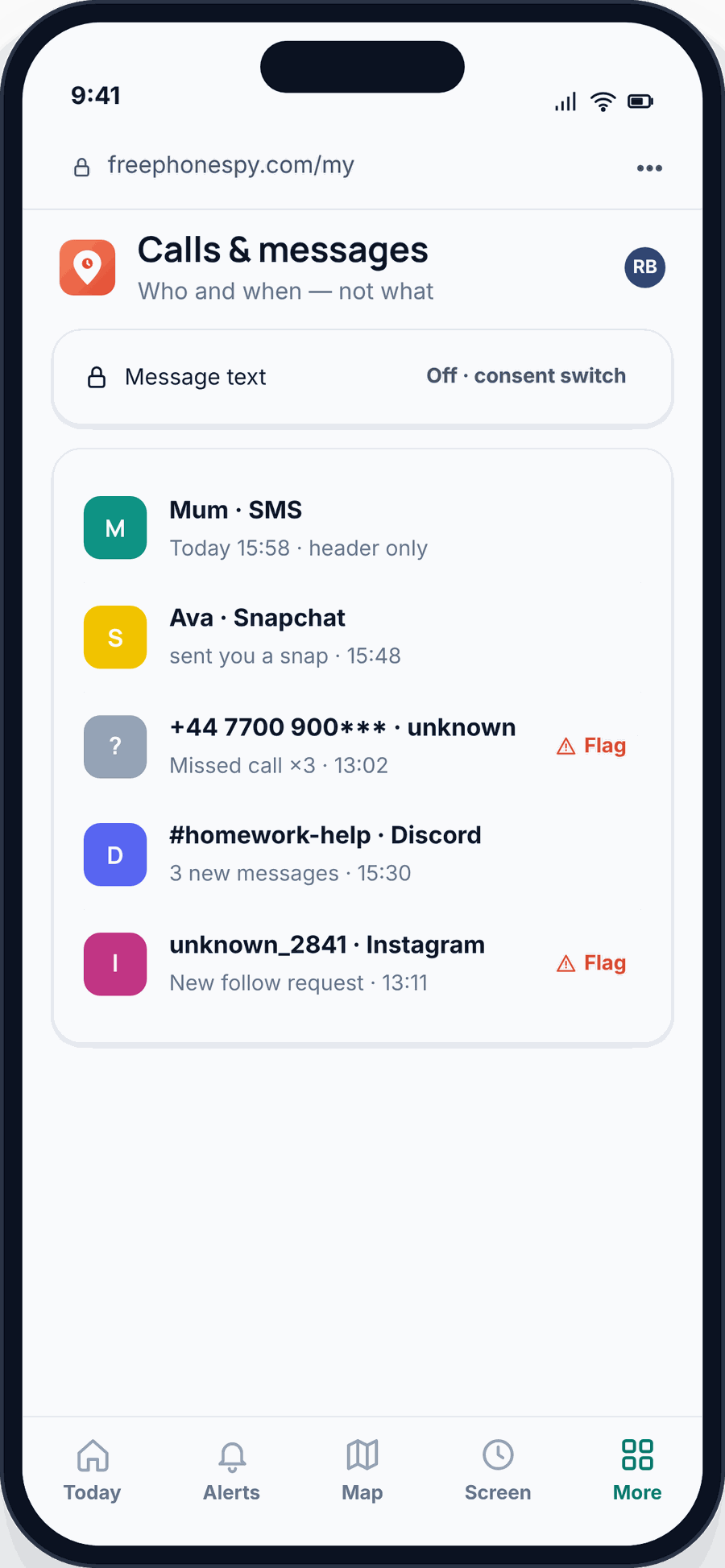
Messages & Social. You see social message headers and the notification lines Instagram itself generates — who’s active, when, roughly how much. Message bodies stay private unless you and your child turn on the consent switch together. This is a deliberate design choice, not a limitation to route around.
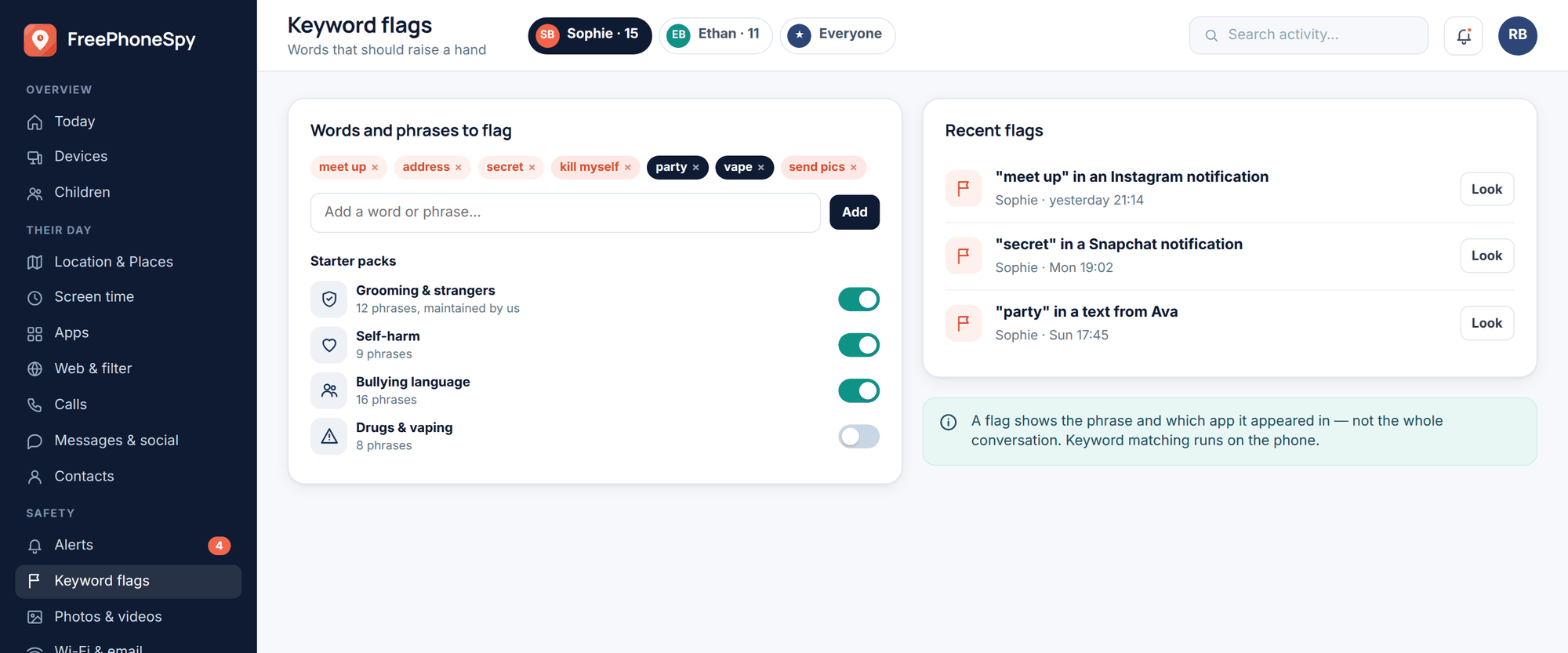
Keyword alerts. Set words that matter — a stranger’s pushiness, self-harm language, bullying terms, “don’t tell your mum” — and get an alert if they show up. It’s a tripwire for the stuff you’d want to know about, not a running read of every chat. More on how that works on keyword alerts.
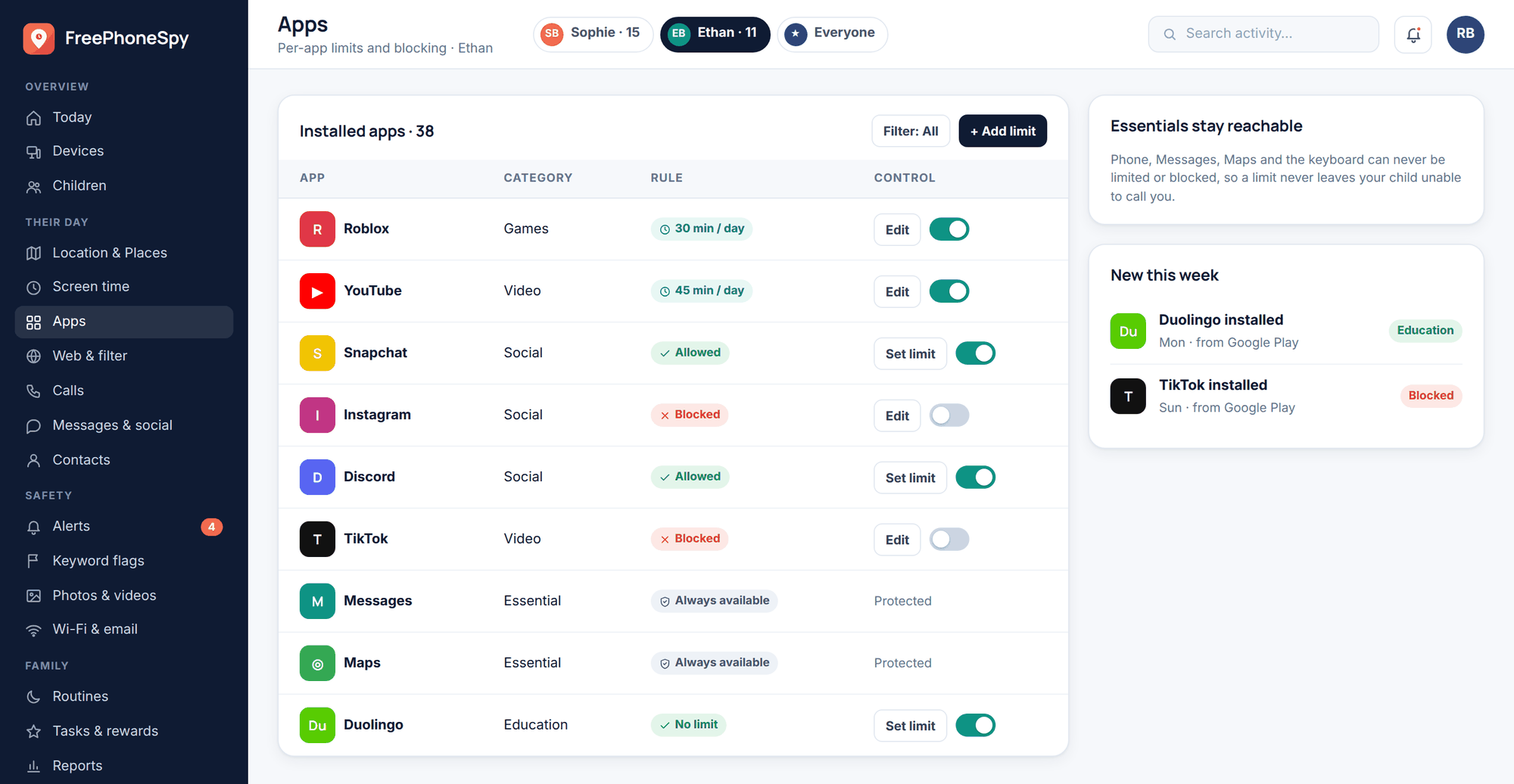
Screen time and app limits. This is where phone-level monitoring beats in-app timers. Instagram’s own break reminders are easy to dismiss. A device-level daily cap on the app — set together, agreed out loud — actually holds. If Reels is eating the evening, this is the lever.
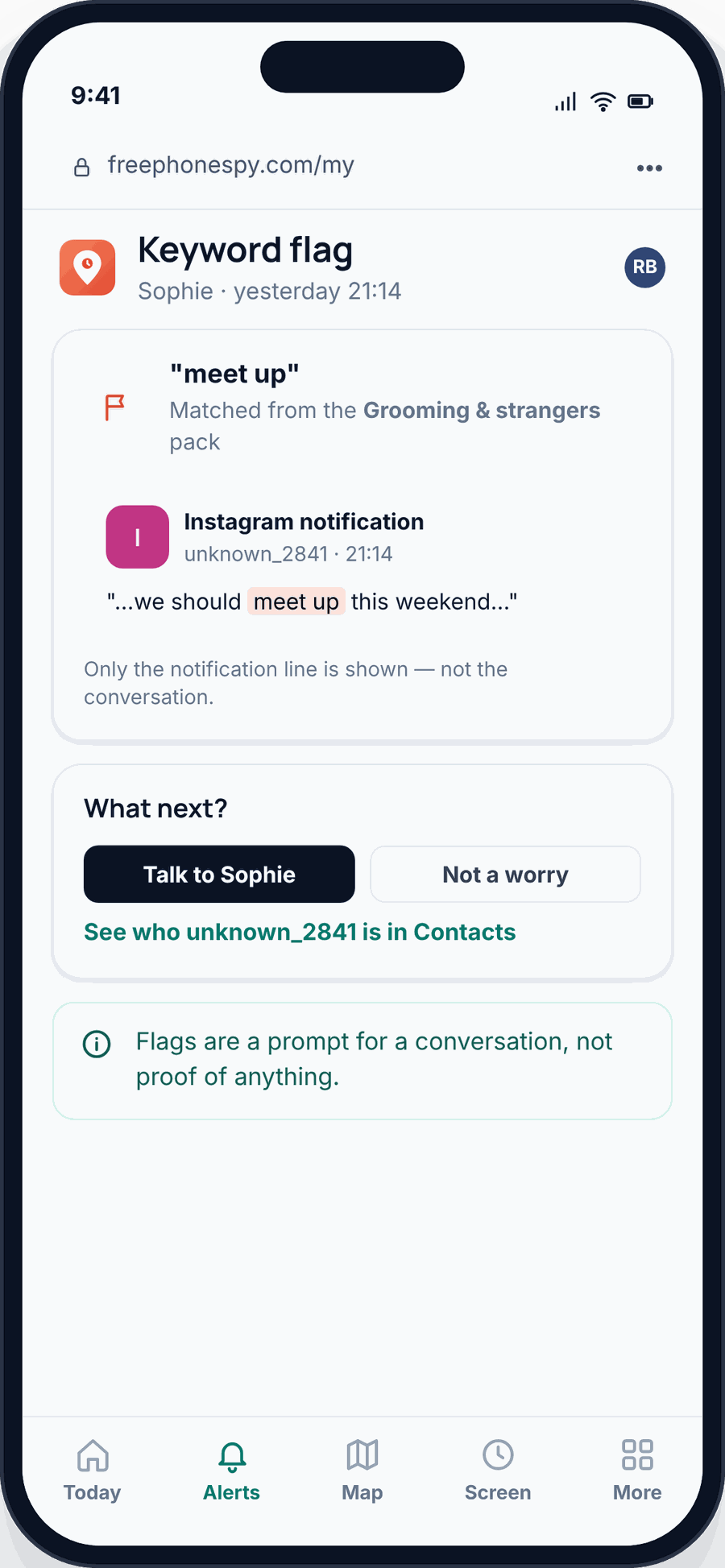
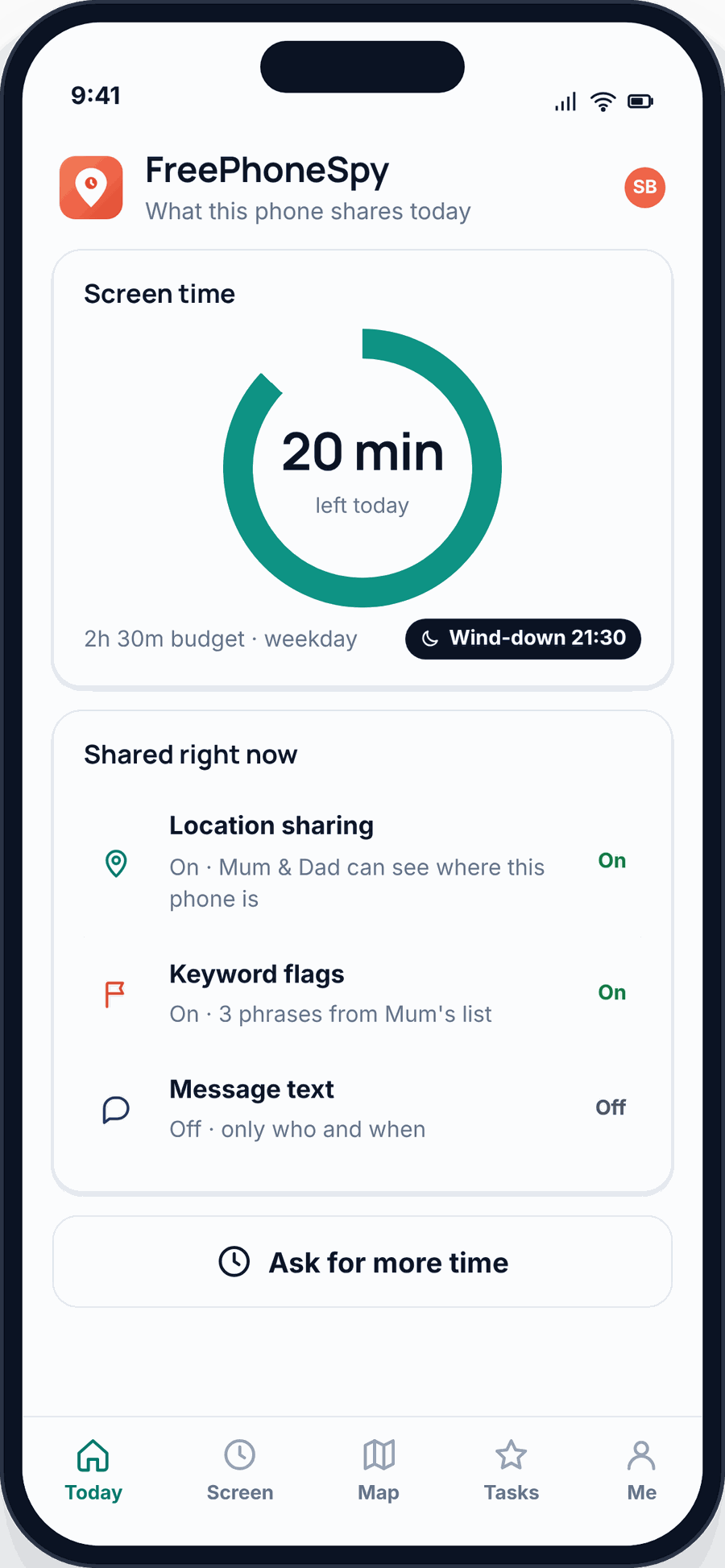
The honest limit: you cannot read inside your child’s Instagram DMs — not with FreePhoneSpy, not with any legitimate tool. Instagram encrypts them and Supervision doesn’t expose them. Anyone selling you “read their secret DMs” is selling covert spyware, which is a different and worse thing. Monitor at the phone level, keep the alerts running, and treat the actual conversation as your main tool. There isn’t a shortcut around talking.
That’s the honest shape of it. Phone-level monitoring gives you time data, a contact overview, and a safety-net alert. It doesn’t give you a transcript, and it shouldn’t. If you want the fuller reasoning on why open beats covert, we lay it out in monitoring vs spying.
Finstas, comparison, and a healthy following list
Settings are the floor. The conversations are what actually keep a kid safe, because they’re what’s running when you’re not in the room.
Spotting a finsta. You usually can’t find one by searching — it’s private and oddly named. The signs are behavioural: a second login on the phone, quick app-switching when you walk in, a follower or following count that doesn’t match the account you know. The move isn’t to hunt it down and bust it. It’s to ask, without heat: “Have you got another account? Loads of people do. I just want to know it’s a safe one.” A finsta discovered by ambush teaches them to hide better. One talked about openly can just… be a normal account you also know exists.
The comparison conversation. Don’t lecture that “it’s all fake” — they’ve heard it and it doesn’t stick. Make it concrete instead. Look at a post together and ask how many tries and edits they think it took. Follow a few accounts that are honest about editing. Notice out loud when you catch yourself comparing, because you do it too. The goal is a running scepticism they own, not a rule they nod at.
A healthy following list. Sit down together and actually scroll who they follow. Not to police it — to prune it. Which accounts leave you feeling rubbish? Unfollow those. Which are you following out of habit, or because a stranger followed first? The feed is only as good as the follows, and a fifteen-minute clear-out changes what the algorithm feeds them for weeks. It’s the most useful half hour you can spend on this, and it’s the opposite of confrontation.
All of this is the same muscle you use for every platform. If Sophie’s also on Snapchat or TikTok, the pattern carries over — see is Snapchat safe for kids? and is TikTok safe for kids? for the platform-specific bits. And when things do go wrong between kids, our cyberbullying guide for parents is the one to have ready. The wider frame lives in social media safety for kids.
FAQ
What age is Instagram actually safe for?
The minimum is 13, and that’s a legal floor, not a green light. Below 13 there are no age protections at all, because the app doesn’t know the child’s real age. Even at 13, “safe” depends entirely on it being set up as a Teen Account with a truthful birthday, private, and supervised. A 13-year-old on a locked-down, linked account is in a very different place from one on an open account with a fake birth year.
Can I read my child’s Instagram DMs?
No — and be wary of anyone claiming otherwise. Instagram doesn’t expose DM contents to parents through Family Center, and they’re encrypted on the phone. Legitimate monitoring shows you screen time, contact patterns and keyword alerts at the phone level. Reading private messages means covert spyware, which is a bigger risk to your child than most of what you’re worried about. Talk instead.
My child says everyone’s account is public — should I insist on private?
Yes, and for an under-16 Teen Account it’s usually private by default anyway. Private doesn’t cut them off from friends; approved followers still see everything. What it removes is strangers and adults being able to message and view them cold. That’s a clear win for a small social cost, and it’s worth holding the line on.
How much time on Instagram is too much?
There’s no magic number, but watch the effect rather than the clock. If they come off Reels flat, snappy or restless, that’s your signal, more than any minute count. A device-level daily limit on the app, agreed together through screen time controls, is more reliable than Instagram’s own dismissable reminders.
What’s a finsta and should I be worried?
A finsta is a secret second account, usually private and jokily named, kept for a smaller circle. Often it’s harmless — just where they’re less polished. The worry isn’t the account, it’s the hiding. Ask about it openly rather than hunting it down; a second account you know about and can talk about is fine, one built to evade you is the actual problem.
Do the Teen Account protections mean I don’t need to do anything?
No. They’re a strong default, but check they’re actually on (the birth year has to be right), and they don’t replace linking Family Center, tidying the following list, or the conversations. Think of Teen Accounts as the seatbelt, not the whole of driving safely.