Is Snapchat Safe for Kids? A Parent’s Guide
Your 13-year-old wants Snapchat because everyone in her class is on it. You’ve heard the words “disappearing messages” and felt your stomach drop. So: is it safe? The honest answer is that it depends on the settings, your child, and whether the two of you can talk about it — and this guide gives you all three, plus the exact taps that make Snapchat much safer in about ten minutes.
What Snapchat actually is
Snapchat is a photo-and-video chat app. You take a picture, add a caption or a filter, and send it to a friend or a group. By default the picture disappears after they view it. There’s no long scrollable history like a text thread — the whole point is that it’s fast and temporary.
Kids love it for a few concrete reasons, and it helps to understand them before you judge the app:
- Streaks. Send a snap back and forth with the same friend every day and you build a “streak” with a little fire emoji and a number. Miss a day and it resets to zero. To a 14-year-old, a 200-day streak feels like a real friendship badge.
- Stories. Photos and clips you post for all your friends to see for 24 hours. It’s the running highlight reel of a teenager’s day.
- Quick, low-pressure chat. A blurry selfie with a caption feels more casual than a text. That’s why they’ll snap a friend twenty times when they’d never send twenty texts.
None of that is sinister on its own. Sophie Bennett, 15, mostly uses it to send daft photos to three friends she also sees at school. Her brother Ethan, 11, keeps asking for it. The app is the same for both of them; the difference is age, maturity, and settings — which is the whole ballgame.
The real risks, one by one
Snapchat isn’t dangerous because it exists. It’s risky because a handful of specific features can go wrong. Here’s each one, in plain terms.
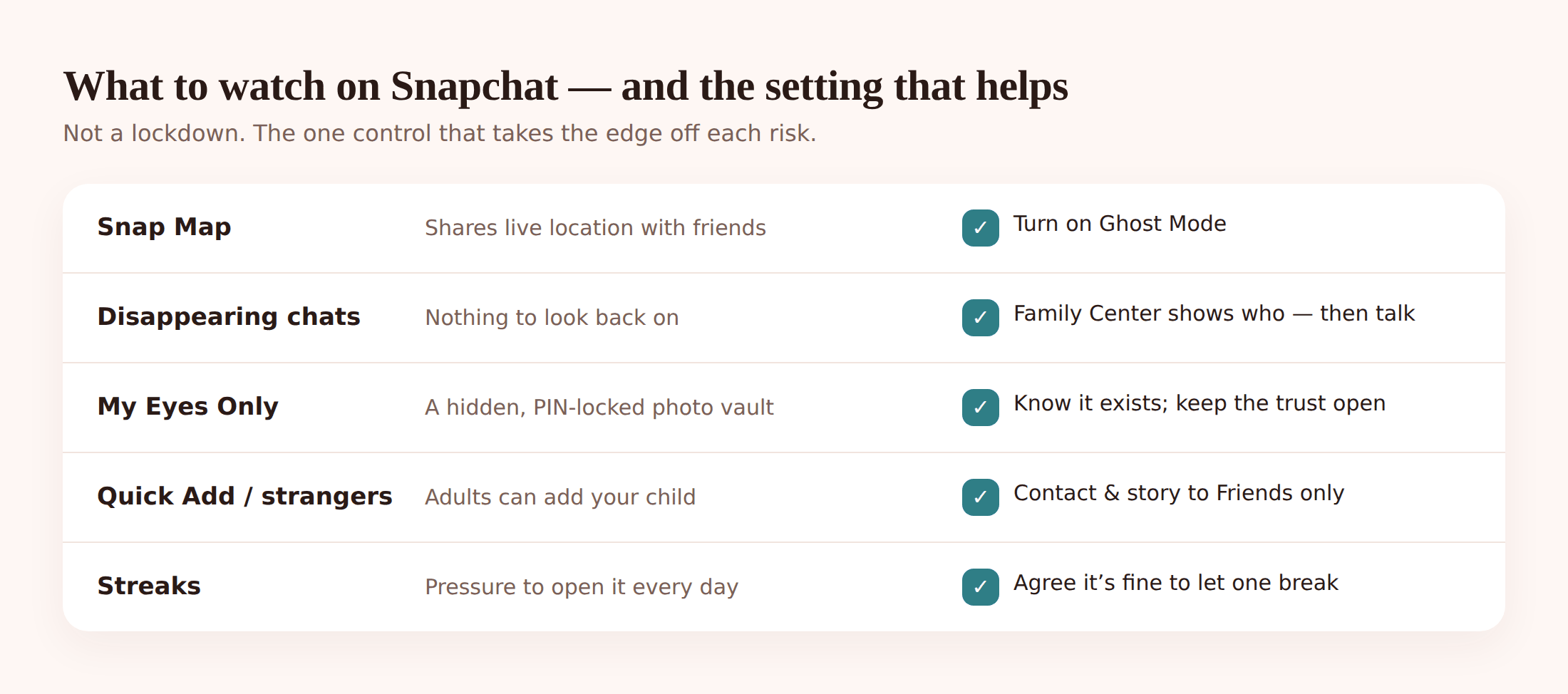
Snap Map. This is the big one. Snap Map shows your child’s exact location on a map to whoever they’ve allowed to see it. Not a town, not a rough area — the actual building. If your teen accepted a stranger as a friend, or left the map open, someone can watch where they are in real time. The fix is a mode called Ghost Mode, which we’ll turn on below. Snap Map is a location feature, so it also sits alongside how you’d think about location more broadly; if you use location tracking and arrive/leave alerts as a family, you already understand why a public live map is a problem.
Disappearing messages. By default, chats vanish after they’re read. That’s fine between two trusted friends. It’s a problem when something upsetting happens — a threat, a nasty photo, grooming — because there’s nothing left to show a parent or a teacher afterward. Your child can’t screenshot fast enough, and often won’t think to.
My Eyes Only. Snapchat has a private, password-locked vault inside the app called My Eyes Only. Anything saved there is hidden behind a passcode you don’t have. It exists for legitimate privacy, but it’s also exactly where a teenager would hide images they know they shouldn’t have. You can’t see inside it, and no monitoring tool can either.
Strangers, Quick Add and Snapchat+. Quick Add suggests people to add based on mutual friends. It’s how a child’s friend list quietly fills up with people they’ve never actually met. Snapchat+ (the paid tier) adds features some kids chase for status. The risk isn’t the subscription — it’s that an open, growing friend list is how strangers get in. Turn Quick Add off and lock down who can contact your child, and most of this problem disappears.
Discover content. The Discover tab is Snapchat’s built-in feed of publisher content — and a lot of it is aimed at adults. Clickbait, sexualised thumbnails, articles no 11-year-old needs. It’s not something your child sought out; it’s just there when they open the app.
Streak pressure and anxiety. Streaks sound trivial until you see a kid hand their phone to a friend on holiday so the streak doesn’t die. It creates a low, constant obligation to be online. For some children it tips into real anxiety about letting people down.
If any of these risks are already in play, our guide on protecting kids from online predators goes deeper on the warning signs, and the cyberbullying parents’ guide covers the group-chat side of things.
Is your child old enough?
Snapchat’s official minimum age is 13. That’s not a maturity assessment — it’s mostly about data-protection law. A child can lie about their birthday in about four seconds, so the “13+” label protects Snapchat more than it protects your kid.
The more useful question is whether your child is ready. A 13-year-old who tells you when something feels off, who’ll show you a weird message instead of hiding it, is in a very different position from one who goes quiet and defensive. Ethan at 11 is below the line on both count and readiness, and “everyone has it” isn’t a reason — plenty of his classmates’ parents are having the exact same standoff. Sophie at 15 is a reasonable candidate, with the settings below in place and an honest agreement about how she uses it.
There’s no universal right age. There’s the age at which this particular child can handle this particular app with your support. For a wider view across TikTok, Instagram and the rest, our social media safety for kids guide is the companion piece to this one.
The settings that actually help
This is the part that changes the risk the most, and it takes about ten minutes together. Do it on your child’s phone, with them watching, so they know what changed and why.
Lock down Snapchat in ten minutes
- Turn on Ghost Mode. Open the Map (pinch the camera screen), tap the settings cog, and set location sharing to Ghost Mode. Now no one can see where your child is. This is the single most important setting.
- Set up Family Center. In Settings, find Family Center and send an invite from your account to your teen’s. Once they accept, you can see who they’ve been chatting with and who their friends are — not the content of messages. It’s a friend-list view, not a message reader, and it’s designed to be visible to your teen too.
- “Contact Me” to Friends only. In Settings under Privacy Controls, set “Contact Me” so only friends can message your child. Strangers can’t slide into the chat.
- “View My Story” to Friends only. Same section — make sure stories only go to accepted friends, not “Everyone”.
- Remove Quick Add. In Privacy Controls, turn off “Show me in Quick Add”. This stops your child being suggested to strangers, and slows down the friend-list creep.
- Turn off location permission at the phone level. In Android Settings, App permissions, set Snapchat’s location to “Deny” or “Only while using”. Belt and braces on top of Ghost Mode.
Those six changes handle Snap Map, strangers, and public stories in one sitting. Family Center is the one to lean on: it’s Snapchat’s own parental tool, it’s honest about showing who your teen talks to without pretending to reveal message content, and because your teen can see it exists, it doesn’t feel like snooping.
Where open phone-level monitoring fits
Settings are the foundation. Some parents also want a bit more awareness of what’s happening on the phone overall — not to read every message, but to catch the moments that matter. That’s where a tool like FreePhoneSpy fits, and it’s important to be straight about what it can and can’t do.
FreePhoneSpy runs on your child’s Android phone as one visible app, paired to your web panel with a 6-digit code. Your child can see it’s installed — it’s transparent by design, and nothing is monitored until you set it up together. Here’s the honest picture for Snapchat specifically.
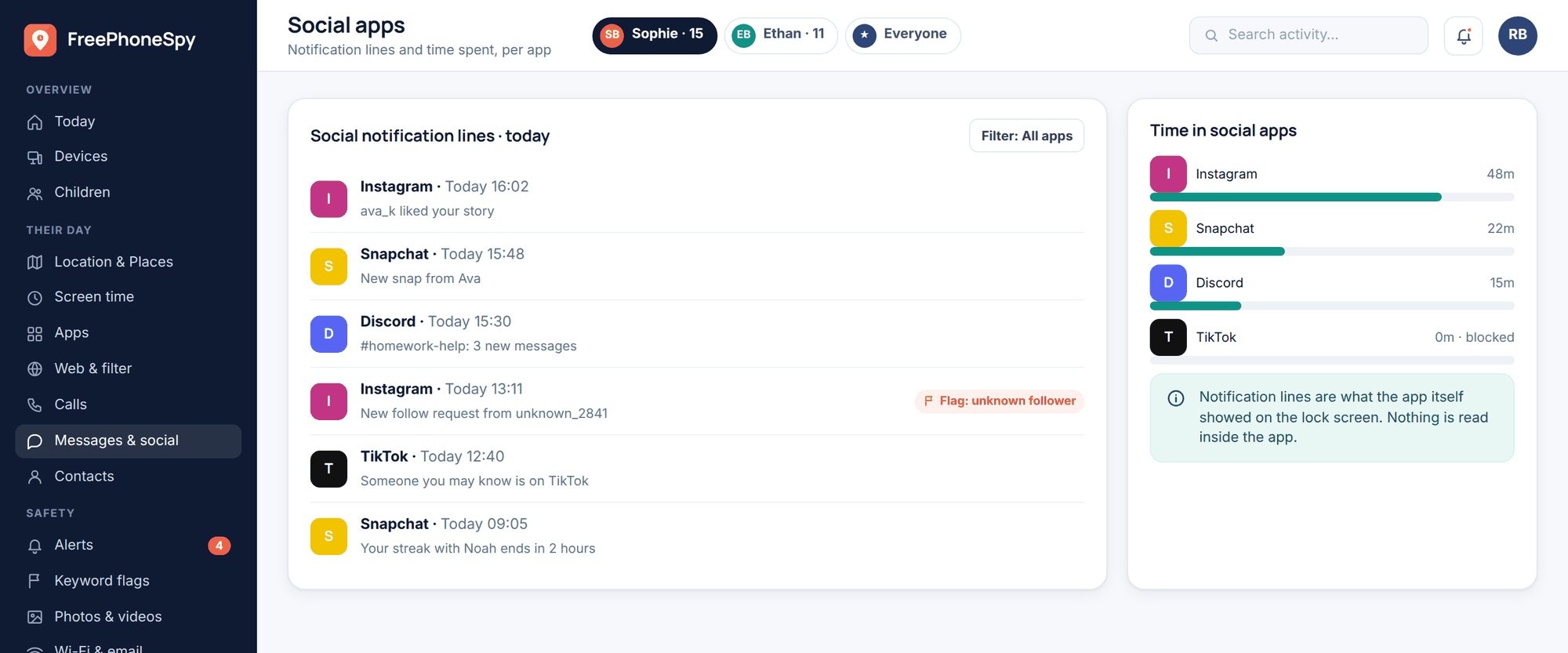
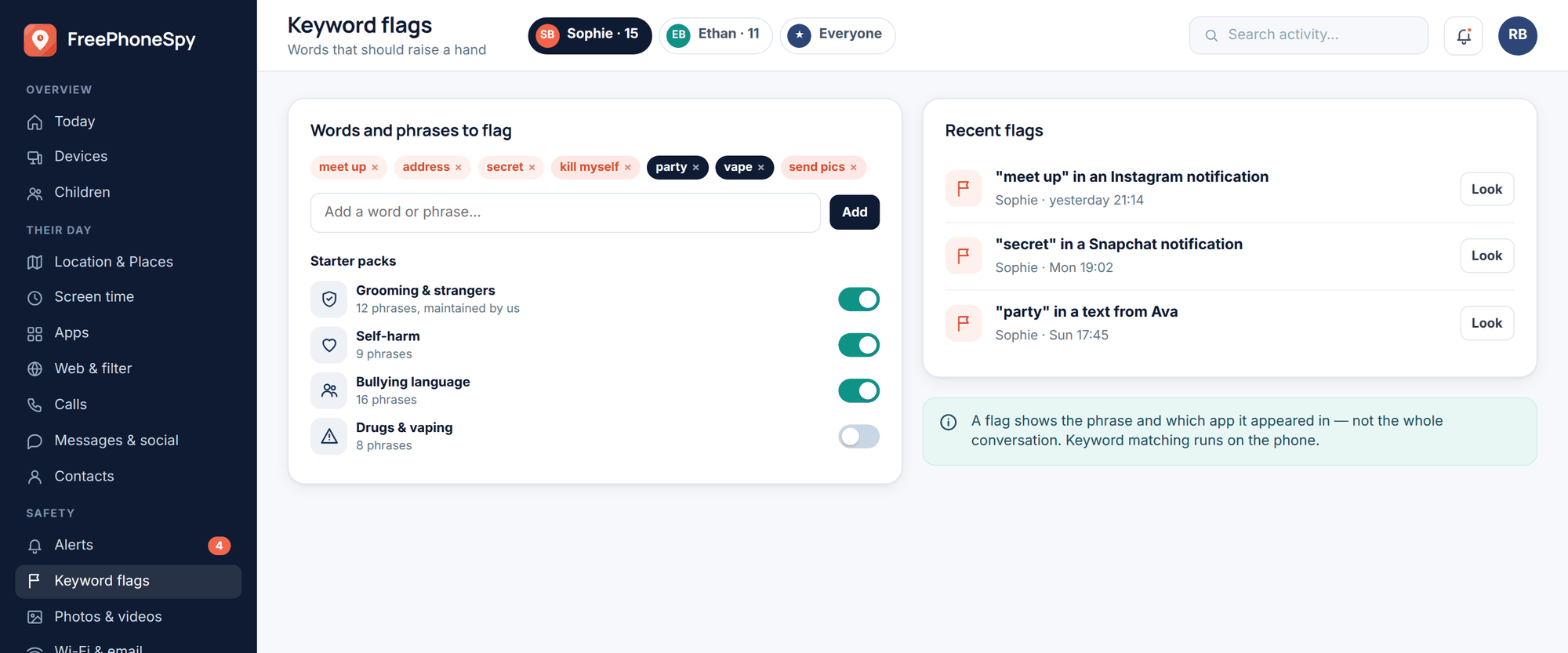
What you’ll see. Snapchat notification lines come through to your messages and social feed — the “who and when” of activity. Message headers (who, what time) are always available; the actual bodies only appear if you turn on an explicit consent switch, which is a deliberate choice you and your child make, not a default.
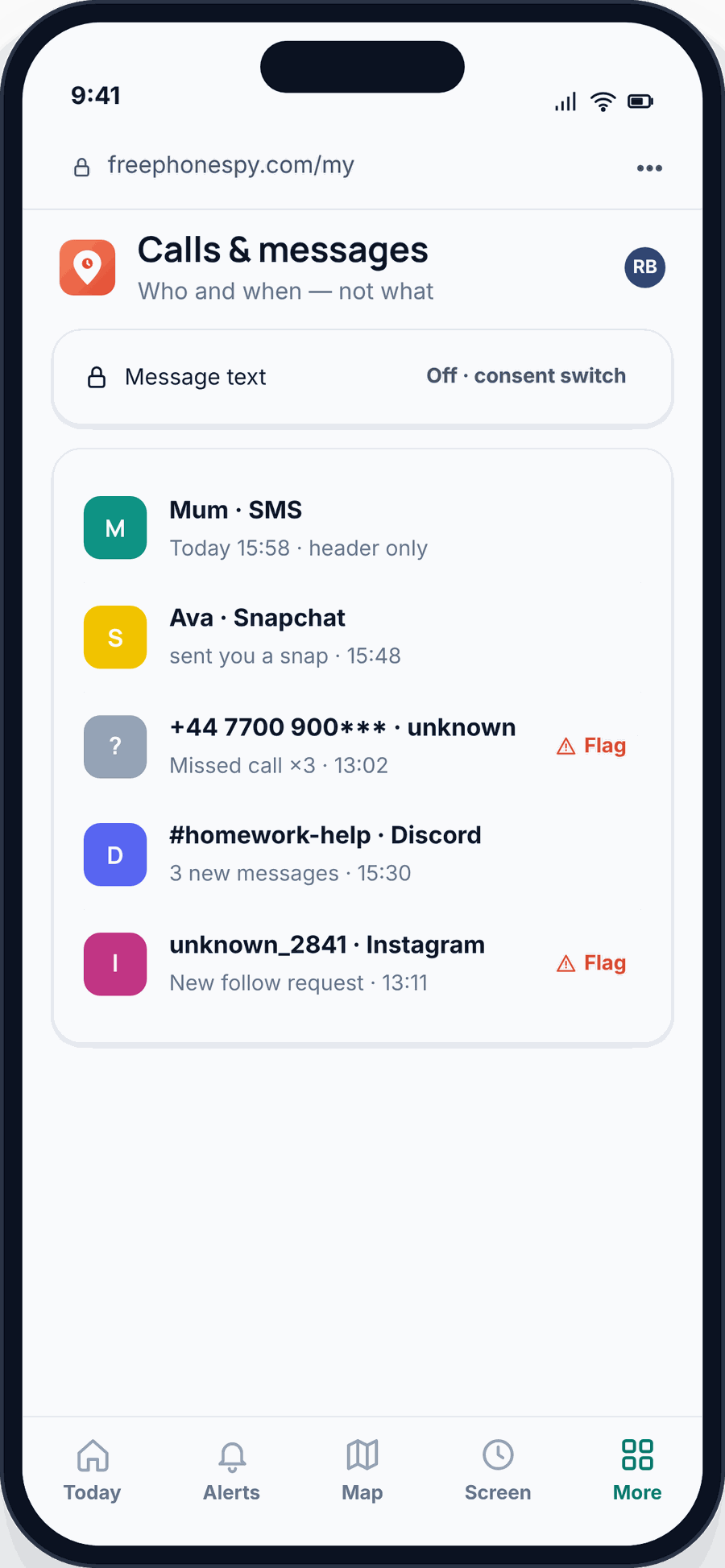
Keyword alerts. You can flag words that worry you — bullying language, drug references, anything about meeting up — and get an alert when they appear in notifications. Keyword alerts are how you find out about a problem without reading every line of everything. You set the list; you get pinged only when something on it shows up.
Location and Places. Because Snap Map is a location feature, our Places and arrive/leave alerts are the parental counterpart — you know your teen got to school or reached a friend’s house, from a tool that’s meant to be shared, not a live public map anyone can watch.
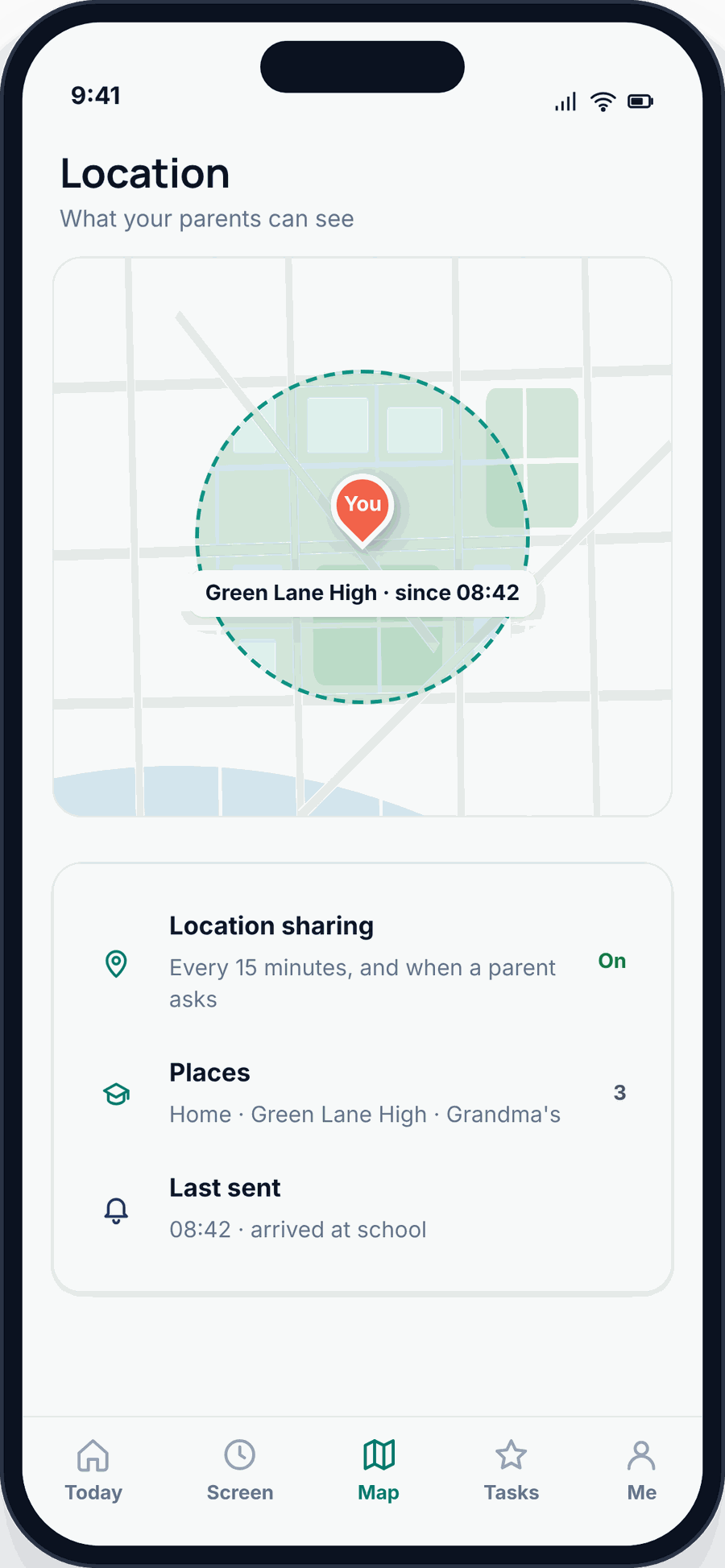
Screen time and blocking. App limits and blocking genuinely work. If Snapchat is eating bedtime, you can cap it or block it during set hours. That’s a concrete lever, and it’s often more useful than any message-reading would be.
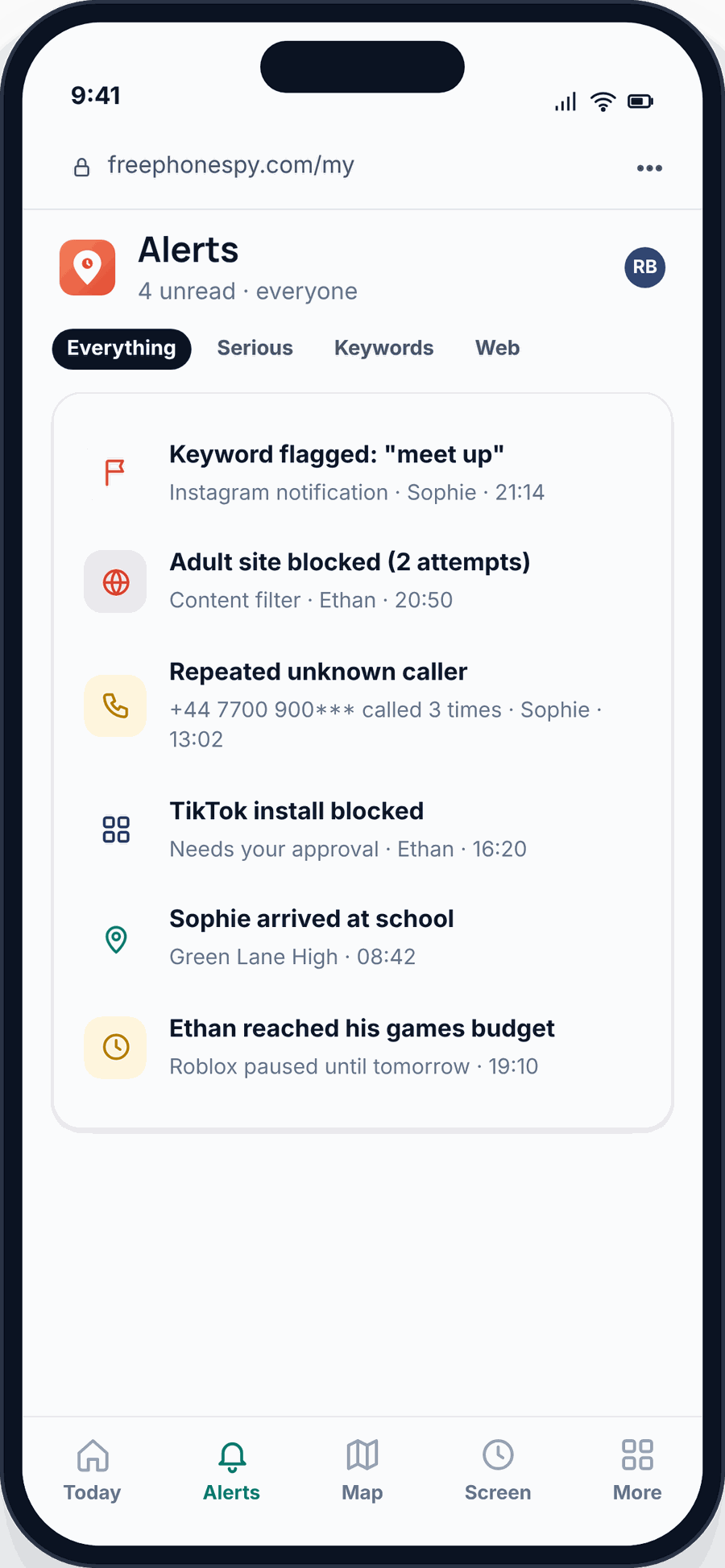
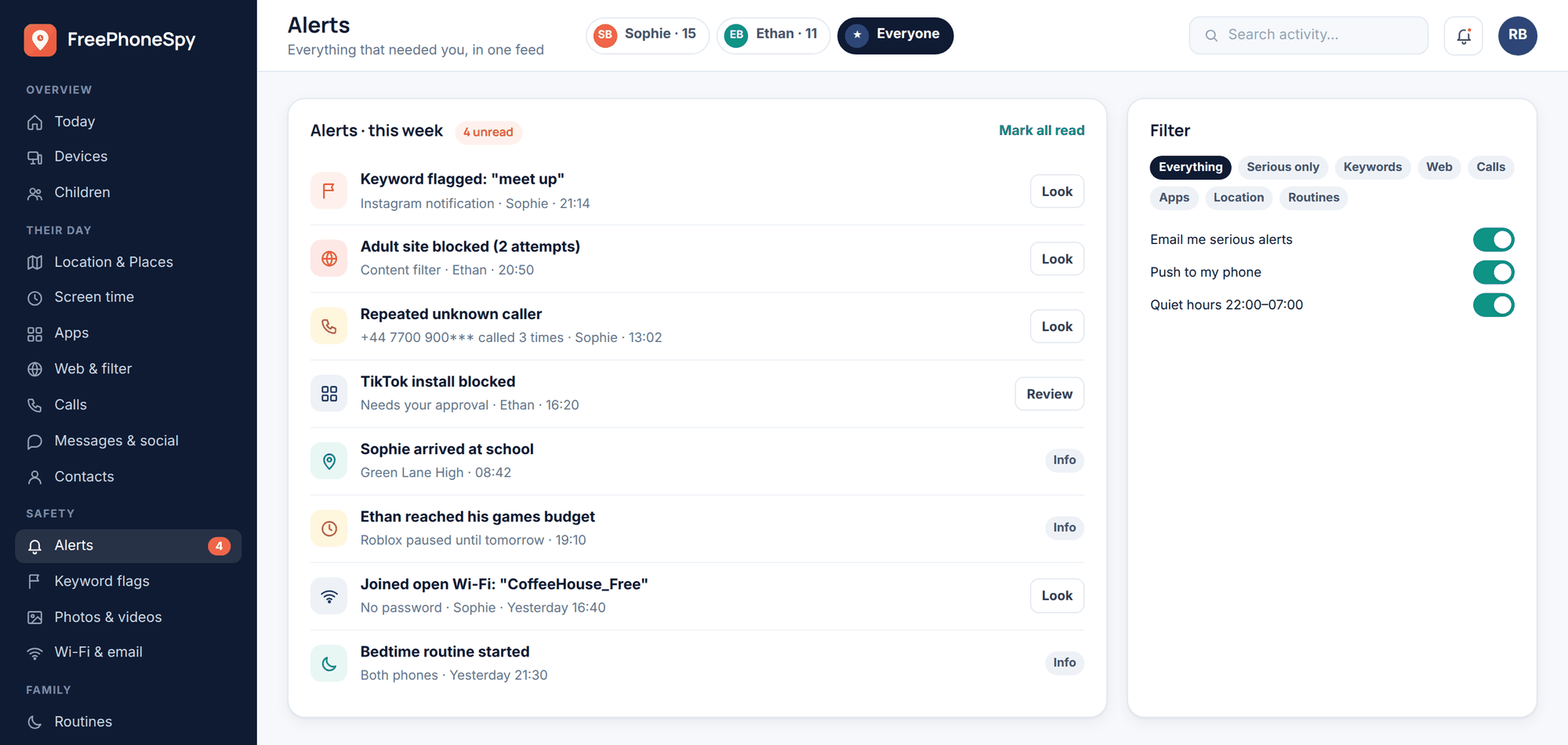
If you’re weighing all this up, it’s worth being clear-eyed about the difference between supporting your child and surveilling them — our piece on monitoring vs spying lays out where the line sits and why the consented, visible approach is the one that actually works.
The conversation to have
Settings and tools buy you a safer starting point. The thing that keeps your child safe over months and years is that they’ll come to you when something’s wrong. That only happens if you’ve built the habit before anything goes wrong.
You don’t need a speech. You need a few clear, calm agreements:
- “Tell me if an adult adds you.” Make this a flat rule with no drama attached. Not “you’re in trouble”, just “show me and we’ll sort it”. A child who’s scared of your reaction won’t tell you.
- “You won’t be in trouble for coming to me.” Say it out loud, more than once. The scammers and bullies rely on kids being too ashamed to speak up. Take that weapon away from them.
- Agree the settings together. Ghost Mode stays on. Friends-only stays on. If they want to change something, they ask first. Because they helped set it up, it feels like a shared deal, not a punishment.
- Agree the hours. Phones out of the bedroom overnight, or Snapchat capped after a certain time. Decide it together and it’ll stick better.
- Check in, don’t interrogate. “Anything weird on Snap lately?” every so often beats a monthly inspection. You’re aiming for a relationship where they’d mention the odd thing without being asked.
Sophie’s parents didn’t ban the app. They turned on Ghost Mode and Family Center together, set a bedtime limit, and told her plainly what to do if a stranger showed up. That combination — sensible settings, light-touch awareness, and an open door — is what “safe” actually looks like. Not a locked-down phone. A kid who talks to you.
FAQ
Can I read my child’s Snapchat messages? Not the disappearing, end-to-end content — no tool can, and you should distrust any that claims otherwise. What you can do openly: see notification lines and message headers, set keyword alerts, use Snapchat’s Family Center to see who they talk to, and manage screen time. The rest is conversation.
Is Snap Map really that dangerous? It can be, because it shows an exact live location to whoever your child has allowed. Turn on Ghost Mode and it shows your child to no one. That single setting removes most of the risk.
What is My Eyes Only and can I see inside it? It’s a password-locked vault inside Snapchat for hiding saved photos. No, you can’t see inside it, and neither can any monitoring app. If you’re worried about what your teen is hiding, that’s a signal to talk, not to hunt for a technical workaround.
What age should a child get Snapchat? Officially 13, but that’s a legal line, not a maturity one. The better test is whether your child will tell you when something’s off. With Ghost Mode, Family Center, friends-only settings and an honest agreement in place, mid-teens is a reasonable starting point for most.
Does FreePhoneSpy work on an iPhone? The child app is Android only. If your child has an iPhone, use Apple’s Screen Time and Family Sharing for limits and location, and lean on Snapchat’s own Family Center for the who-they-talk-to view.
Do I have to hide the app from my child? No — and please don’t. FreePhoneSpy is visible on the phone on purpose, nothing is monitored until you set it up together, and message bodies only appear behind a consent switch. The open approach is the one that keeps trust intact.