How to Monitor WhatsApp and Messaging Apps Safely (With Consent)
Somewhere in your child’s phone, right now, is a chat app you can’t see into. Maybe several. WhatsApp, Snapchat, a Discord server you’ve never heard of. The messages are encrypted, they can be set to disappear, and the honest truth is that no app and no tool can hand you a reliable transcript of what was said inside them. That fact frightens a lot of parents into reaching for something that promises to break through it. This guide takes the opposite turn. It’s about keeping your child genuinely safe on messaging apps — openly, with their knowledge, using the visibility you can honestly have and the relationship that matters more than any of it. The first rule holds throughout: never in secret.
Why chat apps worry parents
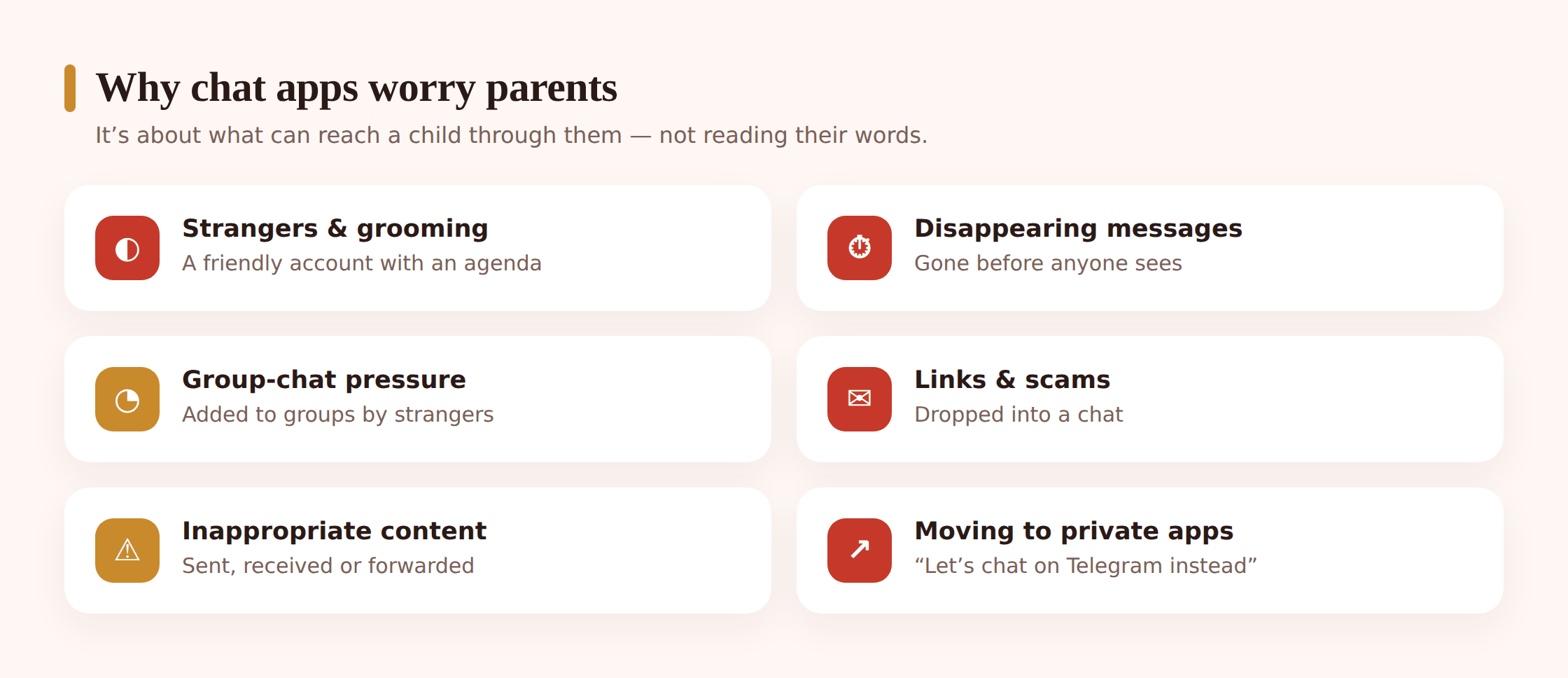
The unease isn’t really aimed at the apps. It’s aimed at what the apps let reach a child. A chat app is a doorway that opens in both directions: it keeps your kid close to the friends they love, and it lets the rest of the world stroll straight up to them — in their bedroom, after lights-out, with no grown-up standing in the corridor. Naming the specific risks helps, because a vague dread is harder to act on than a clear one.
- Strangers and grooming. An adult who joins a group, drops into a DM, or opens with a “wrong number” and heats it up quickly. Grooming takes its time — compliments, secrecy, little presents, “keep this between us,” a request that ratchets up so gradually the child never spots the line being stepped over.
- Disappearing messages. Snapchat built its whole reputation on messages that vanish, and WhatsApp, Instagram and Telegram all offer versions of it now. It can make a child feel a message is consequence-free, and it means genuinely harmful content can arrive and be gone before anyone else sees it.
- Group-chat pressure. The class group, the friend circle, the server. Meanness spreads easily inside them, someone is forever being frozen out or ganged up on, and the tempo can be brutal — a mob that trails a kid all the way home and refuses to quit.
- Links and scams. Bogus prize links, “your account has been locked” warnings, sketchy downloads shared through a group. Children tap, children believe, and they surrender information a more suspicious adult never would.
- Explicit material. Photos and links that land in a chat uninvited, get forwarded around, or that a child is nudged into sending on — occasionally from a stranger, often from a face they recognise.
It’s worth reading the platforms in their own right, too. We’ve looked closely at whether WhatsApp is safe for kids, and the same questions — who can add them, how disappearing messages work, what the reporting tools do — apply across most of the apps below.
The honest reality of encryption and privacy
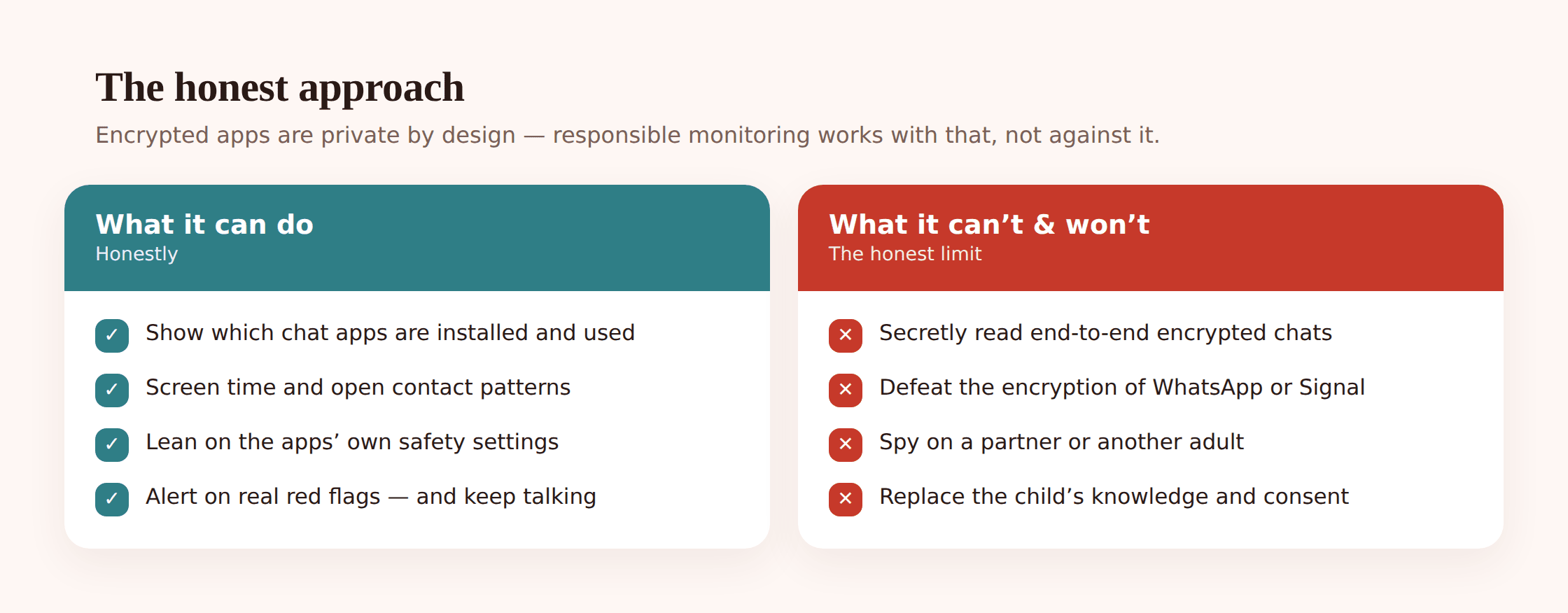
Here’s the part a lot of monitoring advice skips, and it’s the part that changes everything. WhatsApp and Signal are end-to-end encrypted by design. That means the message is scrambled on the sender’s phone and only unscrambled on the recipient’s — not WhatsApp, not your network, not any app installed on the side can read it in transit. Snapchat and Telegram add their own vanishing tricks on top. This isn’t a flaw to be defeated. It’s the same protection that keeps your own banking chats and private conversations safe, and it’s not going anywhere.
So let’s be plain about what that means. Any product that tells you it can secretly read your child’s WhatsApp messages, capture every Snap, or hand you a full log of encrypted conversations is either overpromising, cutting corners in ways that put the whole phone at risk, or lying. “Read all their WhatsApp messages secretly” is not the right goal and not a promise this guide — or any responsible tool — can make. Chasing it usually means installing sketchy software, breaking the phone’s security, and betraying your child, all to get something that still won’t work reliably.
What responsible monitoring actually does is narrower and more honest. It rests on your child’s knowledge and consent. It uses device-level visibility — which chat apps are installed and used, how much screen time each gets, roughly who’s in the contacts — rather than the contents of private chats. It leans on the platforms’ own safety features, which are genuinely good and built for exactly this. It sets up alerts for real dangers where the tools allow. And above all, it depends on an open relationship, because that reaches into encrypted, disappearing apps in a way no piece of software ever will.
Young kids vs teens: two different jobs
Hand a chat app to a nine-year-old and then to a fifteen-year-old and you’re dealing with two almost unrelated creatures, so the sensible plan forks in two directions. The younger one needs a fenced, supervised setup. The teenager needs privacy with a safety net. Force the teenage plan onto a small child and you leave holes; force the small-child plan onto a teenager and you shred the trust you’ll soon depend on.
Young children: co-set-up and supervised
For a first chat app on a younger child’s phone, you set it up together, side by side. Add only known contacts — real friends and family whose parents you could call. Turn the privacy settings up to their strictest so strangers can’t add or message them. Keep the phone charging in a shared space like the kitchen rather than living in a bedroom overnight, and keep the whole thing openly visible: your child knows you can see who they’re chatting with because you set it up in the open. At this stage none of that reads as spying; it’s a set of stabilisers, and few children take it as a breach of trust, because you’re visibly showing them how the app works.
Teens: privacy with a safety net
By this stage a teenager has earned genuine privacy in their chats, and reading through their conversations should have stopped being your habit. What’s still fair is a thin protective layer: check-ins you’ve agreed on, device-level visibility they’re aware of, alerts for real danger where the platform provides them, and a mutual expectation that they’ll flag anything that goes wrong. Just as important is teaching them the skills — how to block and report inside each app, how to recognise a grooming pattern or a scam link, and above all that they can bring anything to you without being punished for it. Sitting inside a competent teenager’s DMs and reading them top to bottom buys almost no safety and costs a great deal of trust; it also nudges them to shift the conversations that actually matter onto an app or a spare account you’ll never hear about.
No matter where your child falls on that line, the movement always heads one way: the more they earn, the more room you hand back. Say so plainly. A line like “This is how we run it for now, and once I watch you cope well on your own, I’ll step back” lands with kids, because it turns sound judgement into something that buys them freedom. It mirrors the same graduated approach we lay out in how to monitor text messages the right way — swap the app and the tools shift, but the underlying idea holds.
Use the apps’ own safety features
The most effective controls for messaging apps are the ones already built into them, and they’re free, honest and don’t require reading a single private word. Sit down with your child and set these up together on each app they use.
- Who can add or message them. Nearly every app lets you limit who can contact your child — “contacts only” for who can add them to groups on WhatsApp, “friends only” on Snapchat, closed servers on Discord. This one setting shuts most strangers out before they ever reach a chat.
- Privacy settings. Hide the profile photo, “last seen,” phone number and about-info from people outside their contacts. Less on show means less for a stranger to work with.
- Disappearing-message awareness. Talk about it rather than trying to defeat it. Make sure your child understands that “vanishing” doesn’t mean private — a screenshot, a second phone, or the other person simply remembering all outlast the timer. A message they wouldn’t send if it stayed forever isn’t safe just because it fades.
- Blocking and reporting. Show them where the block and report buttons live on each app, and make clear that using them is smart, not rude. A child who blocks a stranger without a second thought is far safer than one who worries about being polite.
Snapchat, Discord and Instagram also offer dedicated family or supervision tools that let you see who your teen is friends with or set some limits, openly and with their knowledge — worth turning on together where they exist. For the deeper picture on strangers and grooming specifically, our guide to protecting kids from online predators walks through how these approaches fit together.
Device-level visibility, done openly
Since you can’t and shouldn’t read the encrypted contents, what you can honestly have is a view of the phone at the device level — and that answers more worries than you’d expect. This is about the shape of things, not the substance of private chats, and it’s done with your child’s knowledge, never behind their back.

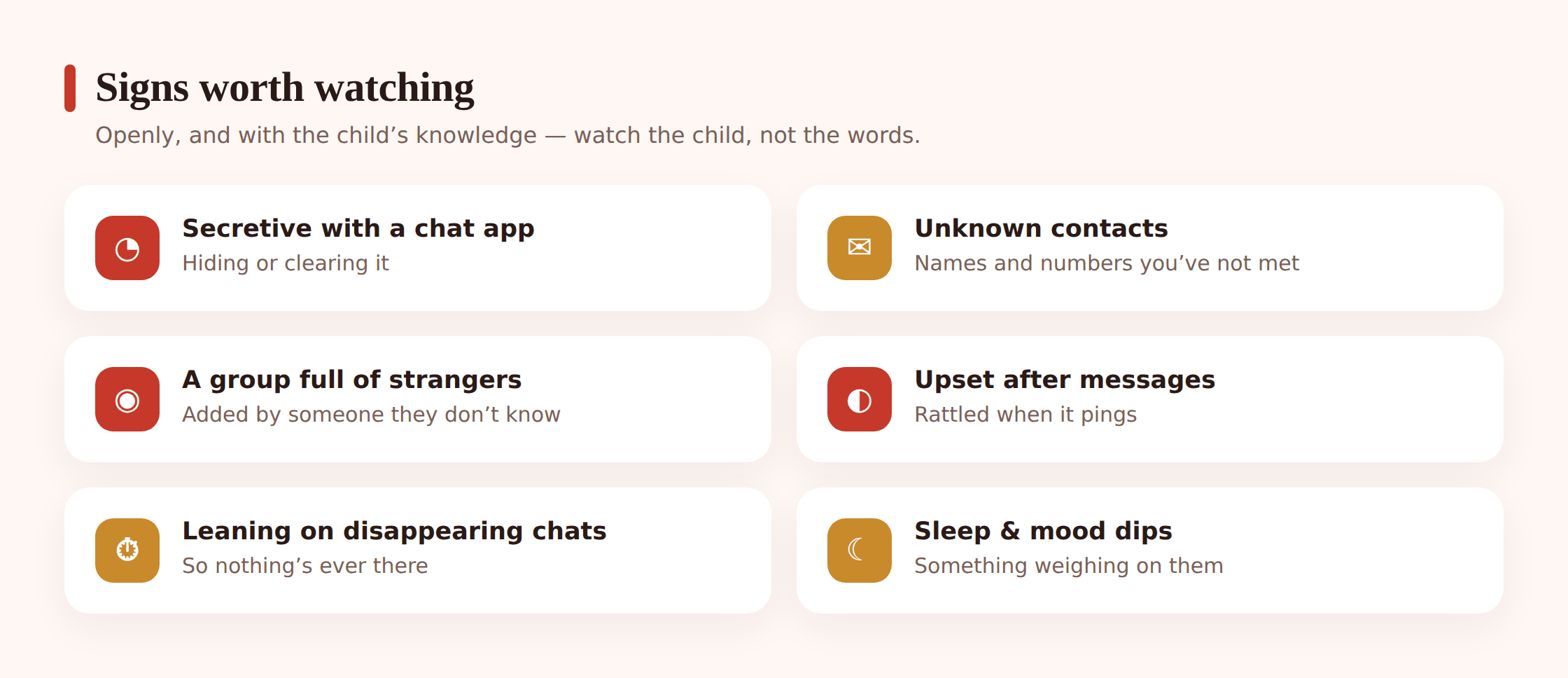
Practically, open device-level visibility can tell you which chat apps are installed and actually used, how much screen time each one is getting, and when the phone is busy — the two-in-the-morning spikes, the brand-new app that appeared overnight. It doesn’t crack open the conversations, and it isn’t meant to. Most of what worries a parent shows up in this shape long before the content would matter: a messaging app your child suddenly hides, a wall of late-night activity, an app you’ve never discussed appearing without a word.
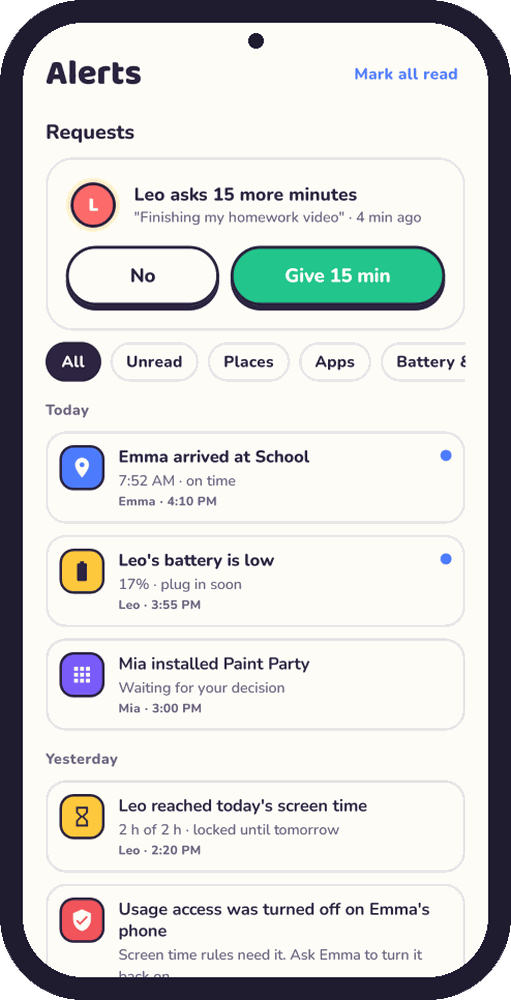
Keep one honest caveat in view: because the apps are encrypted and often set to vanish, this device-level view is a partial one. That’s precisely why the open habits matter more, not less. The screen-time overview and the app list tell you where to start a conversation; they don’t replace it.
The transparency conversation
Before any setting or tool, there’s a talk — and it’s the single most protective thing on this page. Tell your child plainly what you can see and what you can’t. The honest version sounds like: “I’m not going to sit and read your WhatsApp chats — I can’t, and I wouldn’t want to. What I care about is that you’re safe on here, that you’ll block anyone who gives you a bad feeling, and that you’ll show me anything that scares you.” Framing it as their safety kit rather than your surveillance changes how it lands. A child who helped write the rules keeps them; a child ambushed by them starts hunting for the gaps.
Write the important bits down together in a simple agreement — which apps are okay, the privacy settings you’ll both keep switched on, when the phone charges in a shared room, and what your child does the moment a stranger tries to move a chat onto another app or asks for a photo. Then keep the check-ins short and frequent. “Anybody random add you to a group this week?” “Is that class chat still kicking off?” A child in the habit of talking about their apps tells you things no notification could ever surface — that a Snap left them uneasy, that a group turned cold on a friend overnight — because the part that matters usually leaves no trace a tool could flag.
Name the endgame out loud, because it isn’t a phone you can watch forever. It’s a child who, when a Telegram account they don’t recognise starts messaging or a friend turns on them in a group, walks over and holds up the screen. They only do that if they’re sure you won’t seize the phone, delete the app, or lose your temper the second you see it. Each time you stay steady, you earn the next thing they choose to show you. On an encrypted app where messages are built to vanish, that willingness is your only real line of sight — every setting and alert is just support around it.
One check before you open anything: “Am I looking because a real safety flag went off, or because I’m anxious and want to know who they’re chatting to?” If it’s the second, shut the screen and go find your kid instead.
If you find something worrying
Say your child shows you a message, or a pattern sets off real alarm — an unknown account that keeps messaging, a chat app that appeared and then got buried in a folder overnight, a screenshot of something they were sent. What you do in the next few minutes shapes the outcome far more than the thing itself does.
Steady yourself before you speak. The pull is to storm into their room, phone in hand, and demand to know who that account is. Don’t. Whatever you’ve seen will not get worse in the next twenty minutes, but your handling of it easily can if you start talking while your pulse is racing. Give yourself time to settle — a walk to the kitchen, a few slow breaths — so the first words out of you aren’t the panicked ones.
Open a conversation, not a cross-examination. Come at it from worry rather than blame. “I noticed something that’s been bothering me and I’d like to understand it” invites them in; “Who is this and why are they messaging you?” shuts them down on the spot. Let them tell it their own way — a child is far more often caught up in something they didn’t start than steering it, and the real story rarely matches the alarming shape you assembled in your head.
Never make them regret telling you. How you treat this disclosure sets the price of the next one. If your child was brave enough to bring you a message from a stranger, or to admit they tapped a scam link in a group chat, meeting that with a confiscated phone and a deleted account teaches a single lesson: handle it silently next time. Answer instead with calm, with practical help, with “I’m really glad you showed me,” and the channel stays open for whatever comes after — and on these apps, something usually does.
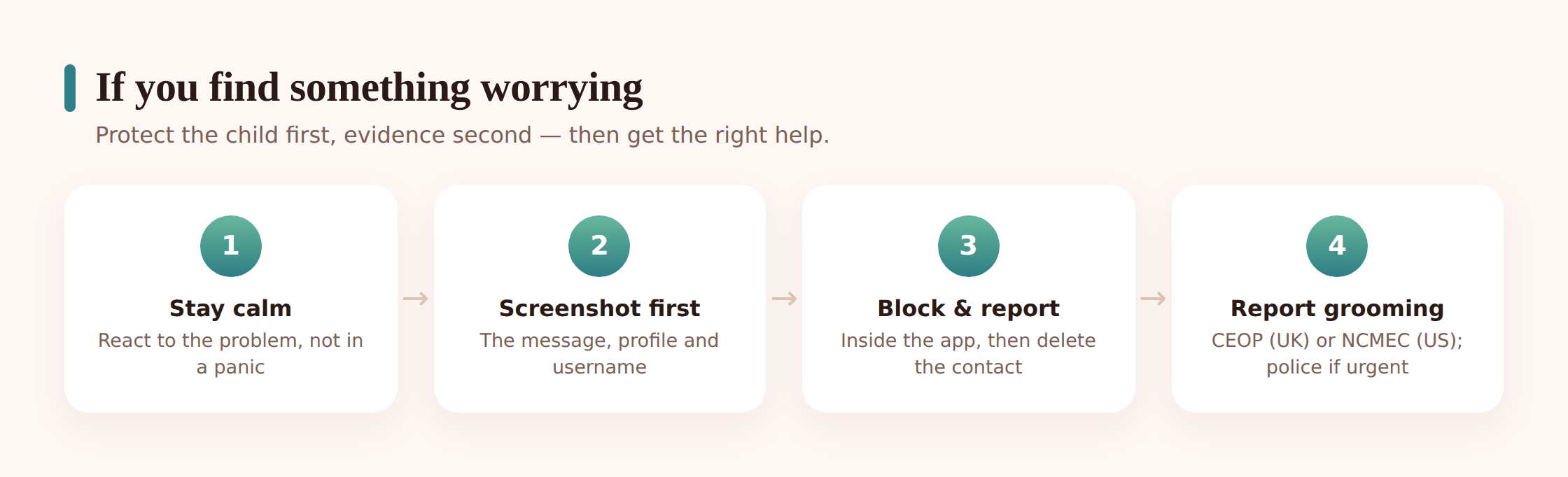
If what you’ve found looks like grooming — an adult building a secret bond with your child, asking for photos, pushing to meet, or trying to move the chat onto a more private app where it’s harder to trace — treat it with the seriousness it deserves. Screenshot the messages and the profile before you touch anything else, because blocking or reporting can make the whole thread disappear; only then block and report the account inside the app. In the UK, report to the CEOP Safety Centre; in the US, use the NCMEC CyberTipline at report.cybertip.org. If your child needs someone to talk to, Childline is free and confidential on 0800 1111. Whenever there’s anything sexual involving your child, or it’s simply more than you should be carrying alone, bring in the police — trust your instinct, and if it feels criminal, treat it as criminal.
Where FreePhone fits
A straight, short note on where our own product sits in all this, since it was designed to support this way of working rather than undercut it. You install FreePhone alongside your child, in plain sight — the phone it runs on shows a “What my parents can see” screen listing exactly what gets shared, and there is nothing concealed about the app itself. What it gives you is device-level help: limits and quiet times for chat apps, approval before a new messaging app is used, “Are you OK?” check-ins, location and an SOS button. What it is not is a window into messages — it doesn’t read WhatsApp, Signal or any chat, or their notifications, and we won’t pretend it can, because that’s neither honest nor a sound way to protect a child. It works on your child’s Android phone, you check it from any browser with nothing to fit on your own device, and it’s free, with every feature. Treat it as a way to keep chat apps in balance and open the right conversation — not a stand-in for the relationship and regular check-ins that do the heavy lifting.
Questions parents ask
Can I read my child’s WhatsApp messages secretly?
No — and it’s worth being clear that this is neither possible in a reliable way nor the right approach. WhatsApp is end-to-end encrypted, so no legitimate tool can quietly hand you a full transcript, and anything claiming to usually means installing risky software and betraying your child. The honest route is open: device-level visibility your child knows about, the app’s own privacy and reporting settings, and a relationship where they’ll come to you. That protects them far better than a secret window ever could.
What’s the right approach for a young child versus a teenager?
They’re two different jobs. For a young child you co-set-up the app, allow known contacts only, lock the privacy settings tight, keep the phone in a shared space, and keep it all openly supervised. For a teenager you shift to privacy with a safety net: agreed check-ins, device-level visibility they know about, and teaching them to block, report and come to you. The rule of thumb is more oversight when they’re small, far more privacy as they grow — and always in the open.
Aren’t disappearing messages a reason to install spyware?
They’re a reason to talk, not to snoop. Vanishing messages can’t be reliably captured by any tool, so chasing that just leads to sketchy software that breaks the phone’s security. Instead, help your child understand that “disappearing” doesn’t mean private — screenshots and second phones outlast any timer — and that a message they wouldn’t send permanently isn’t safe just because it fades. Openness reaches into those apps in a way surveillance never will.
Can I use this to check my partner’s or ex’s messages?
No. Everything here is about your own child, on a device you manage, with their knowledge. Reading another adult’s messages — a partner, an ex, anyone — is a serious privacy violation and is illegal in many places. It isn’t monitoring and it isn’t something we support or provide a way to do. This guide is strictly about keeping a child safe, openly.
A stranger messaged my child on a chat app. What do I do?
Keep your composure and steer clear of blaming your child — none of this is on them. Go through it side by side, use the app’s own tools to block and report the account, and leave the door open so the next one comes straight to you. If the contact keeps at it, turns sexual, or reads like grooming, save the evidence first and then report it — CEOP in the UK, the NCMEC CyberTipline at report.cybertip.org in the US, and Childline on 0800 1111 if your child needs to talk. Bring in the police if your gut says criminal.
Keeping a child secure on chat apps was never truly a matter of the messages. Encryption is doing what it’s meant to, those conversations will stay private, and that’s fine — a full transcript was never what stood between your child and harm. The real guard is the privacy settings the two of you flipped on, the frank chat about why a vanishing message isn’t automatically a safe one, and a kid who feels safe enough to carry the screen over when a stranger or a group thread leaves them uneasy. A light, open hand — worked out between you, watchful for true danger, loosening as they mature — achieves more than any covert window could, and it leaves your bond intact. Set your sights there, and the safety largely follows on its own.