Personalised Ads & Kids’ Data: How Targeted Advertising Works
A child taps into a free game to build a farm, and somewhere in the background a small profile of them is quietly taking shape. Not their name, usually, but their interests, the time they play, roughly where they are, which ads make them stop scrolling. None of it feels like anything is happening. That’s the point. Targeted advertising is designed to be invisible, and kids are the least equipped of anyone to notice it working on them. This is a plain-language guide to how it all fits together and what you can do to turn the volume down.
How targeted advertising actually works
Start with the money. Most of the apps, games and sites a child uses are free to install, and free things still have to pay for servers, staff and updates. The bill gets covered two ways: showing ads, and gathering data that makes those ads worth more. When something online costs nothing, advertising is almost always the engine underneath.
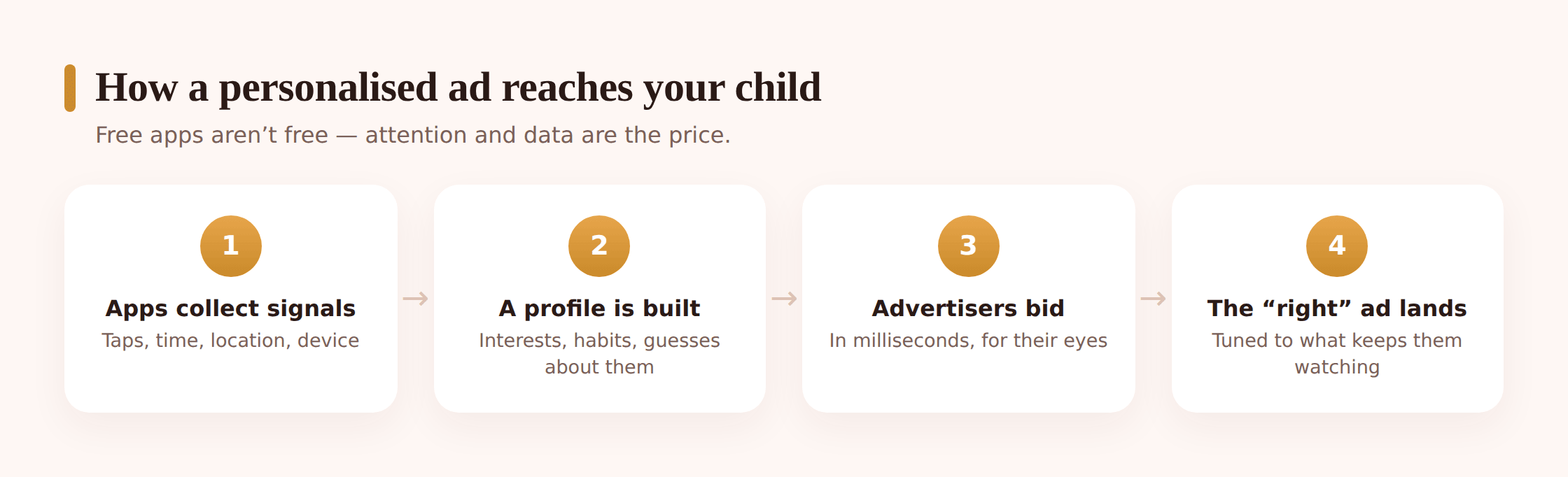
Here’s the flow in plain terms. As your child uses an app, the app quietly notes things — what they tap, how long they stay, what they search for, roughly where the device is. A lot of apps also carry small pieces of code from other companies, often called trackers or ad networks. Those trackers report back to a central system that stitches signals together from many different apps and sites into one rough picture: a profile. The profile doesn’t need a real name to be useful. It just needs to be consistent enough to say “this device belongs to someone who likes dinosaurs, plays in the evenings, and lives near this town.”
When an ad slot comes up inside a game, it gets filled in a fraction of a second. Advertisers effectively bid for the chance to show that particular profile an ad, and the highest bid wins. A profile that looks like a keen young gamer is worth more to a toy company than an anonymous blank, so richer data means higher bids means more revenue. That’s the whole loop. More data makes the ads more valuable, which is why so much effort goes into collecting it.
Feed ranking works on the same fuel. The reason a video app seems to “know” your child is that it’s reading the same interest signals to decide what to show next, ads included. We pull that mechanism apart in how algorithms work — the short version is that engagement and advertising are two ends of one system, both powered by attention and data.
What gets collected about a child
Not every app grabs everything, and the amount varies wildly between a careful, paid, kid-focused app and a free one stuffed with third-party trackers. But the menu of what can be collected is worth seeing laid out, because most parents assume it’s far less than it is.
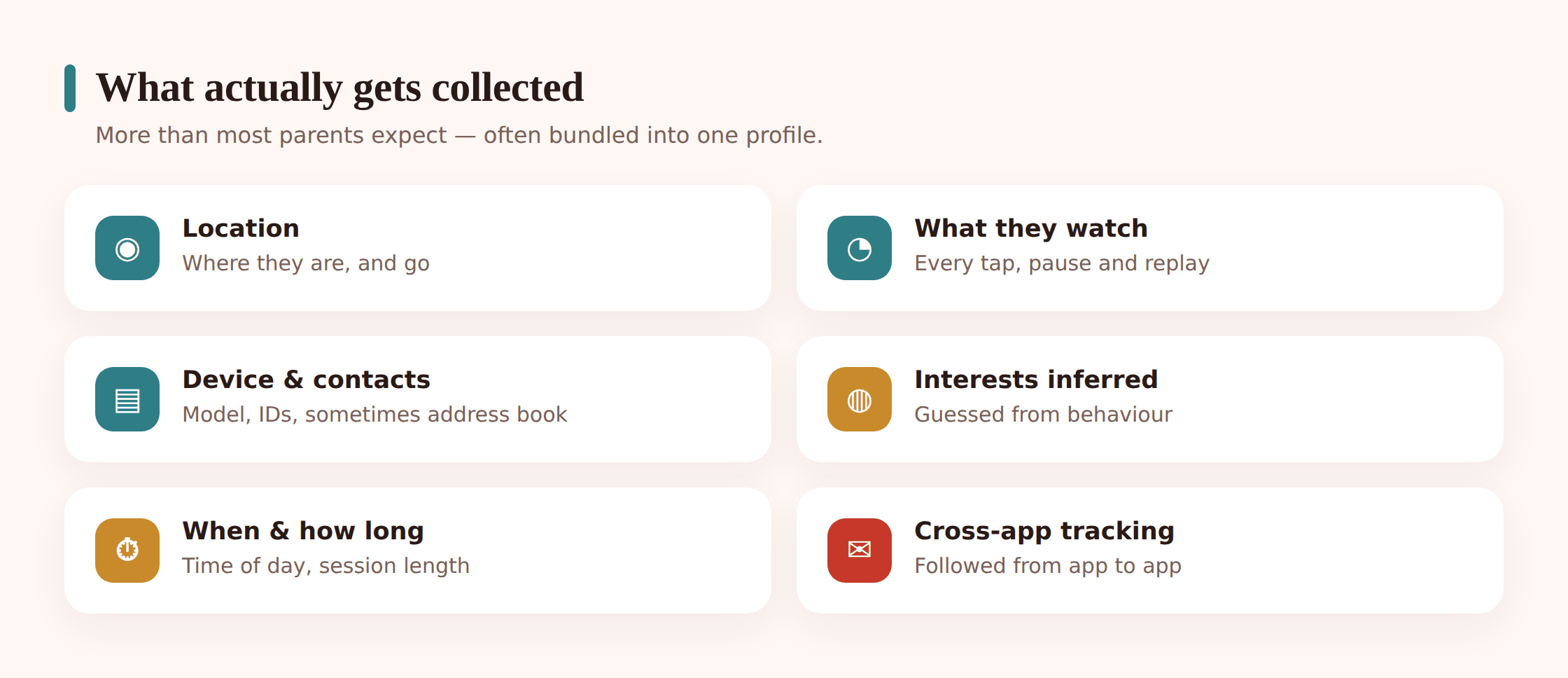
- App and usage patterns. Which apps are open, how long, how often, what gets tapped, when in the day. This alone reveals habits, routines and interests.
- Device information. The model of phone or tablet, operating system, language, and identifiers like the advertising ID — a per-device code specifically built to tie ad activity together across apps.
- Location. Sometimes precise GPS, more often a rough area worked out from the network or Wi-Fi. Even coarse location is valuable for targeting local businesses and inferring where a child lives and goes to school.
- Interests and behaviour. Searches, videos watched, things liked, in-game choices, which ads got a tap. Over time this is the richest signal of all.
- Sometimes more. Contacts, photos, microphone or other permissions an app requested and was granted — occasionally far beyond anything the app actually needs to function.
The quiet problem is time. A single evening of play tells advertisers very little. But the same device, tracked month after month across dozens of apps, builds a profile that follows a child from primary school toward their teens. What looked like scattered, harmless taps becomes a detailed, years-long record of a person who never agreed to any of it. That accumulation is exactly what we mean by a digital footprint, and it’s worth reading your child’s digital footprint alongside this to see the bigger shape of it.
Why it matters more for kids
Adults get targeted too, and most of us shrug it off. The reason to take it more seriously for children is that the usual defences simply aren’t built yet.
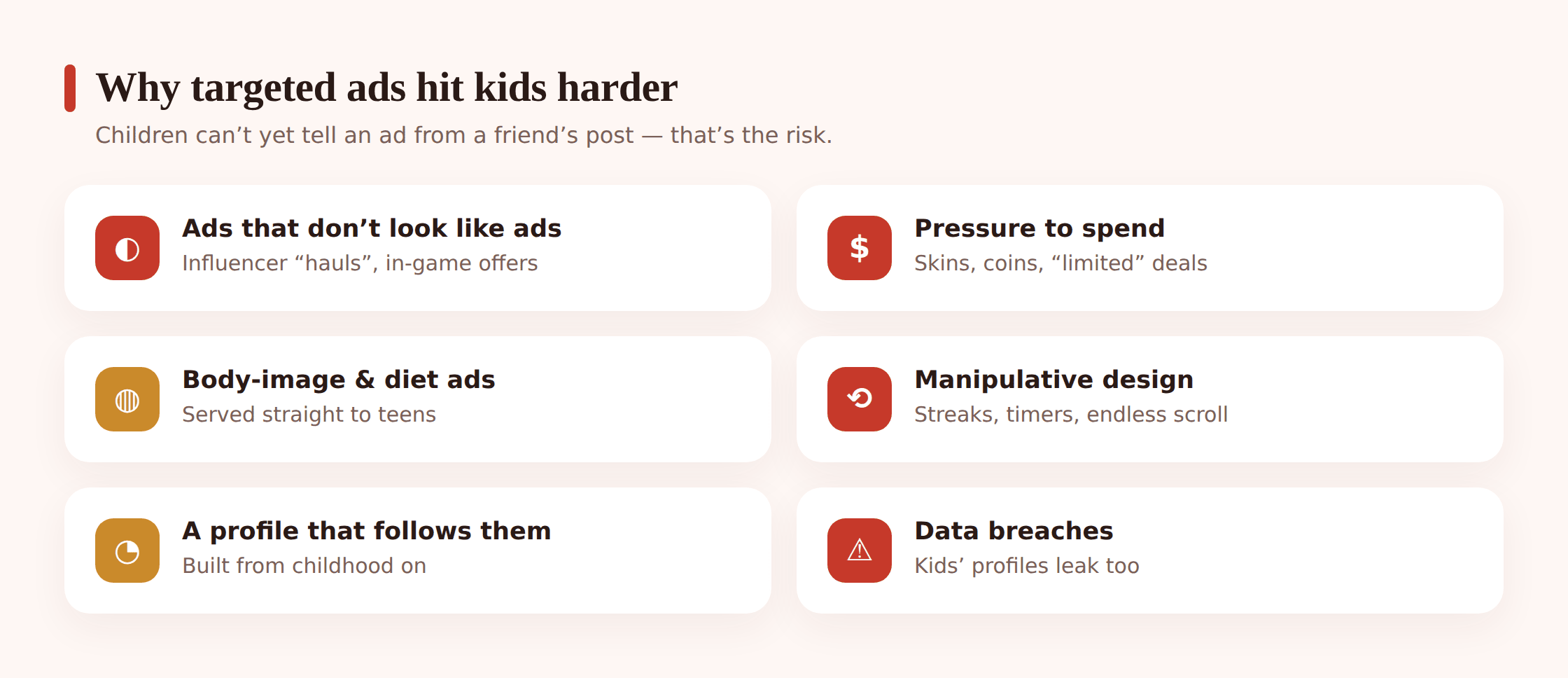
They often can’t tell an ad from content. Research on how young children process advertising has long found that below a certain age, kids don’t reliably recognise an ad as a persuasive message at all — they take it as neutral information, or as part of the show. A grown-up sees a sponsored post and mentally files it as “someone’s trying to sell me something.” A seven-year-old frequently doesn’t. The persuasion lands with no filter in front of it.
The pressure is baked into the play. In-game ads aren’t a break from the fun; they’re wired into it. Watch a reward video and get free coins. Tap the offer to skip a wait. The ad is dressed up as a gift, so refusing it feels like turning down a prize. For a child mid-game, that’s a hard call to make well.
Influencer ads don’t look like ads. A creator your child trusts holds up a product between jokes, and it reads as a recommendation from a friend rather than paid promotion. The little “#ad” tag means little to a young viewer even when it’s there. We go deeper on that bond in kids & influencers, because it’s one of the most effective and least obvious forms of advertising a child meets.
Some design is built to nudge. Countdown timers, “only 3 left,” flashing buttons, rewards for coming back daily — these techniques work on adults and work far better on kids. The same design pressure that drives ad taps also drives spending, which is why it pairs so naturally with in-app purchases.
And the profile compounds. An advertising picture of a child, refined over years, can end up shaping what they get offered and steered toward well before they’re old enough to have any say in it. That’s the part that unsettles most parents once they see it clearly: not one ad, but the slow accumulation of a commercial identity assigned to someone who’s still learning to read.
The sneaky ad formats
Ads aimed at children have moved a long way past the obvious banner. The formats below are effective precisely because they don’t announce themselves as advertising.
Advergames
These are games built as adverts. The whole experience is branded — a cereal mascot’s platformer, a toy line’s mini-game — so the child isn’t watching an ad, they’re playing inside one for as long as they like. The brand becomes the fun rather than an interruption to it.
Reward videos
The “watch this to earn coins” offer. The child chooses to watch, which makes the ad feel like their idea and their reward, and the video usually can’t be skipped. It’s one of the most common ways free games make money, and one of the most persuasive because it’s tied directly to something the child wants.
Sponsored influencer content
A trusted creator features a product inside otherwise ordinary content. Because the recommendation comes wrapped in a relationship the child feels they have with the creator, it carries far more weight than a standard ad and is far harder to spot as paid.
In-app pop-ups and interstitials
Full-screen ads that appear between levels or when an app opens, sometimes with a close button that’s tiny, delayed, or placed so a mis-tap opens the ad instead. The friction is deliberate — an accidental tap still counts.
“Free” apps and games
The broadest category of all. A free app isn’t a gift; it’s a business, and the product being sold is usually your child’s attention and data. This doesn’t make free apps bad — plenty are excellent — but “free” should prompt the question how does this one actually make its money?
How to reduce tracking and ads
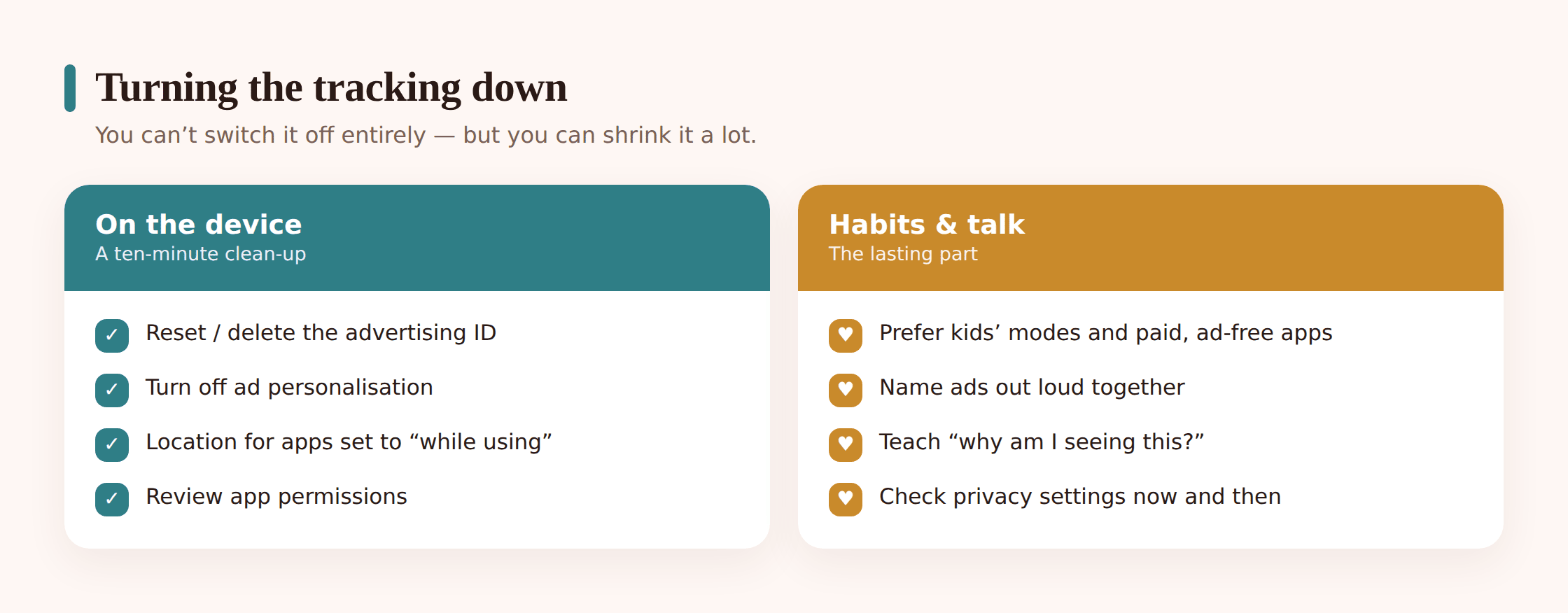
You can’t switch targeted advertising off entirely, and chasing perfection will just wear you out. What you can do is cut the amount of data leaving a child’s device, blunt the personalisation, and — most durably — teach the child to see the ads for what they are. Here’s a practical order to work through.
1. Reset and limit the advertising ID
On Android, open Settings > Privacy > Ads (wording varies by phone) and delete or reset the advertising ID, which breaks the thread linking past ad activity to the device. Where the option exists, turn off ad personalisation entirely. On the child’s other accounts, look for an “ad settings” or “personalised ads” toggle and switch it off too.
2. Prune app permissions
Go through Settings > Apps and check what each app can reach. A colouring game does not need contacts, the microphone, or precise location. Set location to “while using” or “deny” for anything that doesn’t genuinely need it, and revoke anything that looks excessive. Fewer permissions means fewer signals to collect.
3. Turn on the kids’ mode
Use a proper children’s mode where it’s offered — a family account, a supervised profile, or a dedicated kids’ app that limits ads and data collection by design. These aren’t perfect, but they’re built with children’s rules in mind and are a big step up from a standard adult profile handed to a child.
4. Choose reputable or paid apps for the ones they use most
For the app your child opens every day, paying a few pounds for an ad-free version is often the best privacy purchase you can make — no ads, and usually far fewer trackers. Favour apps from established makers with clear, readable privacy policies over a free clone stuffed with ad networks.
5. Rein in location
Location is one of the most valuable signals and one of the easiest to cut. Keep precise location off across the board unless an app truly needs it — maps, say — and prefer approximate location where the phone offers the choice. This alone removes a lot from the profile.
6. Teach them to spot the sell
The setting you can’t toggle is the one that lasts longest. Sit with your child and play “is this an ad?” together. Point out the reward video, the branded game, the creator holding up a product, the pop-up that wants a tap. Ask what the ad wants them to feel and do. A child who can name the trick is far less moved by it — and that skill outlives any single device or app.
The legal protections, briefly
Children’s data does have some legal shelter. In the United States, COPPA sets rules for how services can collect data from under-13s and generally requires verifiable parental consent. In Europe and the UK, GDPR includes specific protections for children’s data, often called GDPR-K, and the UK’s Age Appropriate Design Code pushes services toward privacy-friendly defaults for kids.
These matter, and they’ve changed how many big services behave. But treat them as a floor, not a fix. Rules are uneven across countries, not every app follows them well, plenty of “not for kids” apps end up on kids’ phones anyway, and enforcement lags behind the technology. The protections are a reason to expect better, not a reason to relax. The practical steps above are still yours to take.
FAQ
Are “free” kids’ games really free?
Rarely, in the full sense. The download costs nothing, but the game usually earns its keep by showing ads and collecting data that makes those ads more valuable. That’s not automatically sinister — many free games are made responsibly — but “free” is a good moment to ask how a particular app makes its money, and whether a paid or ad-free version is worth it for the ones your child uses most.
Can I actually stop apps tracking my child?
You can’t reduce it to zero, but you can cut it a long way. Reset and limit the advertising ID, turn off ad personalisation, trim app permissions (especially location), use a proper kids’ or supervised profile, and lean toward reputable or paid apps. Together those steps remove a real share of what gets collected. The influence side is handled by teaching your child to recognise ads.
What is an advertising ID and why reset it?
It’s a code assigned to the device specifically so ad companies can tie activity together across different apps and build one profile. Resetting it breaks the link to everything collected before, so the profile starts over with less to draw on. Limiting or turning off ad personalisation on top of that reduces how much the fresh ID gets used.
Why can’t my young child tell ads from normal content?
Because the mental skill of spotting a persuasive message hasn’t fully developed yet. Younger children tend to take an ad as neutral information or as part of the show, without the “someone’s selling to me” filter adults apply automatically. It’s not a lapse in your parenting — it’s a developmental stage, and one you can shorten by naming ads together as you both come across them.
Are reward videos and advergames a problem?
They’re not dangerous, but they’re persuasive in ways worth understanding. A reward video ties an ad to something the child wants, and an advergame turns the whole game into a brand. Neither is a reason to panic; both are a reason to talk. Point them out, explain what they’re for, and your child starts seeing the mechanism instead of just feeling the pull.
Does location really matter for ads?
Yes, more than most parents expect. Location is one of the most valuable targeting signals, and even a rough area can reveal where a child lives and goes to school. It’s also one of the easiest things to lock down — set precise location off by default and only allow it for apps that genuinely need it, like maps.