Online Learning & Tutoring Apps: Keeping Kids Safe
A kid can learn Spanish from a native speaker in Madrid, get unstuck on algebra at ten at night, or sit in a live coding club with twenty other twelve-year-olds — all from the kitchen table. Online learning is one of the genuinely good things a phone or laptop brought into a child’s life. But some of those lessons put your child face to face with an adult you’ve never met, in a private video call, with a chat box on the side. That’s the part worth thinking about before you hand over the login, and it’s what this guide is about.
What online learning genuinely gives kids
Let’s start honest, because if this reads like a list of dangers you’ll either ignore it or unplug the router, and neither helps. Online learning does things the old model couldn’t.
- A tutor for exactly the thing they’re stuck on. Not the one teacher available in your town, but someone anywhere who specialises in GCSE chemistry, or dyslexia support, or violin.
- Practice at their own pace. Language apps and maths platforms let a kid repeat a level ten times without a class of thirty waiting on them, or race ahead when something clicks.
- Help at odd hours. Homework panic at 9pm doesn’t wait for school. A good platform or a recorded lesson is there when the stuck moment actually happens.
- Access to things your area doesn’t have. Coding clubs, a fluent speaker of a less-common language, a specialist SEN tutor — small towns rarely offer these in person.
- Confidence for quieter kids. Some children who’d never raise a hand in a classroom will type a question into a chat, or speak up in a one-to-one they don’t have to perform in front of peers.
All real. The goal isn’t to talk you out of any of it. It’s to keep the good parts and close the couple of gaps that come with letting strangers and software into your kid’s schooling.
The real considerations
Most online learning is exactly what it says it is. The considerations below aren’t reasons to panic; they’re the specific things that make one setup safer than another.
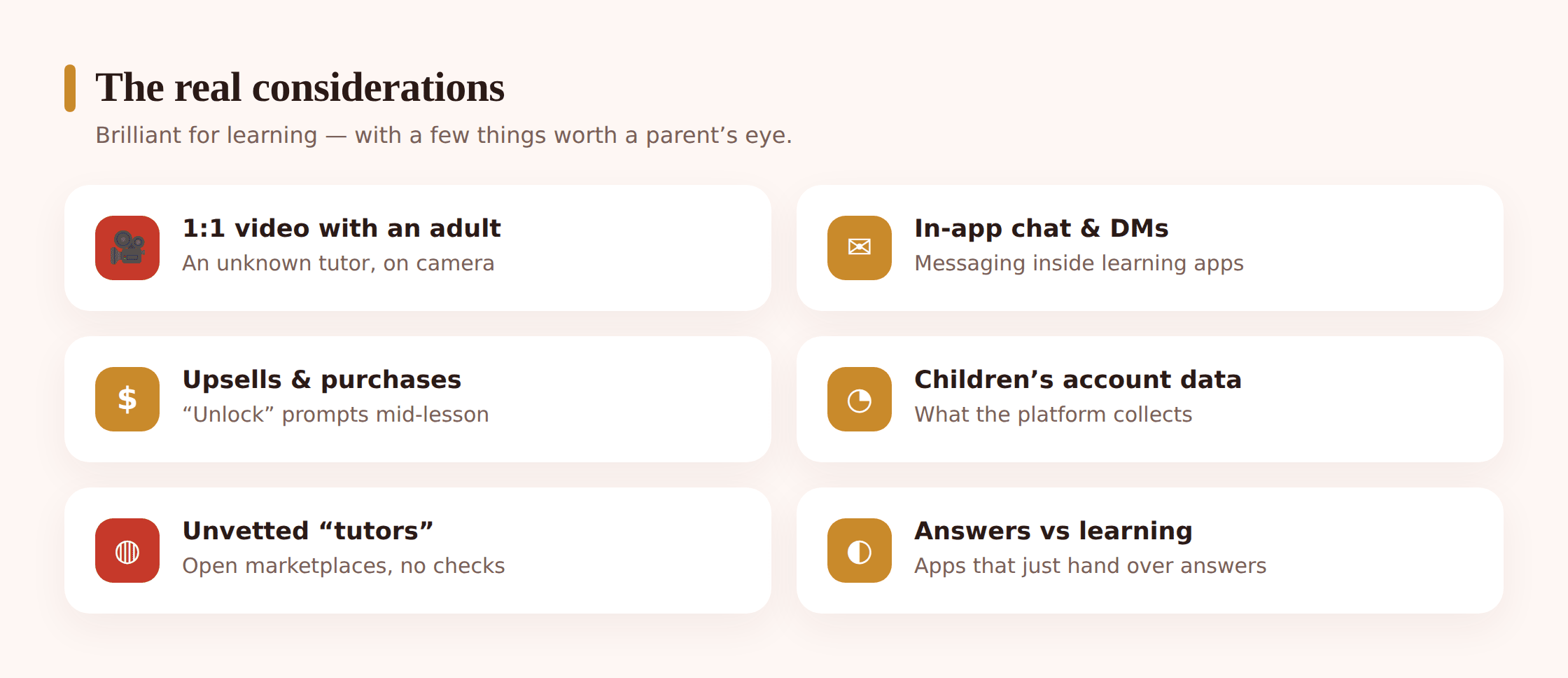
A private video call with an adult you haven’t met
This is the big one, and it’s specific to tutoring in a way a group class or a language app isn’t. One-to-one video puts your child alone (from their side) with an adult, often for an hour, repeatedly, building rapport. That rapport is the point of tutoring — and it’s also exactly the setup a person with bad intentions would want. This overlaps with the wider issue of protecting kids from online predators, but the tutoring version is trickier precisely because the adult has a legitimate reason to be there.
Chat features and DMs inside learning apps
A surprising number of “educational” apps have a chat, a comments section, or direct messages bolted on — coding communities, language-exchange apps, homework Q&A forums. Kids treat these as safe because the app is “for school.” But a DM inside a learning app reaches your child the same way one on any social platform does. Some of the thinking in social media safety applies directly here.
Unvetted “tutors” on open marketplaces
There’s a real gap between a school-arranged tutor, an established tutoring company that background-checks its staff, and an open marketplace where anyone can list themselves as a tutor after uploading a photo. On the open end, “qualified maths tutor” might be true, might be a student earning pocket money, or might be neither. The platform’s job is to vet; not all of them do it well.
In-app purchases and upsells
Free homework-help and language apps make money somewhere. Often that’s a stream of prompts to unlock the full explanation, buy more “hearts,” or upgrade to premium — landing in front of a child mid-lesson, when they’re motivated and not thinking about your card. It’s rarely dangerous, but it’s designed to convert a kid, not inform a parent.
Data and privacy of a child’s account
Learning apps collect a lot: a child’s name, age, school, progress, sometimes their face and voice from recorded lessons. Where that goes and how long it’s kept varies enormously. A children’s account on a reputable education platform is usually careful; a random app from an app-store search may not be.
Recordings
Recording cuts both ways. A recorded lesson is a safety feature — it means nothing happens in private, and there’s a record if something goes wrong. But a recording is also a video of your child that now lives on someone’s server. Knowing who holds it and who can watch it matters.
Homework apps that answer instead of teach
Point a camera at a maths question and some apps hand back the answer, no working, no learning. That’s not a safety risk so much as a learning one — it quietly does the kid’s homework. We go deep on that fork in AI, homework & cheating; it’s worth reading alongside this.
Choosing a safe platform or tutor
The single most protective decision happens before your child ever logs in: where you’re getting the tutor or platform from. A well-run platform does most of the safety work for you.
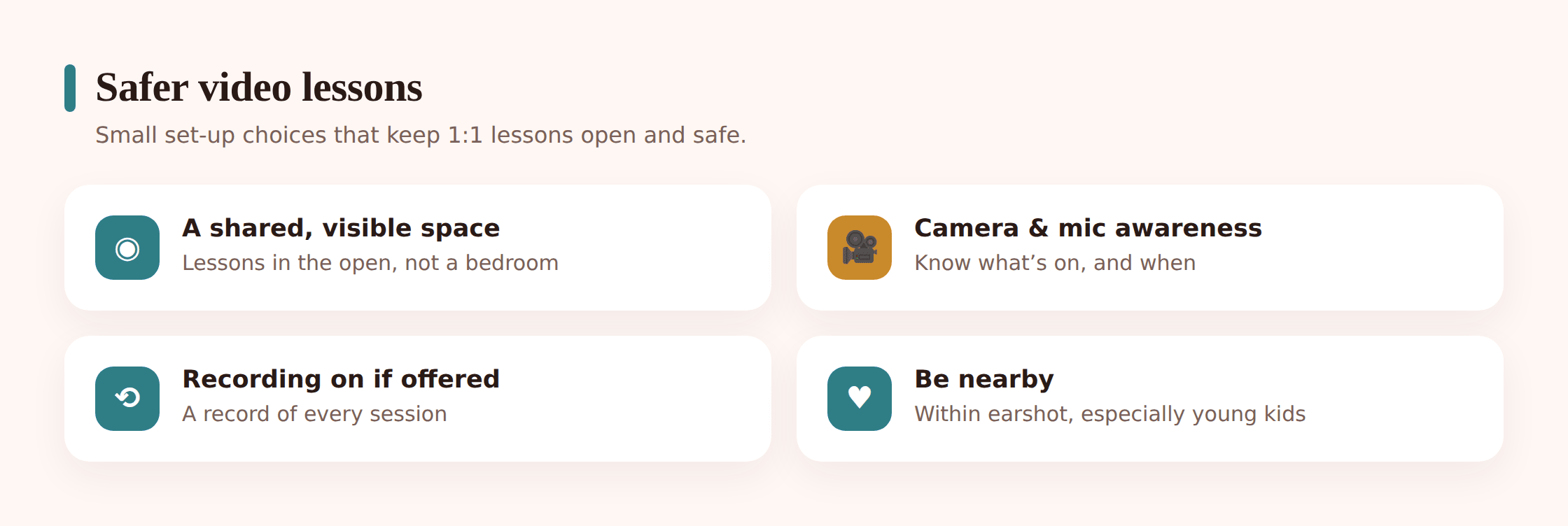
Start with school-provided or well-known platforms
If the school offers a tutoring service, a licensed maths platform, or a recommended homework tool, start there. The vetting is already done and there’s an accountable organisation behind it. The same care you’d take with a school Chromebook setup applies to school-linked learning accounts.
Check who vets the tutors — and how
For anything involving a real adult, find out what the platform actually does. Reputable tutoring companies run background checks (in the UK, a DBS check; elsewhere, the local equivalent), verify qualifications, and have a safeguarding policy you can read. If a marketplace can’t tell you how tutors are checked, treat every listing as unverified.
Read reviews with a filter
Reviews of a tutor are useful, but read for the right things. Plenty of five-star reviews praise results and say nothing about conduct. Look specifically for mentions of professionalism, punctuality, and how the tutor is with kids — and be wary of a tutor or platform with no track record at all.
Favour platforms built for parent visibility
Better tutoring services give parents a way in: session recordings, a parent login, progress reports, the ability to sit in. A platform that assumes a parent should be able to see what’s happening is telling you something good about how it thinks. One that walls parents out entirely is telling you the opposite.
Prefer recorded or observable sessions
Where you can choose, choose the option where lessons are recorded or at least happen somewhere you can be present. This isn’t about distrusting a specific tutor. It’s that “nothing happens in private” is a rule that protects everyone, including the good tutors, from ambiguity.
Setting it up safely
Once you’ve picked well, a few setup choices lock in the safety. None of these are dramatic. Together they change the whole picture.
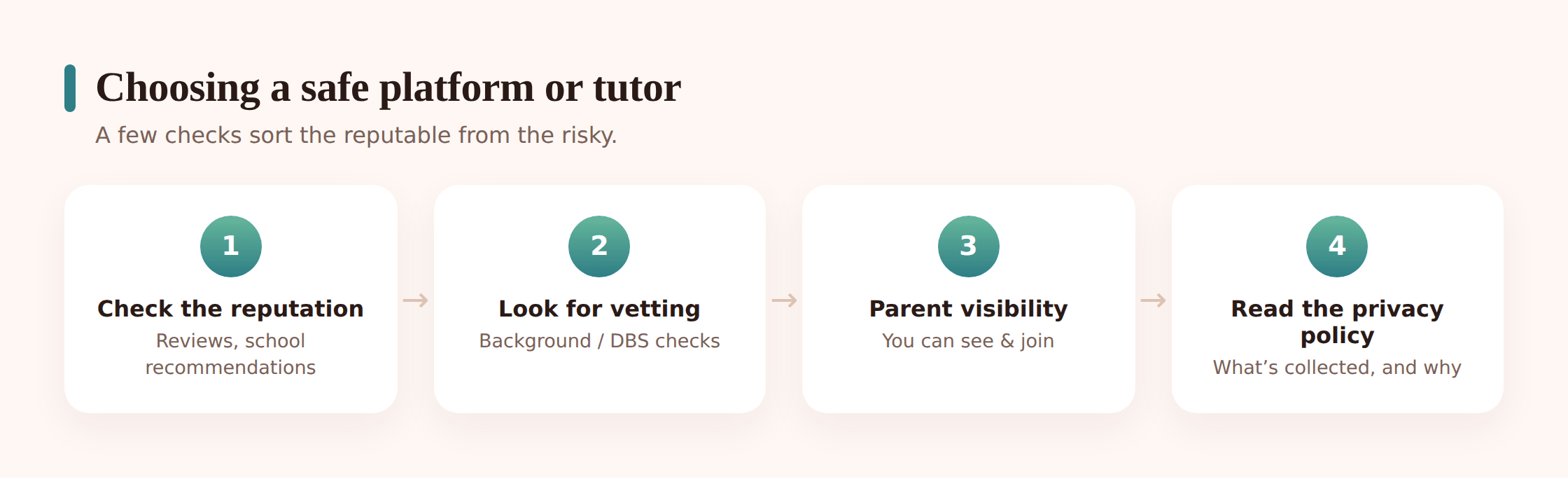
Put the lesson in a shared space, not a bedroom
Kitchen table, living room, hallway desk — anywhere the household naturally moves through. A bedroom with the door shut removes the one protection that costs nothing: an adult who might walk past. This alone is the difference-maker for one-to-one video.
Make camera and mic status visible
Teach your child to notice when the camera and microphone are on, and to know how to turn them off fast. Most kids have no idea the light next to the lens means they’re being seen. A small habit — glance at the indicator, cover or close when the lesson ends — pays off across every app they’ll ever use.
Turn recording on where the platform offers it
If the service records lessons, use it. If it lets a parent enable recording, do. A recorded one-to-one is a safer one-to-one. Just check where the recording is stored and who can see it, so you’re trading one privacy question for a clear answer rather than a vague one.
Set up the account with a real look at privacy settings
Go through the account as you create it. Turn off public profiles, disable or lock down chat and DMs if the app has them, set the profile to the minimum information the app will accept, and switch off anything that shares progress or presence with other users. Don’t accept the defaults — apps default to open.
Keep one-to-one tutoring observable
You don’t have to hover. But be in earshot, leave the door open, and let the tutor know a parent is around. A tutor with nothing to hide is completely comfortable with this. It also, quietly, is a signal to your child that this space is supervised and normal.
Handle purchases at the account level
Turn off in-app purchases or require a password for them, so an upsell mid-lesson can’t turn into a charge. On the browser side, a content filter can keep a homework session from drifting into unrelated sites.
Homework-help apps: teaching vs. just answering
Homework-help and Q&A apps deserve their own moment, because they carry a different risk than the video ones — not to safety, to learning. Two apps can look identical and do opposite things. One walks a kid through a problem and leaves them able to do the next one. The other photographs the question and returns the answer, and the kid learns nothing except how to photograph a question.
When you’re picking one, try it on a problem yourself. Does it explain the steps, ask the kid to try, and check the working? Or does it just produce a number? The first is a tutor in your pocket. The second is a very fast way to hand in homework you didn’t do — which becomes an honesty problem the moment a test arrives and the app isn’t allowed. There’s more on drawing that line in AI, homework & cheating.
Healthy habits and spotting trouble
Settings are the floor. What actually keeps online learning safe over months is a handful of ordinary habits.
- Be nearby, at least at first. Especially for a new tutor or a new platform, sit in on the first session or two. You’ll learn more about whether it’s a good fit in twenty minutes than from any review.
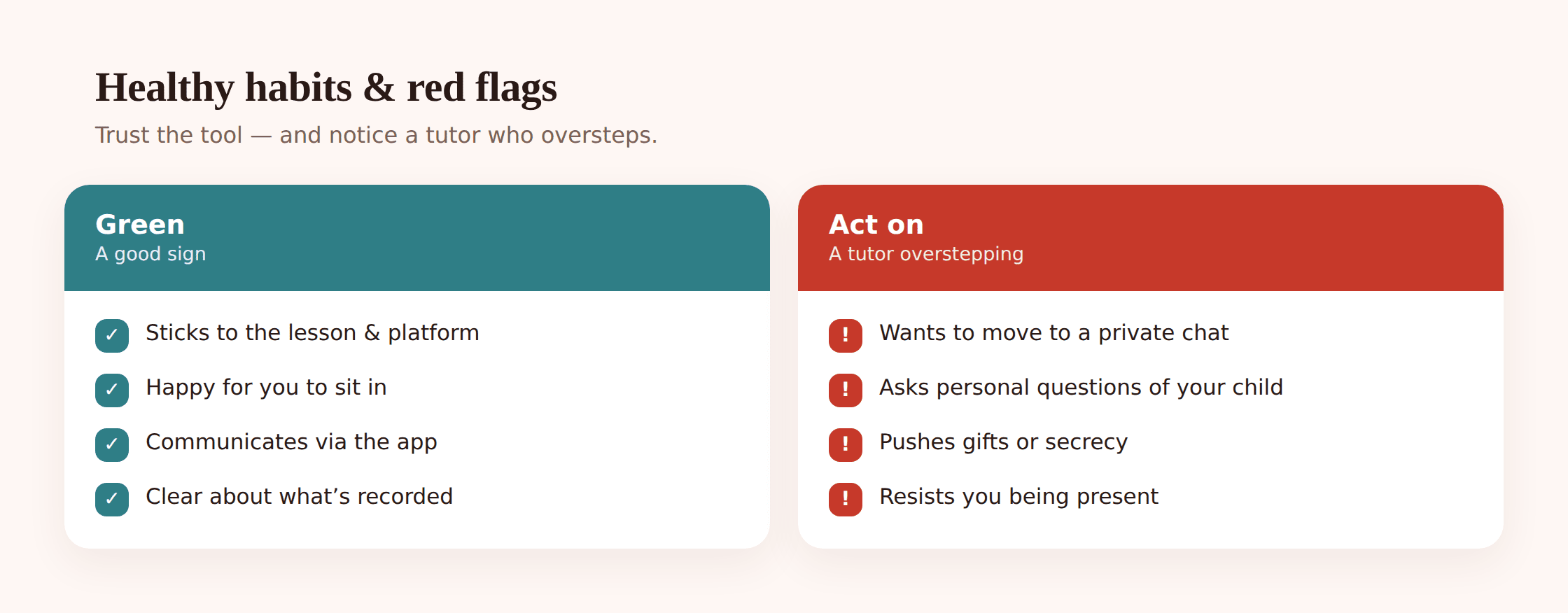
- Agree the rules together. Lessons happen in the shared room. Chat features are for the class, not private messages. If a tutor asks to move to a different app or wants to talk outside lesson time, tell a parent. A kid who helped write the rules keeps them.
- Keep contact on the platform. A good tutor communicates through the tutoring service, with a parent copied in where possible. A request to switch to WhatsApp, a personal number, a game chat, or social media is the single clearest sign to slow down and ask why.
- Talk about it like any other class. “What did you cover today? What’s your tutor like?” Keeping the lessons a normal topic of conversation means anything off will surface in the ordinary way, not as a crisis.
- Watch the account, not the child. Openly, and with them knowing, keeping half an eye on which learning apps are in use and how much they’re being used is a reasonable part of running a family’s devices.
Signs a tutor is overstepping
Most tutors are exactly who they say they are. But it’s worth knowing what crossing a line looks like, because it’s often gradual and dressed up as being friendly. Take it seriously if a tutor wants to move off the platform to a private app or personal number; asks your child to keep parts of lessons secret from you; steers conversation toward personal, private, or physical topics that have nothing to do with the subject; wants the camera off for “privacy” or asks about your child’s home life in a way that isn’t small talk; sends gifts, or pushes for contact outside lesson times. Any one of these is a reason to pause, watch, and if needed report to the platform and end the arrangement. Trust the instinct — you don’t owe a tutor the benefit of the doubt over your kid’s safety.
None of this should make online learning feel fraught. The vast majority of tutors, classes and apps do exactly what a parent hopes. Pick a well-run platform, keep the lessons somewhere you can hear them, agree a few rules out loud, and you’ve handled almost everything worth handling — and kept all the good that made you consider it in the first place.
Is one-to-one online tutoring safe?
Generally yes, with the right setup. The safety comes from three things: choosing a platform that vets its tutors (background checks, verified qualifications, a safeguarding policy), keeping the lesson in a shared room where you can hear it rather than a closed bedroom, and using recording where it’s offered. A one-to-one from an established tutoring company with a parent in earshot is very different from an anonymous marketplace tutor behind a closed door. Set it up so nothing happens fully in private and one-to-one tutoring is a good, safe thing.
Should the camera be on during lessons?
For a live lesson with a real tutor or class, camera on is usually the safer and more useful default — the teaching works better and it keeps things transparent. What matters more is that your child knows the camera is on, can see the indicator, and knows how to turn it off instantly. Be cautious if a tutor asks your child to turn the camera off for “privacy” in a one-to-one; there’s rarely a good reason for that, and it’s a signal to pay closer attention.
How do I check if a tutor is properly vetted?
Ask the platform directly how it checks tutors, and expect a clear answer. Reputable services run background checks (a DBS check in the UK, or the local equivalent elsewhere), verify qualifications, and publish a safeguarding policy you can read. If a marketplace can’t explain how a tutor was vetted, treat that tutor as unverified and either choose a platform that does vet, or stick with school-arranged tutoring where the checks are already done.
Are the chat features inside learning apps a risk?
They can be, and they’re easy to overlook because the app feels “educational.” A chat, comment section or DM inside a learning app can reach your child the same way one on any social platform does. When you set up the account, turn off or lock down direct messaging and public interaction, keep any legitimate class chat for class use, and make it a rule that private messages from anyone — including a tutor — get mentioned to a parent.
Do homework-help apps actually help kids learn?
It depends entirely on the app. The good ones explain the steps and leave your child able to solve the next problem on their own. The ones that just photograph a question and hand back the answer teach nothing and quietly become a way to skip the work. Test it yourself: after your child uses it, can they re-explain the answer with the app closed? If yes, it’s teaching. If no, it’s a shortcut dressed up as help.
What data do children’s learning accounts collect?
Often more than parents expect — name, age, school, learning progress, and sometimes the child’s face and voice from recorded lessons. How carefully that’s handled varies a lot between a reputable education platform and a random app from a store search. Favour well-known, school-recommended platforms, read the privacy settings as you create the account, share the minimum the app will accept, and check where any recordings are stored and who can access them.