How to Recover Deleted Contacts & Call Logs
You deleted a contact, or your whole address book went blank after a phone reset, and now you can’t find that number you need. Take a breath. If your contacts sync to Google or iCloud, and most people’s do without ever thinking about it, a deleted contact is usually recoverable. The sooner you look, the better your odds. Call logs are a harder story, and this covers that honestly too.
First, don’t panic
Here’s the thing most people don’t realize until they need it: your contacts probably live in two places, not one. There’s the copy on your phone, and there’s a copy in the cloud that quietly syncs behind the scenes. When you delete a contact, both copies update. But the cloud keeps deleted contacts around for a while before it truly erases them, and that grace period is your window.
Google keeps deleted contacts for about 30 days. Apple keeps recoverable versions too. So if the delete happened recently, you’re in good shape. Act reasonably soon rather than letting it sit for a month, and don’t add or delete a bunch of other contacts in a panic while you figure this out.
One quick check before anything else: make sure you’re signed into the same account you normally use. A lot of “all my contacts vanished” moments are really “I’m signed into the wrong Google or Apple account,” and everything reappears the moment you switch back.
Where deleted contacts come back from
There are really only a handful of places a lost contact can return from. Knowing which one applies to you saves a lot of flailing.
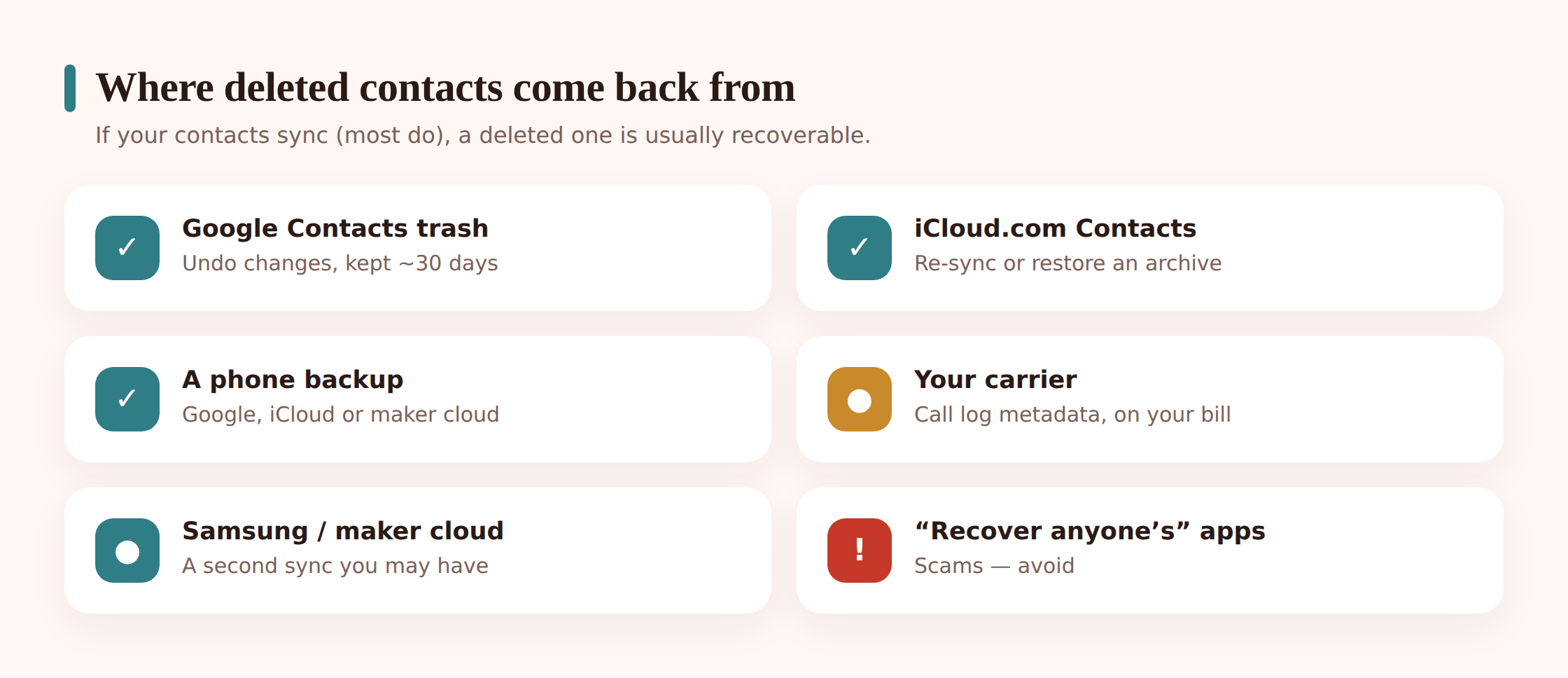
- Cloud sync (Google / iCloud). The live copy of your address book. Often the contact is still here, just hidden by a sync glitch or a wrong account.
- A deleted-contacts trash. Google’s Contacts has a “Trash,” and both Google and Apple can undo recent changes. This is where a genuine delete goes to wait out its grace period.
- A device backup. A full phone backup (Google, Samsung, or iCloud/computer) taken before the delete. Powerful, but restoring it usually means rolling the whole phone back.
- A manufacturer cloud. Samsung, Xiaomi, and others run their own accounts that may hold a separate contacts copy alongside Google’s.
Recover contacts on iPhone
On iPhone, iCloud is doing the heavy lifting. Start on the web, because it’s the fastest and it won’t touch anything else on your phone.
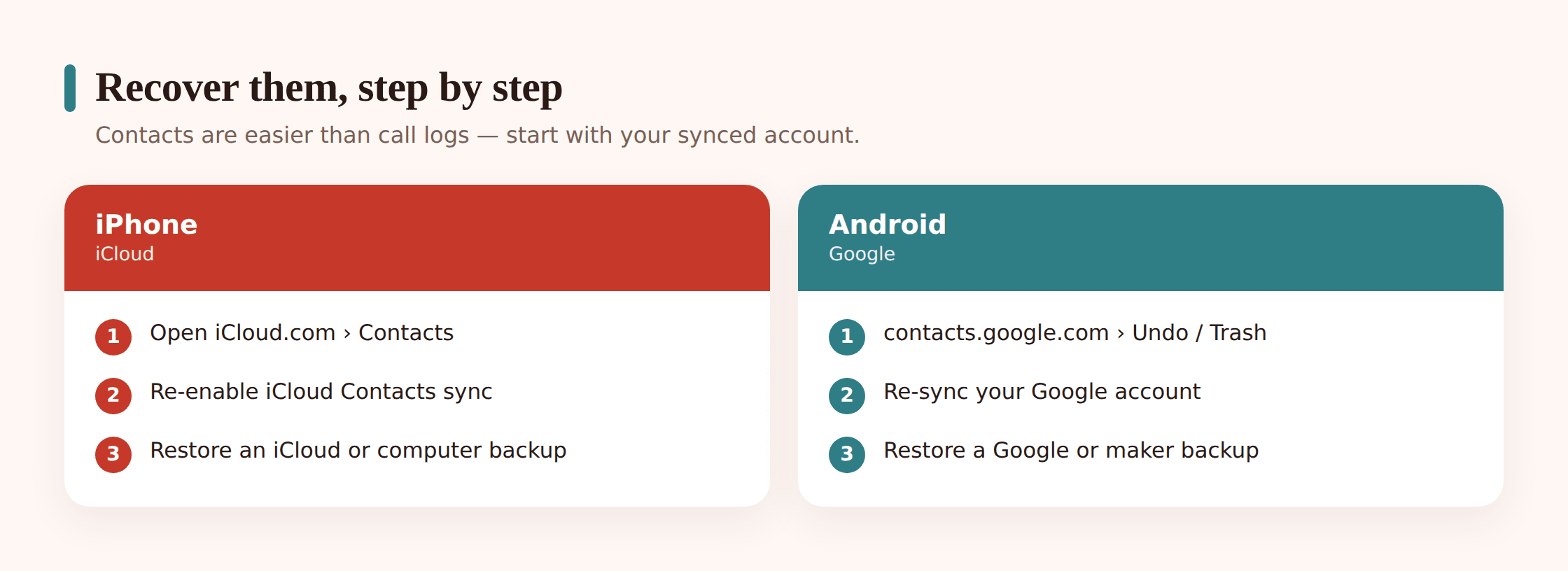
Check iCloud.com first
On any browser, go to iCloud.com, sign in with your Apple ID, and open Contacts. If the contact is there, it never really left your account, and it should reappear on your phone once sync catches up. If it’s missing here, move to the next step.
Look for “Restore Contacts”
Apple has historically offered an archive of earlier contact snapshots under iCloud settings on the web (Account Settings, then “Restore Contacts”). If your account still shows it, you can roll your entire address book back to a dated version. Note that it replaces your current contacts with that snapshot, so anything added since is swapped out — Apple usually archives the current set first so you can undo it.
Re-enable iCloud Contacts sync
On the phone, open Settings, tap your name, then iCloud, and check that Contacts is turned on. If it got switched off, turning it back on can pull your cloud contacts down again. If it asks whether to merge, choose merge so you don’t lose local additions.
Restore from a backup (last resort)
If none of the above worked and you have an iCloud or computer backup from before the delete, you can restore it. The catch: this restores the whole device to that point in time, so newer photos, messages, and app data revert too. Only do this if the lost contacts really matter more than everything added since that backup.
Recover contacts on Android
On Android, Google Contacts is the safety net, and it’s a good one. It has a proper “undo” for recent changes, which makes most deletes trivial to reverse.
Open contacts.google.com
On a computer or phone browser, go to contacts.google.com and sign in with the Google account your phone uses. Seeing your contacts here confirms the account is right and the data exists.
Check the Trash
Google Contacts has a Trash in the left menu. Deleted contacts sit there for about 30 days. Find yours, open it, and restore. Done — it’ll sync back to your phone on its own.
Use “Undo changes”
Still in Google Contacts, open Settings and look for “Undo changes.” You can roll your whole contact list back to how it looked 10 minutes, an hour, a day, or up to 30 days ago. This is perfect when a sync error or a bad import wiped or scrambled a lot of entries at once.
Re-sync the Google account
On the phone, go to Settings, Accounts, pick your Google account, and force a Contacts sync. If contacts were showing in the browser but not on the device, this usually closes the gap.
Check the manufacturer’s cloud
Samsung phones keep contacts in a Samsung account too, separate from Google. Open Settings, Samsung Cloud (or Samsung account), and look for contacts there. Xiaomi, Oppo, and others have similar clouds. It’s a second copy worth checking if Google came up empty.
Restore from a Google backup
If a contact predates your cloud history and you have a full Google backup of the device, you can restore it during phone setup. As with iPhone, this is a whole-device rollback, so treat it as a last resort rather than a quick fix.
The truth about recovering call logs
Time for the honest part. Call history is harder to recover than contacts, and anyone who tells you otherwise is usually selling something. Contacts sync to the cloud constantly. Call logs mostly don’t — they tend to live on the phone itself, and when they’re gone from the device, there’s often no cloud copy to pull back.
That said, you’re not completely out of options. Here’s what actually works, roughly in order of how likely it is to help.
- A phone backup that included it. Some full-device backups capture call history. Restoring a Google backup on Android, a Samsung Cloud backup, or an iCloud/computer backup on iPhone can bring the log back — if that backup ran before the log was cleared, and if it included call history in the first place. Same whole-device caveat as before.
- Your carrier’s records. Your phone company logs your calls for billing. That means the numbers, the dates and times, and the durations exist on their side even after your phone forgets them. More on this below.
- A call-log backup app you already had running. If you were using an app that backs up call history, and you set it up before the loss, you can restore from it. But this only helps if it was already in place. No app can reach back and recover a log that was never backed up.
Set your expectations here. If you had no backup and no carrier record you can access, a deleted call log is often simply gone from the device, and that’s the reality rather than a failure on your part.
Your carrier’s records
This is the one people forget. Your carrier keeps a record of your calls because they need it to bill you. So even when your phone’s log is wiped, the who-and-when may still exist on your account.
What carriers typically keep is metadata: the other number, the date and time, and the call’s duration. Incoming and outgoing both. What they generally do not keep is the content of the call — there’s no audio recording of your conversations sitting in your billing file.
How to get at it:
Sign into your online account
Most carriers show recent call and usage detail in your account portal or their app. Look for “usage,” “call detail,” or “itemized” records. This is the fastest route and it’s free.
Pull an itemized bill
Your monthly statement can often be set to itemize calls. Past bills in your account may already list the numbers and times you’re after.
Request records directly
If it’s not online, contact the carrier and ask for your call detail records for a specific date range. They can usually provide them for the account holder.
Two limits to know. First, carriers only release records to the account holder, and they verify who you are — this protects you, and it means you can’t pull records for a number you don’t own. Second, how far back they go varies by carrier and region, so older calls may have aged out. Ask about the date range you need.
Contacts vs. call log: what’s recoverable
Here’s the whole picture at a glance, so you know where to spend your effort.
| What you lost | How recoverable | Where to look |
|---|---|---|
| Contacts | Usually recoverable | iCloud.com / contacts.google.com, the Trash or “Undo changes,” re-enabling sync, manufacturer cloud, a device backup |
| Call log (recent) | Sometimes | A device backup taken before the loss, a call-log backup app already running |
| Call log (numbers, times, duration) | Often, via your carrier | Carrier online account, itemized bill, or a records request — metadata only, not audio |
| Call recordings / content | No | Carriers don’t keep call audio; only your own recordings, if you made any, exist |
A warning about “recovery” apps
Be skeptical of any app that promises to recover deleted call logs from thin air — or worse, to read someone else’s. An app claiming it can pull back a call history you never backed up, or recover the deleted calls of a phone you don’t control, is almost always either a scam charging you for nothing or outright malware fishing for permissions and your money. Real recovery comes from a backup you already had or from your carrier, not from a magic app installed after the fact.
The tell is the promise. Legitimate tools restore from something that already exists — your Google account, your iCloud backup, your carrier’s records. Anything advertising that it can reach into a device and resurrect data that was never saved anywhere is selling a fantasy. And anything advertising that it can read another person’s private records is selling something you shouldn’t buy.
Make sure it never happens again
The best recovery is the one you never need. A few minutes of setup now means a deleted contact is a shrug, not a crisis.
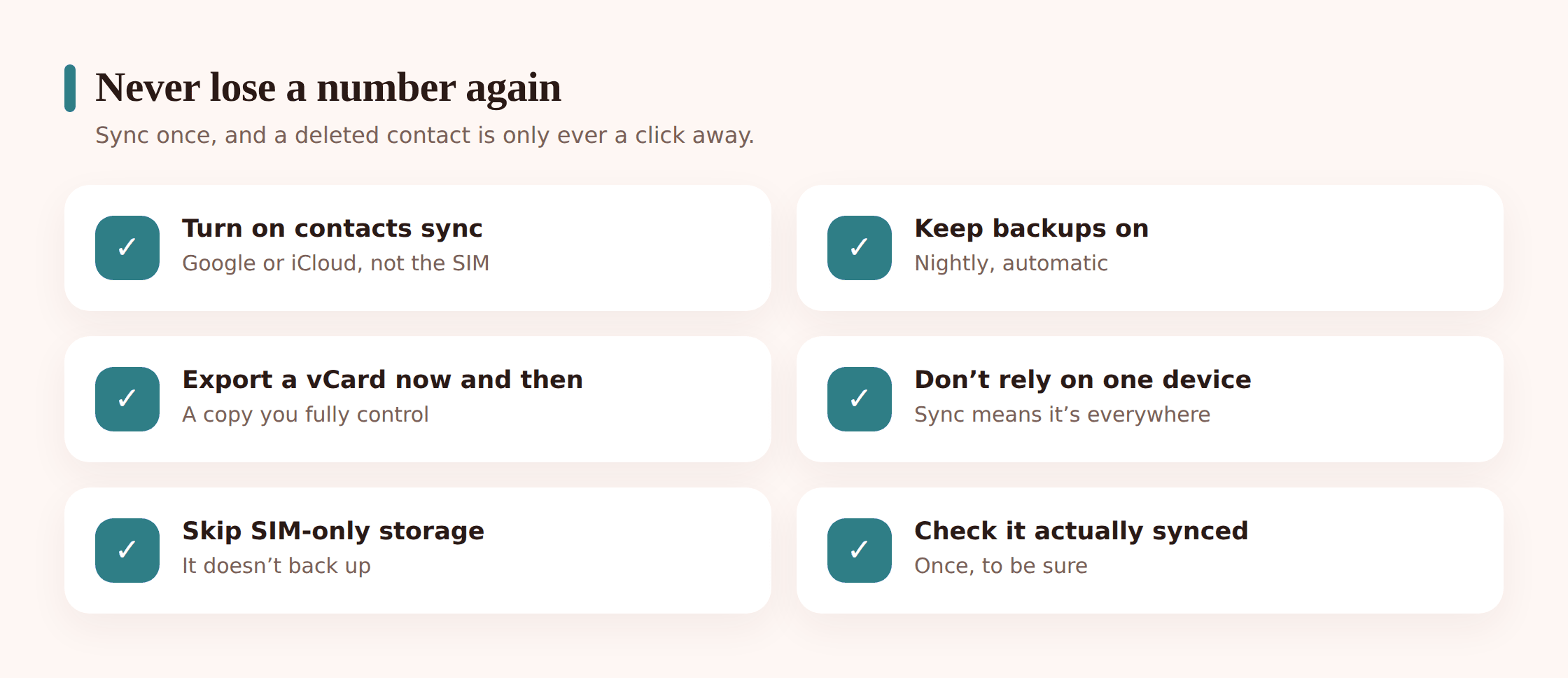
- Turn on contacts sync. On iPhone: Settings, your name, iCloud, Contacts on. On Android: Settings, Accounts, your Google account, Contacts sync on. This alone makes most deletes reversible.
- Keep device backups running. iCloud Backup on iPhone; Google backup (and Samsung Cloud, if you have it) on Android. These are your fallback for call logs and everything else.
- Export a vCard now and then. From iCloud.com or contacts.google.com you can export your whole address book as a .vcf file. Save it somewhere safe. It’s a plain, portable copy you fully control.
- Don’t rely on the SIM or one device. Numbers stored only on a SIM card, or only on a single phone with no sync, have no safety net. Move them into a synced account.
If you’re setting a phone up fresh, this is also the moment to get it right — our guides on backing up your phone and transferring to a new phone walk through turning all of this on from the start.
A quick related note for parents. If you manage a child’s Android phone openly with FreePhoneSpy, the call log and contacts already show up in your web panel — handy, but that’s a view, not a backup, so still keep the child’s contacts synced to their own Google account.
Quick checklist
- Confirm you’re signed into the right account (a lot of “gone” contacts are just the wrong login).
- Check iCloud.com or contacts.google.com in a browser.
- Look in the Trash and try “Undo changes” (Google) or “Restore Contacts” (Apple).
- Re-enable and force a contacts sync on the phone.
- Check your manufacturer’s cloud (Samsung, Xiaomi, and so on).
- For call logs: try a pre-loss backup, then your carrier’s records.
- Once recovered, turn on sync, keep backups on, and export a vCard.
FAQ
I deleted a contact an hour ago. Can I get it back?
Almost certainly, if it synced. On Android, open contacts.google.com and check the Trash or use “Undo changes.” On iPhone, check iCloud.com Contacts, and if needed the “Restore Contacts” archive. An hour is well inside the grace period.
Can I recover a call log with no backup at all?
Not from the phone itself, usually. But your carrier logs the numbers, times, and durations for billing, so check your online account or itemized bill, or request the records. That gets you the who and when, though not the call audio.
Does my carrier keep recordings of my calls?
No. Carriers keep call metadata for billing — number, date, time, duration — not the content of your conversations. The only recordings that exist are ones you deliberately made yourself.
An app says it can recover deleted calls. Should I trust it?
Be very cautious. If you had no backup, there’s nothing genuine for it to recover, and apps promising otherwise are typically scams or malware. Restore from a real backup or use your carrier instead.
My contacts are on my SIM card. Are those backed up?
No. SIM contacts don’t sync to the cloud on their own. Copy them into your Google or iCloud account so they’re protected, then rely on that account going forward.
I lost texts and photos too. Same approach?
Similar idea, different tools. See our guides on recovering deleted text messages and deleted photos — both lean heavily on cloud sync and backups, just like contacts.