How to Tell If Your Phone Is Being Monitored (and What to Do)
Your phone feels off. It runs hot on the desk, the battery’s gone by lunch, and someone seems to know things you never told them. That’s a horrible feeling. Most of the time the cause is dull and fixable. Sometimes it isn’t. Here’s how to tell the two apart, calmly, and what to do if it turns out something really is watching.
First, breathe: it’s usually not spyware
Phones misbehave for boring reasons all the time. A battery two years old holds a fraction of its old charge. A big system update reshuffles everything and drains power for a day or two while it re-indexes. A single misbehaving app can heat the handset and eat data in the background without anything sinister going on.
So before you assume the worst, know that “my phone’s acting weird” almost never means spyware. Weird is the phone’s natural state. The trick is separating ordinary weird from the pattern that should worry you. Read the signs below not as a checklist of doom but as a way to reason clearly. One symptom on its own means very little. Several at once, arriving together and with no obvious cause, is when it’s worth a proper look.
The real warning signs
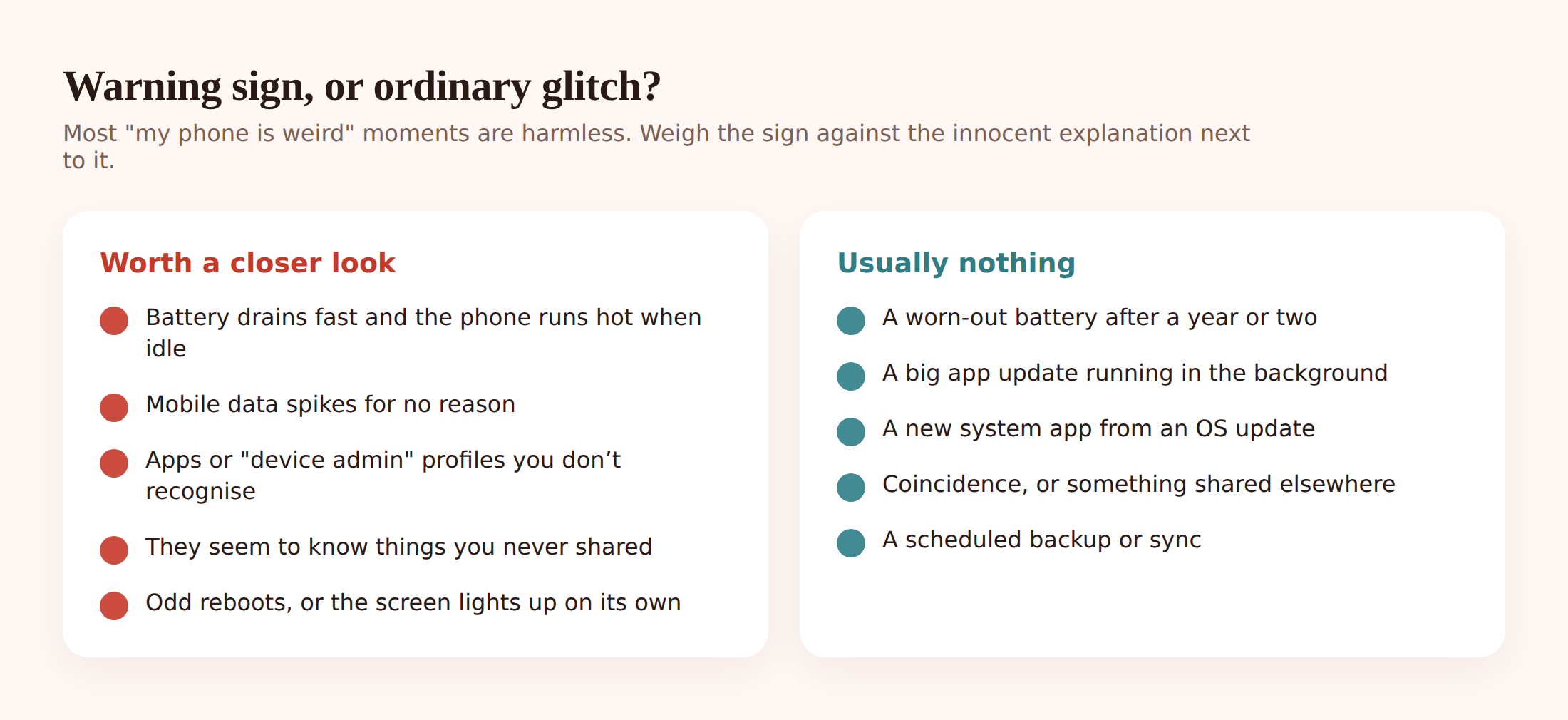
Here’s what people notice, and the everyday explanation sitting right next to each one.
- Battery drops fast. Real signs: it dies mid-afternoon when it used to last all day, and it started suddenly. Innocent version: the battery’s simply old, or a new app is misbehaving. Check which app is using the power first.
- It’s warm when you’re not using it. Real signs: hot to the touch while sitting idle on the desk, screen off. Innocent version: charging, a stuck app, or a phone left in the sun.
- Data use has spiked. Real signs: your mobile data is gone and you didn’t stream anything. Innocent version: an app auto-updating over mobile, cloud photo backup, or a video that autoplayed.
- It reboots or lights up on its own. Real signs: odd restarts, the screen waking with nothing on it. Innocent version: a scheduled update, or a flaky charging cable.
- There’s an app you don’t recognise. Real signs: something with a vague name and a generic icon you never installed. Innocent version: a system app, a carrier app, or something you forgot you downloaded.
- Someone knows things you never shared. This is the one that matters most. If a person repeats your private messages, turns up where you didn’t say you’d be, or references calls you never mentioned, that’s not a battery problem. Trust that instinct.
Notice the theme: technical symptoms are ambiguous, but the human one rarely is. A phone that’s just tired won’t tell someone your location. If the worry is coming from something a person said or knew, take that seriously even if every technical check comes back clean, because covert tools are designed to leave no obvious trace.
The line that matters: consent
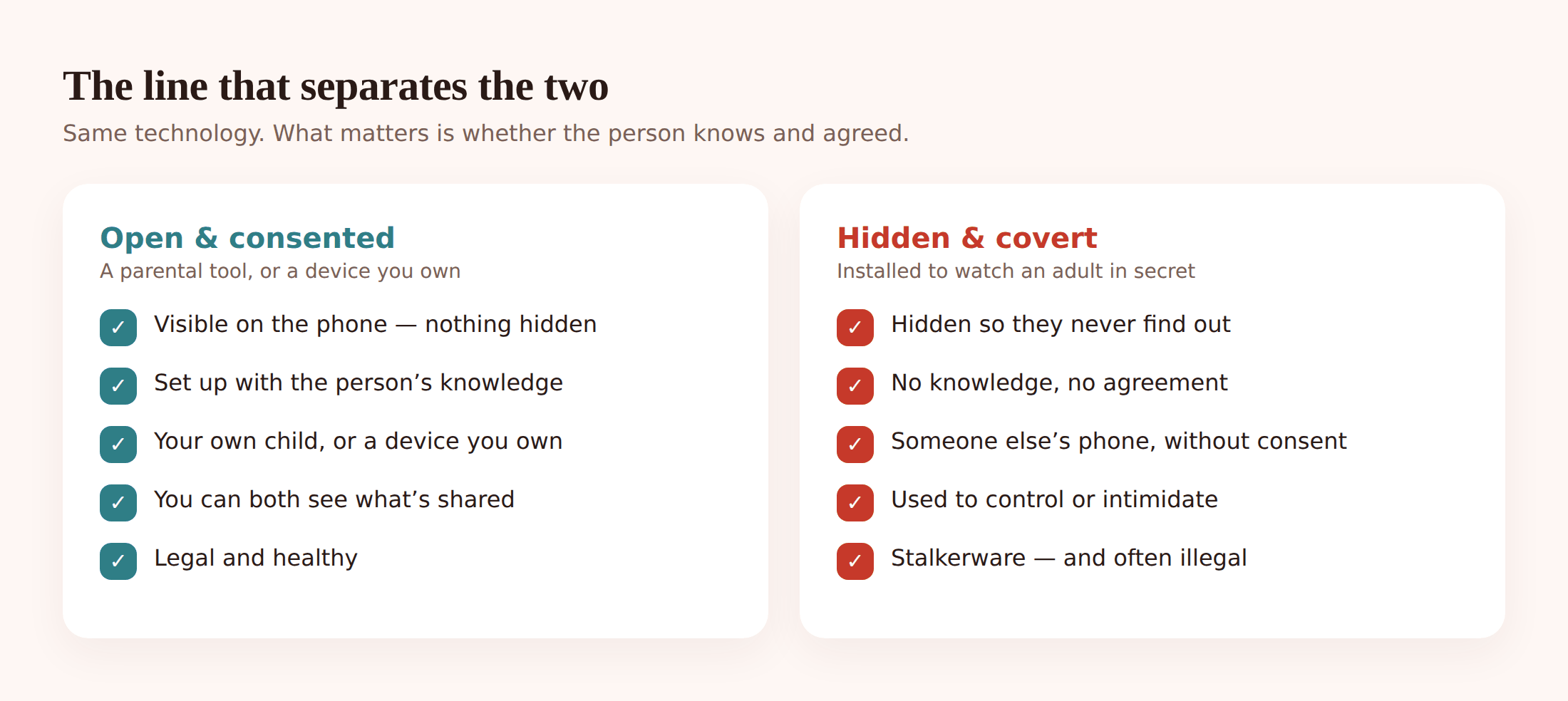
“Monitoring” gets used for two things that couldn’t be further apart, and it’s worth being precise, because the difference is the whole point of this page.
A parent setting up a tool on a young child’s phone, where the app is visible on the device and the child can see what it shares, is one thing. A device you own and manage yourself is another. Both are out in the open. Nobody’s hiding anything.
A hidden app installed on another adult’s phone without their knowledge, so someone can read their messages and track their movements, is a different thing entirely. It has a name: stalkerware. It’s a form of control and abuse, and in many places it’s a crime. Secretly intercepting someone’s communications is illegal in the UK, across the EU, and in much of the US, regardless of the relationship between the people involved.
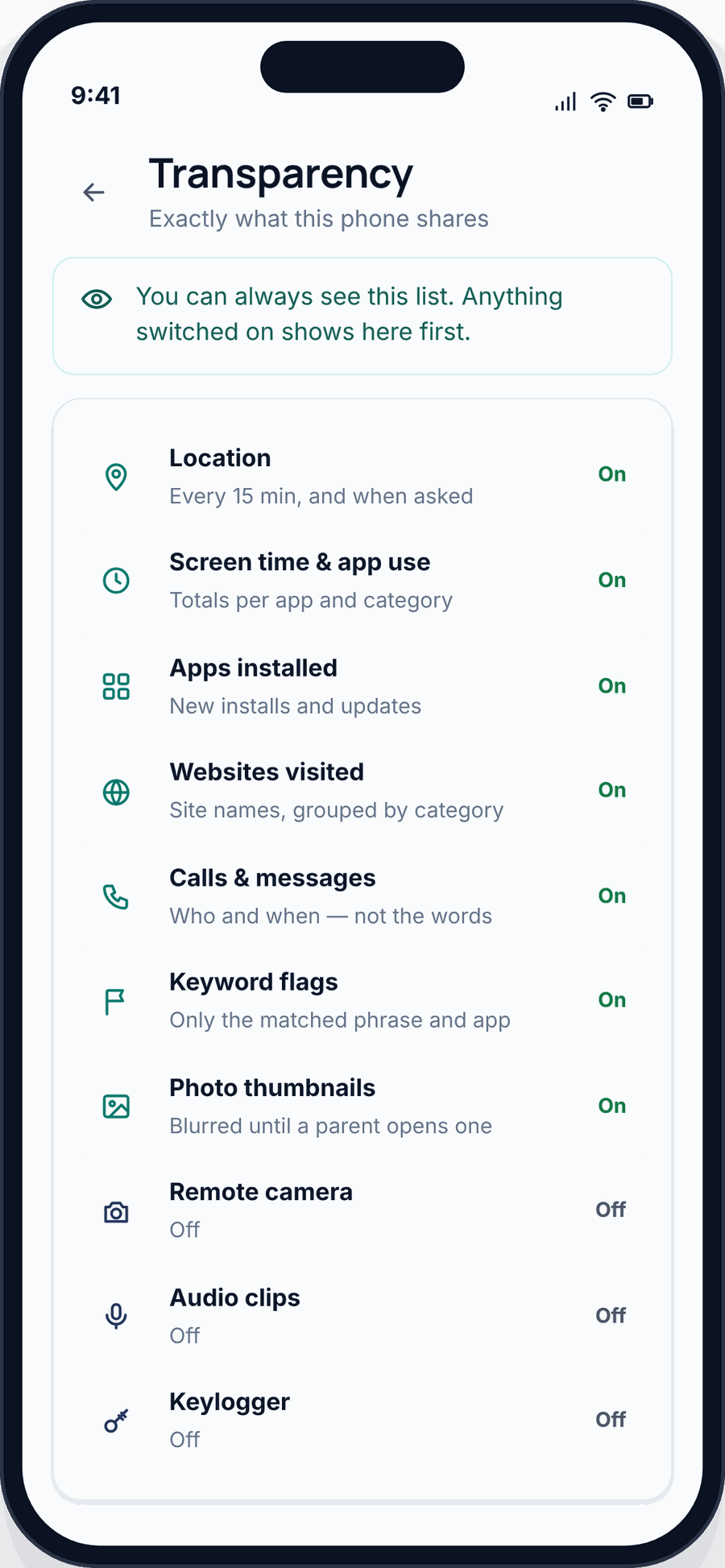
If you want to see what the open, honest version looks like in practice, the monitoring vs spying comparison lays it out. The short version: if a tool has to hide to work, that’s the tell.
How to check on Android
Android gives you several honest ways to look. Work through them in order. You’re looking for anything you don’t recognise and, more tellingly, anything with permissions far beyond what it should need.
- Scan your installed apps. Open Settings > Apps and choose to see all apps, including system ones. Read the whole list slowly. Spyware often hides behind a dull name like “System Service”, “Device Health”, or “Sync”. If something looks off, search its exact name online before touching it.
- Check Device admin apps. Go to Settings > Security (or search “device admin”). Device-admin rights let an app control your phone deeply and resist being uninstalled. You want to recognise everything here. If you don’t, that’s a red flag worth investigating.
- Review Accessibility permissions. In Settings > Accessibility, look at which apps have access. Accessibility is meant to help people who need it, but it can also let an app read your screen and log what you type. Anything switched on here that you didn’t set up deliberately deserves a hard look.
- Run Play Protect. Open the Play Store, tap your profile, then Play Protect, and scan. It won’t catch everything, but it catches a lot and it’s a sensible baseline.
- Do a Google Account security check. Visit your Google Account’s security section and review it. Sign out any devices you don’t recognise, and check the recovery email and phone number are still yours and not something a controlling person quietly changed. Reviewing signed-in devices is the same habit an honest tool encourages: with FreePhoneSpy the parent side is a plain web panel, nothing hidden on the phone itself.
- Try Safe Mode. Booting into Safe Mode runs only the apps that came with the phone. If the strange behaviour stops there, a downloaded app is the cause, which narrows things down fast.
How to check on iPhone
iPhones are harder to secretly monitor, which is genuinely reassuring, but not impossible. The routes in are through profiles, a shared or compromised Apple Account, or a jailbroken device.
- Look for unfamiliar profiles or MDM. Go to Settings > General > VPN & Device Management. On a personal phone this should usually be empty. A configuration profile or a mobile device management (MDM) enrolment you didn’t add, and that isn’t from your employer or school, is a serious red flag.
- Check your Apple Account and iCloud. Open Settings and tap your name at the top. Review the list of devices signed in to your account and remove any you don’t recognise. If someone else knows your Apple Account password, they can see a lot without ever touching your phone.
- Review Family Sharing and shared logins. Still under your name, check Family Sharing. Location sharing and shared purchases are fine when everyone agreed to them. What you’re watching for is sharing you didn’t set up, or a family organiser you didn’t consent to.
- Look for jailbreak signs. A tool called Cydia, Sileo, or unexplained apps you can’t account for can indicate a jailbroken phone, which strips away Apple’s protections. If you spot this and didn’t do it yourself, treat the phone as compromised.
- Check location sharing. In Settings > Privacy & Security > Location Services, and in Find My, confirm who can see your location. Turn off anything you didn’t knowingly agree to.
How to remove it safely
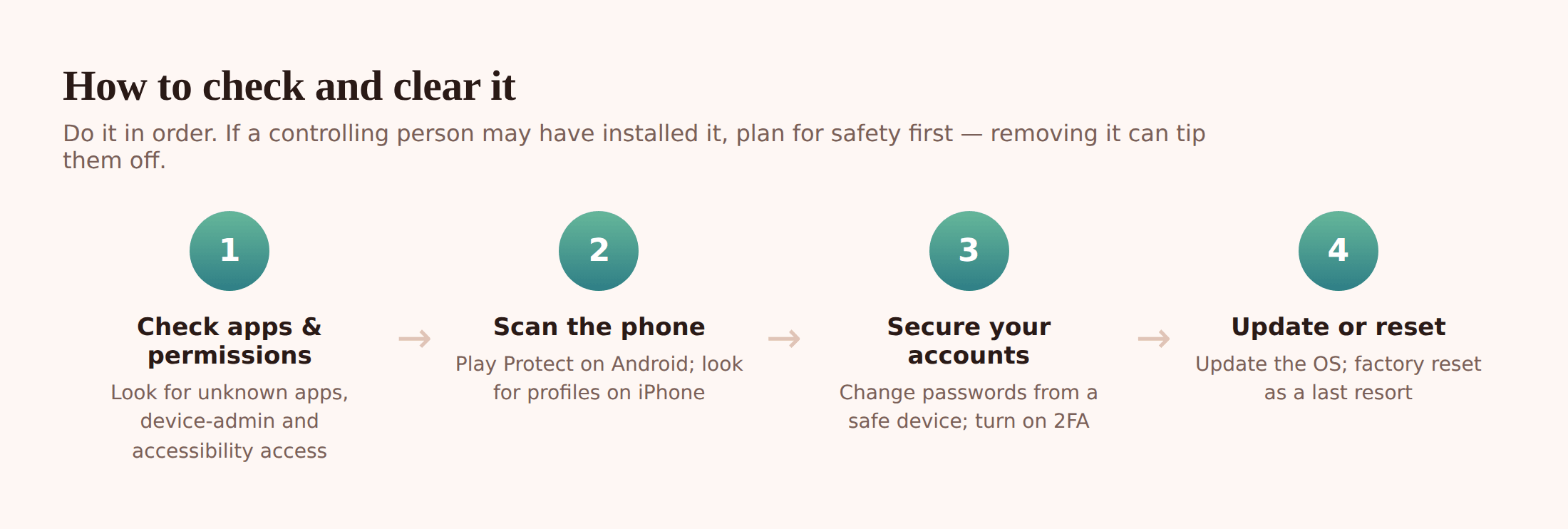
Getting rid of spyware is straightforward. Doing it in a way that keeps you safe takes a little more thought, especially if the person who might have installed it could react badly.
- Back up what matters first. Photos, contacts, documents. Save them somewhere the phone doesn’t automatically sync to, so you’re not carrying anything hidden across with them.
- Understand that removal can alert the installer. Some tools send a notification when they’re disabled or the phone goes quiet. If someone’s monitoring you against your will, that alert can escalate the situation. If that’s a risk, do the safety-planning step below before you change anything on the device.
- Change your passwords from a safe device. Not the phone you’re worried about. Use a device you trust, and change your email, Apple or Google account, and anything financial. Start with email, because whoever controls that can reset everything else.
- Turn on two-factor authentication. Once passwords are changed, add 2FA to your key accounts so a stolen password alone is no longer enough. Use an authenticator app rather than SMS where you can.
- Update the operating system. Installing the latest OS closes security holes and can break older spyware outright. Do this after your accounts are secured.
- Uninstall what you found. Remove any app you identified, and revoke its device-admin and accessibility permissions first if it resists deletion.
- Factory reset as a last resort. If you can’t be sure the phone is clean, a full factory reset wipes it. Set it up fresh afterwards and reinstall apps one at a time from the official store only. Don’t restore from a backup that might carry the problem back in.
Locking your phone down for good
Once it’s clean, a few habits keep it that way. None of this is technical wizardry. It’s just closing the doors spyware usually walks through.
- Set a strong screen lock. A six-digit PIN or better, plus biometrics. Almost all covert tools need a few minutes of physical access to install. A lock the other person doesn’t know removes that opening.
- Only install from the official store. On Android, keep “install unknown apps” switched off. Most stalkerware arrives as a sideloaded file, not from the Play Store.
- Review app permissions regularly. Every few months, check which apps can see your location, microphone, and camera. Turn off anything that doesn’t need what it’s asking for.
- Keep your accounts tight. Strong, unique passwords and 2FA on email, Apple, and Google. Check the list of signed-in devices now and then, and sign out anything you don’t recognise.
If you’re a parent reading this to keep a child safe rather than because you fear for yourself, the same instinct for openness applies. The complete guide to child phone monitoring and the family location sharing guide both start from the same place: agreement, and nothing hidden.
If it might be a partner
This is the hardest part of the page to write, so I’ll be plain. If the reason you’re here is that a partner or ex seems to know too much, and you’re afraid, please treat your safety as the first thing, ahead of the phone.
Removing spyware or changing passwords can feel like taking back control, and it is. But to someone who’s been secretly monitoring you, it can also read as a threat, and that can make things more dangerous before they get better. That’s not a reason to do nothing. It’s a reason to talk to someone first.
A domestic-abuse helpline can help you think through the order of what you do so you stay safe while you do it. In the UK, the National Domestic Abuse Helpline is free and open around the clock. Wherever you are, a local helpline or a trusted friend or family member who knows your situation can help you plan. You don’t have to work this out alone, and you shouldn’t have to.
Questions people actually ask
Can someone monitor my phone without touching it?
For most covert tools, no. They need a few minutes of physical access and your passcode to install. The main exception is your accounts: if someone knows your Apple or Google password, they can see a great deal remotely without ever holding the phone. That’s why changing those passwords matters so much.
Does antivirus find spyware?
Sometimes. A reputable security app and Play Protect will catch known threats, and running them is worth it. But some stalkerware is built to dodge detection, so a clean scan is reassuring rather than proof. If the human signs point one way and the scans point another, don’t dismiss the human signs.
Will a factory reset definitely remove it?
A full factory reset removes almost everything, including nearly all spyware, as long as you set the phone up fresh afterwards rather than restoring a backup that might carry the problem back. It’s the reliable last resort when you can’t identify exactly what’s wrong.
Is it legal to put a monitoring app on someone’s phone?
It depends entirely on consent and whose phone it is. Monitoring your own young child’s device, openly, is generally lawful. Secretly installing an app on another adult’s phone to read their messages or track them is illegal in many places and is abuse regardless. Consent is the line.
My phone’s hot and the battery’s bad. Is that spyware?
Probably not. Heat and battery drain are far more often caused by an ageing battery, a recent update, or one greedy app. Check which app is using the power before you worry. Treat those symptoms as a prompt to look, not as proof.
What’s the difference between this and a proper parental tool?
Visibility. A legitimate parental tool sits on the phone where it can be seen and tells the person what it shares. Stalkerware hides. If a tool only works by staying secret from the person using the phone, that’s the answer to what it really is.
If you’ve worked through the checks and come away reassured, good. That’s the most common ending, and it’s a real one. If you haven’t, you now know the safe order to act in, and where to turn for help. Either way, you took the worry seriously and looked. That was the right thing to do.