
Introduction: Navigating the Modern Digital Environment
In the current era, digital devices are integrated into nearly every aspect of daily life. For modern children, smartphones and tablets are not merely tools for occasional entertainment; they are primary vehicles for education, socialization, and discovering the world around them. While this unprecedented connectivity offers immense educational advantages and instant access to global information, it also introduces a significant parenting challenge: managing the volume of time spent staring at digital screens.
The transition from physical play and in-person interaction to digital engagement has happened rapidly. Parents today are tasked with navigating a landscape that simply did not exist during their own formative years. The omnipresence of technology has elevated screen time management from a casual concern to a central pillar of modern child-rearing. Excessive digital consumption is frequently correlated with a range of negative outcomes, including disrupted sleep cycles due to blue light exposure, a decline in physical activity, difficulties with sustained attention, and complex behavioral shifts.
Establishing boundaries for electronic device usage is no longer optional; it is a fundamental requirement for fostering healthy development. However, simply removing devices is rarely a practical or effective long-term solution. Technology is a permanent fixture in modern society, and children must learn how to interact with it responsibly. The goal is not absolute restriction, but rather the cultivation of balanced digital habits.
This comprehensive guide explores the multifaceted approach to screen time management. We will examine the recommended guidelines for digital consumption, detail how to utilize the built-in management features of both iOS and Android operating systems, review highly-rated management applications available through official app stores, and provide actionable strategies for establishing a balanced digital environment within your household.
Understanding the Impact of Unregulated Screen Time
Before implementing technical restrictions, it is crucial to understand the physiological and psychological mechanisms at play when children interact with digital devices. The design of modern software, particularly social media platforms and mobile games, relies heavily on variable reward schedules. These systems trigger the release of dopamine in the brain—the same neurotransmitter associated with pleasure and reward.
The Neurological Response
When a child receives a notification, achieves a new level in a game, or scrolls through an endless feed of optimized content, their brain receives a micro-dose of dopamine. This creates a powerful feedback loop that encourages continuous engagement. Over time, the brain requires increasing amounts of stimulation to achieve the same level of satisfaction, leading to extended device usage and a reluctance to detach from the screen. This neurological response explains why transitioning away from a device often results in frustration or irritability.
Sleep Disruption and Blue Light
One of the most immediate and measurable impacts of excessive screen time is the disruption of sleep architecture. Mobile devices emit high-intensity short-wavelength light, commonly referred to as blue light. In the natural environment, blue light is abundant during daylight hours and signals the brain to remain alert.
When children consume digital media in the hours leading up to bedtime, the artificial blue light inhibits the pineal gland’s production of melatonin, the hormone responsible for regulating the sleep-wake cycle. This suppression delays the onset of sleep, reduces overall sleep duration, and diminishes the quality of restorative REM sleep. Chronic sleep deprivation in children is linked to cognitive deficits, mood volatility, and weakened immune function.
Physical Health and Sedentary Behavior
The displacement of physical activity by sedentary screen time is a growing concern among pediatric health professionals. Time spent immobilized in front of a tablet or smartphone is time subtracted from active play, sports, and physical exploration. This sedentary lifestyle contributes to a decrease in cardiovascular fitness, poor posture (often referred to as “tech neck”), and a higher risk of metabolic issues.
Furthermore, digital consumption is frequently accompanied by mindless snacking. The distraction provided by the screen overrides the body’s natural satiety signals, leading to increased caloric intake without corresponding physical expenditure.
Cognitive and Emotional Development
During early childhood, the brain undergoes rapid and critical phases of development. This development is heavily reliant on back-and-forth interactions with caregivers and the physical manipulation of objects in the real world. While some interactive media can offer educational value, passive screen viewing does not provide the same cognitive stimulation as physical play.
For older children and adolescents, the emotional impact of the digital world—specifically social media—becomes prominent. The curation of idealized lives online can foster unrealistic comparisons, leading to feelings of inadequacy, social anxiety, and diminished self-esteem. Managing screen time is not just about limiting hours; it is about mitigating exposure to environments that can negatively impact emotional well-being.
Establishing Baselines: Official Screen Time Recommendations
To navigate these challenges, parents require a baseline for what constitutes “appropriate” digital consumption. The American Academy of Pediatrics (AAP) has established comprehensive guidelines based on developmental stages. These recommendations emphasize that the quality of the content and the context of the engagement are just as important as the absolute duration of usage.
Children today consume media across multiple vectors. While television viewing may account for several hours, the addition of mobile gaming, educational tablets, and smartphone usage can easily push daily screen time well beyond healthy limits.
Guidelines by Developmental Stage
-
Infancy (Under 18 Months): The AAP recommends avoiding all digital media use for children younger than 18 months, with the sole exception of interactive video chatting (such as conversing with distant relatives). At this stage, the brain requires physical, three-dimensional interactions to develop spatial awareness and language skills. Two-dimensional screens provide no tangible developmental benefit for infants.
-
Toddlerhood (18 to 24 Months): For parents who wish to introduce digital media, the focus must be entirely on high-quality, educational programming. Crucially, this consumption should never be solitary. Caregivers should co-view the content, actively engaging with the child, repeating words, and helping them understand what they are seeing. The screen should act as a catalyst for real-world interaction, not a digital pacifier.
-
Early Childhood (2 to 5 Years): Screen time should be limited to a maximum of one hour per day of high-quality programming. Co-viewing remains essential. Parents are encouraged to help children connect the concepts viewed on the screen to their physical environment. Non-educational, purely entertainment-focused screen time should be heavily restricted.
-
School-Age Children and Adolescents (6 Years and Older): The AAP transitions away from strict hour limits and instead advises parents to place consistent limits on the time spent using media, as well as the types of media consumed. The primary directive is to ensure that digital habits do not displace essential activities: adequate sleep, physical activity, academic responsibilities, and offline social interaction.
While these guidelines provide a structured framework, individual family dynamics and the specific needs of a child must be considered. The objective is to use these recommendations to craft a personalized family media plan that prioritizes health and development.
Utilizing Built-in Operating System Solutions
Before exploring dedicated applications, parents should fully utilize the management tools integrated directly into modern mobile operating systems. Both Apple and Google have developed robust, native features designed to monitor and control device usage. Because these tools are built into the operating system architecture, they are highly reliable, difficult for children to bypass, and seamlessly integrated with the device’s core functions.
Apple’s Screen Time (iOS)
Introduced in iOS 12, Apple’s Screen Time is a comprehensive suite of features built directly into iPhones and iPads. It provides detailed analytics regarding device usage and offers powerful tools for setting hard limits. Because it is a native iOS feature, it operates seamlessly without requiring external downloads or subscriptions.
Core Features of Apple Screen Time:
-
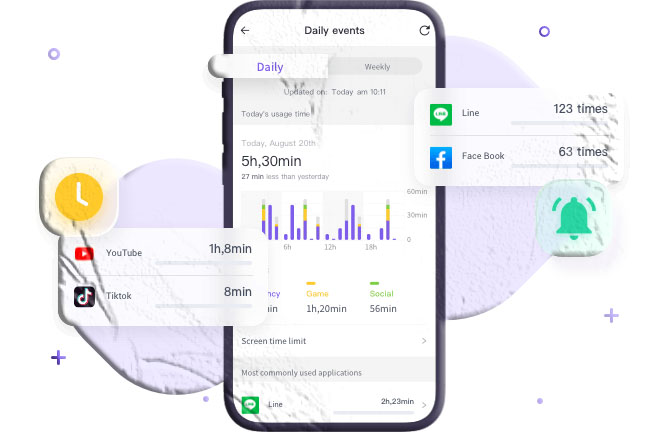
Activity Reports: Screen Time generates detailed daily and weekly reports. These reports break down precisely how much time is spent on the device, categorized by application type (e.g., Social Networking, Games, Productivity). It also tracks the number of times the device was picked up and the frequency of notifications received, providing a clear picture of digital habits.
-
Downtime: This feature allows parents to schedule specific blocks of time when the device is largely inaccessible. For example, Downtime can be scheduled from 8:00 PM to 7:00 AM. During this period, only phone calls and specific, parent-approved applications (like the clock or a reading app) remain available. All other app icons are dimmed, and launching them requires a parent-set passcode.
-
App Limits: Parents can set precise daily time limits for specific categories of apps or individual applications. If you want to limit gaming to one hour per day, you can apply an App Limit to the “Games” category. Once the time is exhausted, access is blocked until the following day, or until the parent enters the Screen Time passcode to grant an extension.
-
Communication Limits: This tool allows parents to control who their child can communicate with—via Phone, FaceTime, and Messages—during standard allowed screen time and during scheduled Downtime. This ensures that late-night device usage is restricted to family members or designated emergency contacts.
-
Content & Privacy Restrictions: This highly granular section allows parents to block inappropriate content, prevent the installation or deletion of applications, and restrict in-app purchases. It also provides controls over privacy settings, ensuring location services and photo access are managed securely.
Configuring Apple Screen Time:
To configure these settings effectively, a parent should utilize the Family Sharing feature. By creating an Apple ID for the child and adding them to a Family Sharing group, the parent can manage the child’s Screen Time settings remotely from their own iPhone or iPad. A dedicated Screen Time Passcode (distinct from the device unlock code) must be established to prevent the child from altering the parameters.
Google Family Link and Digital Wellbeing (Android)
For devices operating on the Android platform, Google provides a two-tiered approach to management: the native Digital Wellbeing dashboard for localized tracking, and the powerful Google Family Link application for comprehensive parental control.
Google Family Link Overview:
Family Link is Google’s official family management application, available directly from the Google Play Store. It is designed to help parents guide their child’s online experience by establishing digital ground rules. It operates by linking a parent’s Google account with the child’s Google account, granting the parent administrative oversight of the Android device.
Core Features of Family Link:
-
Application Management: When a child attempts to download an application from the Google Play Store, the parent receives an approval request on their device. This allows parents to review the app’s content rating and description before it is installed. Furthermore, parents can hide specific pre-installed apps from the child’s device entirely.
-
Screen Time Limits and Bedtimes: Family Link allows parents to set a daily global screen time limit (e.g., 2 hours total per day). Additionally, parents can establish a strict “Bedtime” schedule. When the daily limit is reached, or the bedtime hour arrives, the device locks. A locked device only permits incoming phone calls and access to designated emergency contacts.
-
Per-App Time Limits: Beyond the global device limit, parents can set specific daily allowances for individual applications. This is highly useful for allowing unlimited access to educational tools while strictly capping time spent on social media or games.
-
Location Tracking: Family Link utilizes the device’s GPS hardware to provide real-time location tracking on a map, allowing parents to ensure their child’s physical safety alongside their digital safety.
-
Bonus Time and Remote Locking: If a child needs additional time to finish homework or complete a level in a game, parents can grant “Bonus Time” directly from their own device. Conversely, parents can remotely lock the child’s device at any moment with a single tap, enforcing immediate offline time.
Android Digital Wellbeing:
Integrated directly into the Android settings menu, Digital Wellbeing functions similarly to the analytical side of Apple’s Screen Time. It provides a visual dashboard detailing daily usage statistics, notification counts, and device unlocks. While Family Link handles the administrative restrictions, Digital Wellbeing helps older children and teenagers independently monitor their habits and utilize features like “Focus Mode” to pause distracting apps while studying.
Top Official Store Applications for Device Management
While the built-in tools provided by Apple and Google are highly effective, some families require specialized features, cross-platform compatibility (managing an iOS device from an Android parent phone, or vice versa), or more advanced content filtering. In these instances, utilizing highly-rated, official applications from the Google Play Store or Apple App Store is the recommended approach.
These applications must adhere to the strict security and privacy protocols mandated by official app repositories, ensuring a safer management environment compared to unverified software.
1. FreePhoneSpy Parental Control Solutions
For parents seeking comprehensive oversight of their child’s digital footprint, applications like FreePhoneSpy represent a robust category of management tools available through official channels. Designed as an all-in-one digital parenting assistant, it focuses on providing granular control over device accessibility and usage patterns.
Key Management Features:
-
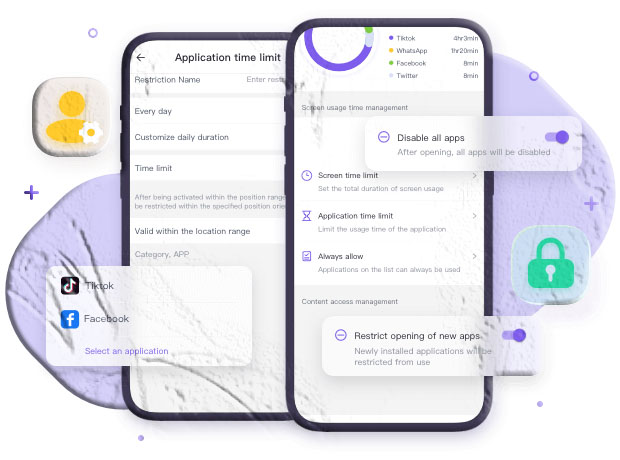
Precision Time Allocation: Parents can establish specific limits on how long the device can be used daily, or apply targeted restrictions to individual applications or broader categories (such as grouping all gaming apps together).
-
Flexible Scheduling: The software allows for the creation of distinct schedules. Parents can map out “Study Time,” “Bedtime,” or “Family Time,” automatically locking distracting applications during these vital periods to ensure the child remains focused on their immediate environment.
-
Application Whitelisting: Recognizing that not all screen time is detrimental, the application allows parents to maintain a “Whitelist.” Educational applications, reading materials, or communication tools can be set to remain accessible even when broader screen time limits have been exhausted.
-
Location-Based Rules: Advanced management tools often incorporate location-awareness. This allows parents to configure dynamic rules—for instance, automatically restricting access to social media or games when the device’s GPS detects it is within the geographical boundaries of the child’s school.
-
Comprehensive Activity Reporting: Daily and weekly analytics provide a transparent view of digital habits. By reviewing these reports together, parents can guide their children toward building healthier, self-managed digital behaviors.
Note: When exploring comprehensive monitoring tools, it is vital to ensure they are downloaded directly from the official Google Play Store or Apple App Store to guarantee compliance with platform security standards.
2. Kidslox: Streamlined Device Control
Kidslox is recognized for its straightforward, user-friendly interface, making it accessible for parents who may not be highly technical. It prioritizes ease of use while delivering essential control mechanisms.
Key Management Features:
-
Instant Lockdown: With a single tap on the parent’s dashboard, the child’s device can be instantly locked, overriding any pre-existing schedules. This is particularly useful for immediately enforcing family time or addressing behavioral issues.
-
Three-Way Toggle System: Kidslox operates on an intuitive three-mode system: Parent Mode (all apps allowed), Child Mode (only approved apps allowed), and Lockdown Mode (device heavily restricted).
-
Task-Based Rewards: The application incorporates a positive reinforcement system. Children can request extra screen time, and parents can grant it upon the completion of real-world tasks, such as finishing homework or completing household chores.
-
Content Filtering: It includes built-in domain restriction capabilities, allowing parents to block access to known inappropriate websites and specific application categories.
Considerations: While highly intuitive, some users note that technologically savvy children may occasionally find workarounds for blocked applications, emphasizing the need for open communication alongside technical controls.
3. FamilyTime: Rule-Based Digital Structuring
FamilyTime excels in establishing pre-defined, structured rules for daily routines. It shifts the focus from constant monitoring to automated, routine-based management.
Key Management Features:
-
Routine Customization: The application shines in its ability to automate restrictions based on daily life. Parents can easily configure parameters for “Dinner Time,” “Homework Time,” and “Bed Time.” Once established, the device automatically adjusts its accessibility without requiring daily manual intervention.
-
One-Click Application Blocking: If a specific game or social media platform becomes an immediate concern, parents can completely sever access to that specific application with a single command.
-
Speed Limit Notifications: A unique feature geared toward older children and teenagers is the ability to monitor driving habits. The application can notify parents if the device is traveling above a pre-set speed limit, promoting safer physical habits alongside digital ones.
Considerations: The free tier of the application is primarily diagnostic, tracking usage without the ability to enforce limits. Accessing the robust scheduling features requires a transition to the premium model.
4. Qustodio: Advanced Analytics and Filtering
Qustodio is widely regarded as one of the most comprehensive digital management suites available on official stores. It is designed for parents who require deep analytics and stringent filtering across multiple device types.
Key Management Features:
-
Granular Daily Limits: Parents can configure highly specific daily allowances that vary depending on the day of the week, acknowledging that weekend device usage often differs from weekday requirements.
-
Panic Button Functionality: Qustodio includes a critical safety feature: an emergency panic button on the child’s interface. If they find themselves in an unsafe situation, a single press instantly broadcasts an emergency alert and their precise GPS coordinates to trusted contacts.
-
Web Filtering Technology: The application utilizes intelligent filtering to actively monitor and block inappropriate web domains, ensuring a safer browsing experience even when the child is navigating outside of dedicated applications.
-
Cross-Platform Consistency: It provides a unified dashboard for managing digital environments across Android, iOS, Windows, and macOS, making it ideal for households with diverse hardware ecosystems.
Considerations: While the base version offers foundational time limits, granular per-app control and advanced filtering are reserved for the premium subscription tier.
5. OurPact: Contract-Based Device Management
OurPact takes a slightly different approach, focusing on creating digital contracts and managing device accessibility through a highly visual scheduling interface.
Key Management Features:
-
Visual Schedule Creation: The application allows parents to build out a weekly digital calendar, visually plotting out periods of permitted device usage and mandatory downtime.
-
App Allowance Rules: Parents can dictate specifically which applications are permitted during scheduled screen time. For example, educational apps might be allowed during the afternoon, while gaming apps are only accessible on weekends.
-
Text Messaging Oversight: On compatible operating systems, OurPact offers tools to regulate access to messaging applications, helping parents establish rules around digital communication.
-
Geofencing Alerts: Parents can create digital boundaries around physical locations (like a school or a friend’s house) and receive automated notifications when the device enters or exits those zones.
6. Bark: AI-Driven Content Monitoring
Bark diverges from traditional time-management applications by prioritizing content analysis over strict time locking. It is designed for parents who are more concerned with what their child is doing online rather than purely how long they are doing it.
Key Management Features:
-
Machine Learning Algorithms: Bark connects to a child’s social media accounts, text messages, and email. It uses advanced machine learning to scan communications silently in the background.
-
Proactive Alerting: Instead of requiring parents to read every message, the AI analyzes context. If it detects language indicative of cyberbullying, depression, suicidal ideation, online predators, or explicit content, it immediately sends a flagged alert to the parent.
-
Privacy-Focused Monitoring: This approach respects the child’s privacy by only exposing messages that trigger safety algorithms, rather than granting parents unfettered access to all benign communications.
-
Screen Time and Filtering: Alongside its AI monitoring, the application also includes standard tools for managing overall screen time schedules and filtering web content.
Considerations: Because the algorithms are highly sensitive, parents may occasionally receive false-positive alerts, requiring them to review the context to determine if a genuine risk exists.
7. FamiSafe: Comprehensive Location and Content Control
Developed by Wondershare, FamiSafe is a robust application that combines reliable screen time management with advanced location tracking and explicit content detection.
Key Management Features:
-
Smart Scheduling: Create detailed daily plans that automate device locking during critical periods like school hours or late at night.
-
Explicit Content Detection: Similar to Bark, FamiSafe scans incoming text messages and specific social media platforms for suspicious keywords or explicit imagery, alerting parents to potential digital hazards.
-
In-App Purchase Blocking: A crucial feature for parents of younger children, it allows the administrative blocking of micro-transactions and in-app purchases, preventing unexpected credit card charges.
-
Driving Reports: For teenage drivers, the application tracks maximum speeds, sudden braking, and rapid acceleration, providing parents with a summary of their driving habits.
Strategies for Reducing Screen Time Effectively
Relying solely on technical software to lock devices is an incomplete strategy. If restrictions are applied unilaterally without communication, they frequently result in conflict and attempts to bypass the software. True digital management requires a holistic approach that changes the family culture regarding technology.
Implementing technical boundaries must be paired with actionable, real-world strategies to reduce reliance on digital screens.
1. Involve Children in the Planning Process
Mandated rules are often met with resistance. However, when children are involved in establishing the boundaries, they are far more likely to adhere to them. Sit down as a family and discuss why screen time needs to be managed. Explain the concepts of eye strain, the importance of sleep, and the value of physical activity in terms they can understand.
Work collaboratively to draft a “Family Media Plan.” Agree together on what constitutes reasonable daily limits, determine which applications are appropriate, and establish clear consequences for violating the agreed-upon rules. Document this agreement and place it in a visible location.
2. Establish Tech-Free Physical Zones
One of the most effective ways to reduce passive screen time is to designate specific areas of the home where devices are strictly prohibited.
-
The Dining Area: Meals should be a time for family connection and conversation. Banning devices from the dining table ensures that family members are present and engaged with one another.
-
The Bedroom: The most critical tech-free zone is the child’s bedroom, particularly overnight. Devices should be charged in a central, common area (like the kitchen or living room) rather than on a nightstand. This single rule eliminates late-night scrolling, reduces exposure to sleep-disrupting blue light, and severely limits the opportunity for unsupervised, late-night digital communication.
3. Lead by Example
Children are astute observers and will mimic the behavior of their primary caregivers. If a parent insists on limiting a child’s tablet usage while simultaneously scrolling through their own smartphone during dinner, the rules will be perceived as hypocritical and invalid.
Parents must model healthy digital habits. Demonstrate putting your phone away during conversations, verbalize when you are logging off for the evening, and prioritize reading a physical book or engaging in a hobby over watching television. When you show that a fulfilling life exists independent of a screen, your children are more likely to adopt the same perspective.
4. Implement Incremental Reductions
If a child is currently accustomed to four hours of daily unstructured screen time, suddenly cutting that allowance to one hour will cause significant distress and behavioral pushback.
Instead of drastic measures, employ a strategy of gradual reduction. Start by trimming 20 to 30 minutes off their daily allowance each week. This slow transition allows the child to adjust to the new boundaries gradually and gives them time to figure out how to fill the newly available time with offline activities without feeling overwhelmed.
5. Proactively Promote Alternative Activities
When screen time is restricted, a void is created. If that void is not filled with engaging alternatives, the child will inevitably complain of boredom and beg for the device back.
Parents must proactively facilitate offline activities. Keep a well-stocked supply of art materials, board games, puzzles, and building blocks. Encourage outdoor play, arrange playdates, or introduce them to a new sport or instrument. The goal is to make the physical world more appealing and accessible than the digital one. When a child discovers a passion for a real-world activity, their reliance on digital entertainment naturally diminishes.
6. Utilize the 20-20-20 Rule
When screen time is permitted—especially for educational purposes or homework—it is vital to protect the child’s physical eye health. Staring at a fixed distance for extended periods causes significant ocular fatigue.
Teach your child the 20-20-20 rule, recommended by optometrists worldwide: Every 20 minutes spent looking at a screen, the child should look away at an object that is at least 20 feet away for a minimum of 20 seconds. This brief pause allows the ciliary muscles in the eyes to relax and reset, significantly reducing the risk of digital eye strain and headaches.
[Image Placeholder 3: A family sitting together in a living room, playing a board game on a coffee table. No digital devices are visible. Alt text: A family engaging in a tech-free activity, playing a board game together. Caption: Proactively substituting screen time with engaging family activities is crucial for long-term behavioral change.]
Frequently Asked Questions
How can I tell if my child has a genuine screen addiction? While “addiction” is a strong clinical term, signs of problematic digital dependency include: intense irritability or tantrums when devices are removed, a noticeable decline in academic performance, withdrawal from physical social interactions and hobbies they previously enjoyed, deceptive behavior to gain access to devices, and sleep deprivation due to nighttime usage. If these behaviors are severe and persistent, consulting a pediatric psychologist may be beneficial.
Are educational apps counted towards daily screen time limits? This depends entirely on your family’s specific media plan. The AAP generally distinguishes between passive entertainment (like watching cartoons) and active educational engagement. Many parents choose to allow unlimited access to highly educational applications (like language learning or coding apps) while strictly limiting games and video streaming. However, even educational screen time should not displace physical activity or sleep.
Is it better to use built-in OS tools or download a separate management app? Built-in tools like Apple Screen Time and Google Family Link are excellent, highly secure starting points that cost nothing and integrate seamlessly with the device. They are sufficient for the majority of families. However, if you require cross-platform management (e.g., managing an Android phone from an iPhone), highly specific web filtering, or AI-driven content analysis for cyberbullying, a reputable application from the official app store may provide the necessary advanced functionality.
At what age should I stop monitoring my child’s device? There is no universal age; it depends entirely on the maturity of the adolescent and the trust established over time. Monitoring should transition from strict oversight in early childhood to coaching and guidance in the teenage years. By late high school, the goal is for the teenager to self-regulate their digital habits effectively, preparing them for the unmonitored environment of adulthood. Transitioning away from monitoring should be a gradual process based on demonstrated responsible behavior.
Conclusion
Managing a child’s digital life is one of the most persistent and evolving challenges of modern parenting. As technology advances and new platforms emerge, the specific tools and tactics required will inevitably shift. However, the foundational principles remain constant: technology is a tool that requires guided, intentional usage.
By understanding the physiological and emotional impacts of unregulated device usage, parents can make informed decisions. Utilizing the powerful built-in tools provided by mobile operating systems, or leveraging reputable, officially vetted applications, provides the necessary structural boundaries.
Yet, software is only half of the solution. The most effective digital parenting relies on open communication, the collaborative creation of family media plans, and the conscious promotion of engaging, real-world activities. By prioritizing physical health, emotional well-being, and family connection, parents can guide their children to develop a balanced, healthy relationship with technology that will serve them well into the future.